
7 Best Making Tax Digital Software for Landlords in 2026



Discover the best Making Tax Digital software solutions for landlords & find tools to stay compliant, reduce admin, and manage your property finances.


In this article
The best Making Tax Digital (MTD) software for landlords in 2026 is software that automatically keeps digital records, prepares quarterly updates, and files your final return with minimal manual input.
From April 2026, landlords earning over £50,000 have to comply with MTD for Income Tax, requiring at least four quarterly updates plus a final declaration each year. HMRC introduced MTD to reduce errors, which they estimate cost billions annually in lost tax revenue.
The challenge: more frequent reporting mceans more admin, higher costs, and greater risk of mistakes unless your software handles it for you.
In this article, we’ll list the best MTD software for landlords, so you can make an informed decision.
Quick comparison of the best MTD software for landlords
| Software | Best for | Automation level | Starting point |
| ANNA | Zero admin + cost savings | Very high | £ |
| Xero | Scaling portfolios | Medium | ££ |
| QuickBooks | Simplicity | Medium | ££ |
| FreeAgent | Tax visibility | Medium | ££ |
| Sage | Traditional accounting | Medium | ££ |
| Landlord Studio | Property-specific tracking | Medium | ££ |
| August | Self-managing landlords + built-in property management | High | £ |
How we chose these tools
We selected these platforms based on what actually matters under MTD:
- Verified MTD compliance for Income Tax (or roadmap readiness)
- Level of automation vs manual bookkeeping required
- Suitability for landlords specifically
- Overall cost efficiency, including hidden costs like accountant reliance
- Ease of use for non-accountants
The best MTD software for landlords (2026)
The tools below focus on automation, ease of use, and suitability for property owners managing multiple responsibilities:
1. ANNA
ANNA is best for landlords who want MTD handled automatically while reducing software and accounting costs.
ANNA combines a business account, bookkeeping, tax calculations, and MTD submissions into one automated system. Its HMRC-recognised Auto Accountant handles everything in the background, so there’s no need for manual record-keeping or separate tools.
Unlike traditional accounting software, ANNA is designed to remove admin entirely, not just digitise it.
Here’s what makes ANNA stand out:
- MTD compliance included: No additional fees for MTD requirements
- Free Self Assessment filing: 2025/26 return submitted at no cost
- Switching cost covered: Filing fees refunded when you move
- Automated bookkeeping included: No manual categorisation required
- Quarterly updates prepared automatically: Always ready for submission
- Year-end filing handled automatically: No separate tools required
- Real-time tax tracking included: Always know what you owe
- Built-in payments and invoicing included: No extra integrations needed
With most MTD software, you’re still responsible for keeping everything up to date. With ANNA, there’s nothing to worry about. It tracks, categorises, calculates, and prepares everything for submission automatically, so when deadlines come around, you’re already prepared.
For landlords managing properties alongside other responsibilities, this can save hours of admin every month and reduce the need for paid accounting support altogether.
Pricing
ANNA uses a monthly subscription model, with MTD compliance included at no extra cost.
You also get your 2025/26 Self Assessment filed for free, and if you’ve already paid elsewhere, ANNA will refund that cost when you switch. This makes it one of the few options that can effectively reduce your total MTD cost.

When to use ANNA:
- You want fully automated MTD compliance with minimal admin.
- You prefer a single platform that handles banking, bookkeeping, invoicing, and tax submissions.
2. Xero
Xero is a cloud-based accounting platform widely used in the UK. It supports MTD and offers a large ecosystem of integrations, making it suitable for landlords with more complex or growing portfolios.
Xero is designed to give you full control over your finances, but that also means more hands-on involvement.
Here’s what Xero has to offer:
- Strong integration ecosystem: Connects with property management tools and apps
- MTD compliance: Supports digital record-keeping and submissions
- Bank feeds and automation: Imports transactions automatically
- Flexible reporting: Gives detailed insights across multiple properties
- Accountant-friendliness: Widely supported by UK accountants
Xero’s drawbacks:
- Requires manual categorisation and ongoing bookkeeping
- Can feel complex without accounting knowledge
- Increases in cost with add-ons and integrations
With Xero, you get flexibility and control, but you’re still responsible for maintaining your records and preparing your accounts. For landlords with larger portfolios, that structure can be useful, but it comes with more admin.
Pricing
Xero offers tiered monthly plans, typically ranging from around £16 to £65 per month, depending on features.
Lower tiers cover basic bookkeeping, while higher plans add reporting, multi-currency support, and advanced tools, often needed by landlords with larger portfolios. Costs can increase further with add-ons like payroll or additional integrations.

When to use Xero:
- You need flexible reporting across multiple properties.
- You want to collaborate with an accountant or integrate with other tools.
When NOT to use Xero:
- You’re not comfortable doing regular bookkeeping or manual categorisation.
- You have a small, simple portfolio and don’t need advanced reporting or integrations.
3. QuickBooks
QuickBooks is one of the most popular accounting platforms globally, offering a balance between usability and functionality. It supports MTD and is often used by landlords moving away from spreadsheets.
It simplifies bookkeeping but still requires regular input.
Here’s what QuickBooks offers:
- Easy-to-use interface: Designed for non-accountants
- Automated transaction imports: Connects your bank account
- MTD-ready system: Supports digital submissions
- Basic reporting tools: Tracks income and expenses easily
- Large support ecosystem
QuickBooks’ drawbacks:
- Manual categorisation still required
- Limited landlord-specific features
- Less automation compared to newer tools
QuickBooks simplifies bookkeeping and provides a familiar interface, making it a solid choice for smaller portfolios or landlords moving from spreadsheets.
That said, it doesn’t handle property-specific tracking automatically, so you’ll still need to keep an eye on rental income and expenses to remain fully compliant.
Pricing
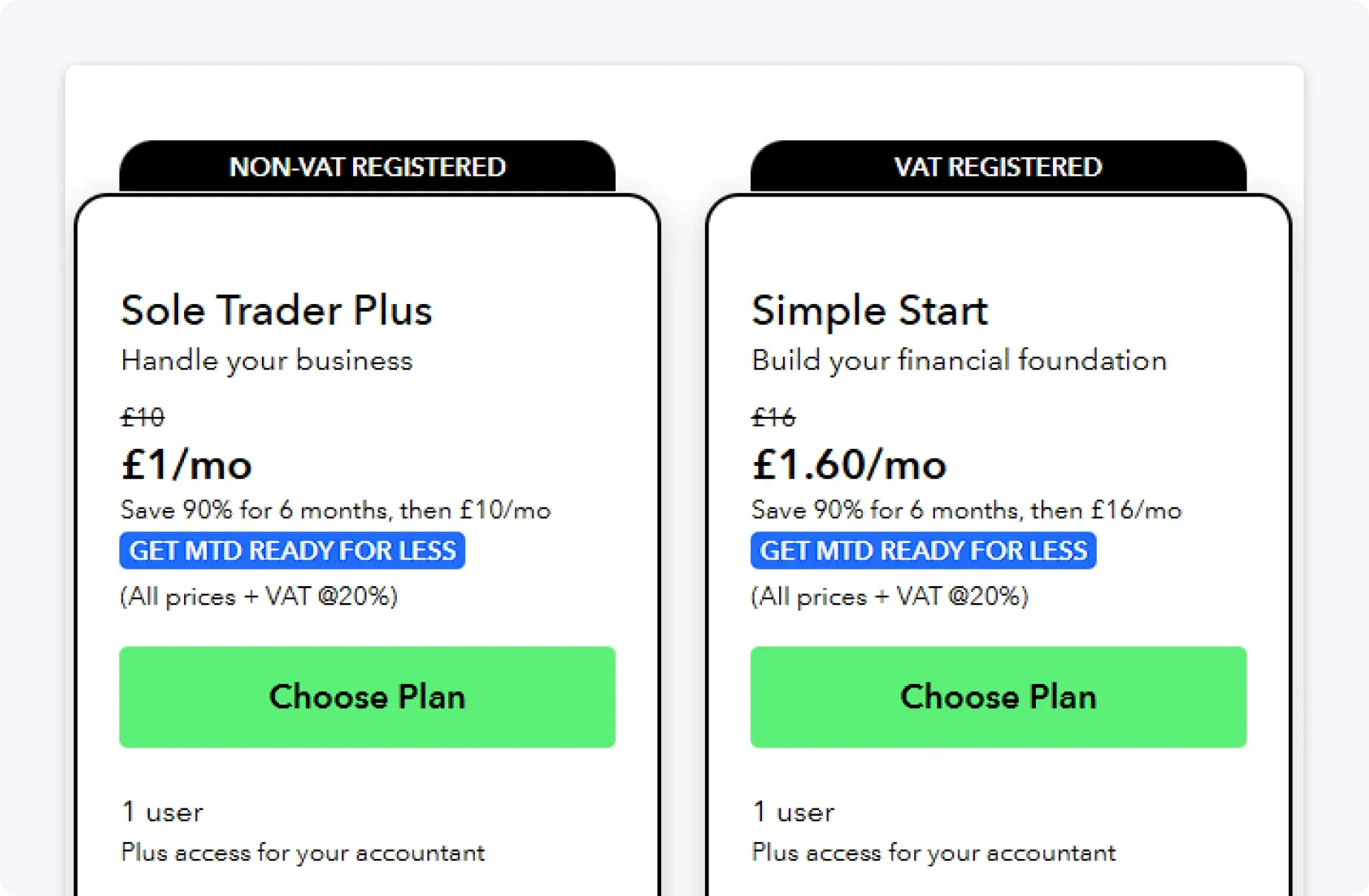
QuickBooks pricing generally starts at around £10 per month and can exceed £100 per month for advanced plans.
Most landlords will fall into the £16–£47 range, depending on features, but additional services such as payroll or reporting tools can increase the total cost. While affordable at entry level, pricing scales quickly as your needs grow.
When to use QuickBooks:
- You want a simple, well-known accounting tool with moderate automation.
- You have a smaller portfolio and are comfortable doing some manual categorisation.
When NOT to use QuickBooks:
- You want landlord-specific features like property-level tracking built in.
- You manage multiple properties and need more advanced reporting.
- You want a system that handles compliance and tracking with little oversight.
4. FreeAgent
FreeAgent focuses on helping users understand what they owe and when that’s due. It supports MTD and provides a clean interface with strong tax forecasting tools.
It’s particularly useful for landlords who want more clarity over upcoming liabilities.
Here’s what FreeAgent has to offer:
- Real-time tax estimates: Have a clear view of what you owe
- Timeline-based dashboard: See upcoming deadlines
- MTD-compatible submissions: Get support with compliance
- Clean, user-friendly design: Navigate your taxes without problems
- Good mobile experience: Stay on top of your obligations on the go
FreeAgent’s drawbacks:
- Requires ongoing manual bookkeeping
- Less suited for complex property portfolios
- Fewer integrations compared to competitors
FreeAgent gives landlords clear insight into tax obligations and deadlines, helping with planning and forecasting.
However, its limited multi-property reporting means landlords with several properties may need additional tools or manual checks to ensure all income and expenses are accurately captured.
Pricing
FreeAgent typically costs around £19–£33 per month, depending on business type.
It’s free if you have a NatWest, RBS, Ulster Bank, or Mettle account, making it one of the most cost-effective options available. All features are generally included in a single plan.

When to use FreeAgent:
- You need clear visibility over your tax position throughout the year.
- You want a timeline of upcoming deadlines and real-time tax estimates.
When NOT to use FreeAgent:
- You manage a large or complex property portfolio.
- You need strong integrations with external tools or property software.
- You want automation beyond tax estimates and basic categorisation.
5. Sage Accounting
Sage Business Cloud Accounting is a long-established platform offering MTD compliance and standard bookkeeping tools. It’s reliable and widely used, particularly by those familiar with traditional accounting systems.
Here’s what Sage offers:
- Reliability as an established provider: Sage has a long-standing reputation in UK accounting
- MTD compliance included: Supports digital record-keeping and submissions
- Advanced reporting: Provides detailed financial insights
- Bank feeds: Automatically imports transactions
- Structured workflows: Follows traditional accounting processes
Sage’s drawbacks:
- Steeper learning curve for beginners
- Interface can feel outdated
- Requires manual input and maintenance
Sage delivers a reliable, traditional accounting workflow with advanced reporting, ideal for landlords comfortable with structured processes.
However, it offers minimal automation for property-specific tasks, so staying on top of MTD submissions and reconciliations requires more ongoing effort.
Pricing
Sage pricing typically ranges from free introductory offers up to around £39 per month, depending on the plan.
Lower tiers cover basic accounting, while higher tiers include more advanced reporting and features. As with other traditional tools, additional services or integrations may increase the overall cost.

When to use Sage:
- You prefer a traditional accounting workflow and are comfortable with manual updates.
- You value structured processes and advanced reporting, even if it requires more admin effort.
When NOT to use Sage:
- You want a modern, intuitive interface with a minimal learning curve.
- You’re not experienced with traditional accounting workflows.
- You want automation rather than manual data entry and maintenance.
6. Landlord Studio
Landlord Studio is designed with landlords in mind, focusing on tracking rental income, expenses, and property performance. It also supports MTD compliance.
Here’s what Landlord Studio has to offer:
- Landlord-specific features: Designed for rental income tracking
- Property-level tracking: Monitors income and expenses per property
- Receipt capture: Scans and logs expenses easily
- MTD reporting: Supports compliant submissions
- Portfolio insights: Tracks overall property performance
Landlord Studio’s drawbacks:
- Limited broader accounting functionality
- May require additional tools for full financial management
- Manual input still required
Landlord Studio focuses on property management rather than full financial automation, so you may still need other tools to cover everything.
Pricing
Landlord Studio offers a freemium model, with a free plan for basic use and paid plans starting at around £12 per month for more advanced features.
Costs can increase with the number of properties you manage, as some features are priced per property. This makes it affordable for small landlords, but more expensive as portfolios grow.

When to use Landlord Studio:
- You want property-specific tracking of rental income and expenses.
- You prioritise portfolio insights over full accounting automation.
When NOT to use Landlord Studio:
- You want full automation across bookkeeping and tax compliance.
- You manage finances outside of property and need broader financial visibility.
- You want a single tool instead of combining multiple platforms.
7. August
August is property management software built specifically for self-managing UK landlords, combining HMRC-recognised MTD for Income Tax support with rent tracking, compliance and tenancy management in one app.
Here's what August has to offer:
- HMRC-recognised MTD software: Listed on the GOV.UK software list for MTD for Income Tax, with quarterly updates submitted directly to HMRC with no bridging software
- Automated rent tracking: Connects to your bank via Open Banking and matches rent payments to tenancies automatically
- HMRC-aligned expense categories: Income and expenses are recorded digitally in the right categories from day one
- Compliance built in: Step-by-step checklists and reminders for gas safety, EICR, EPC, deposit protection and Right to Rent
- AI assistance included: August Intelligence reads uploaded documents, suggests reminders and answers questions about your tenancies
August's drawbacks:
- Built for residential landlords, so it doesn't cover wider business accounting needs
- MTD quarterly submission requires a paid plan
- Newer platform compared to established accounting brands
August is best understood as a landlord platform first and an MTD tool second. If your only income is UK property, that focus works in your favour, because the same records that run your portfolio feed your quarterly updates automatically.
Pricing
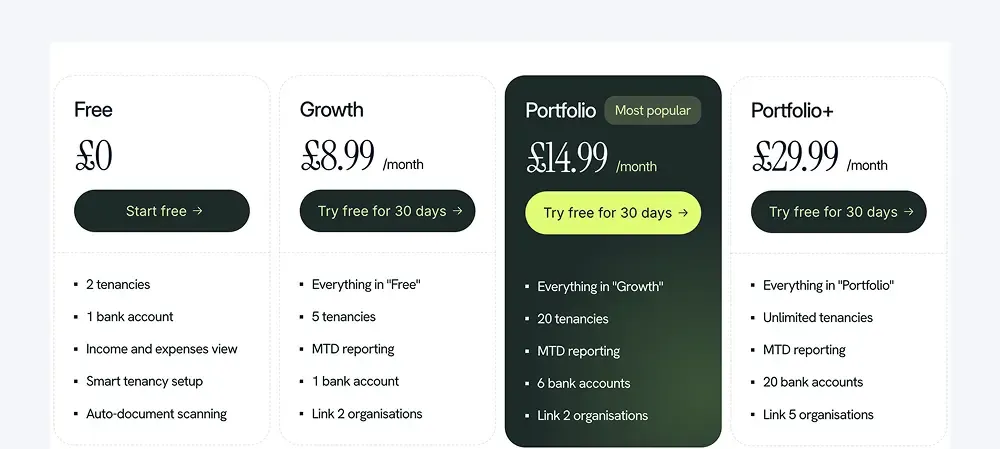
August offers a free plan for up to two tenancies, with no time limit and no card required. Paid plans start at £8.99 per month (Growth), rising to £14.99 (Portfolio, up to 20 tenancies) and £29.99 (Portfolio+, unlimited tenancies). MTD reporting is included on all paid plans, and tenants use the app free.
When to use August:
- You're a self-managing landlord who wants MTD, rent tracking and compliance handled in one app.
- You want landlord-specific automation at a lower price point than general accounting tools.
When NOT to use August:
- Your income extends beyond property and you need broader business accounting.
- You'd rather use a long-established general accounting platform.
Why ANNA is the best choice for landlords
Selecting the right Making Tax Digital software can make a significant difference for landlords. With the new quarterly reporting and year-end submission requirements, having a platform that automates record-keeping, tax calculations, and filings not only saves time but also reduces errors and unnecessary costs.
For landlords who want fully hands-off MTD compliance, ANNA stands out as the most automated and cost-effective option.
If you want to save time, reduce costs, and have full confidence that your MTD obligations are handled, ANNA is the simplest and most efficient choice for landlords.
So get started with ANNA today and experience hassle-free MTD compliance. And if you have any questions, we are here in the app to help you, 24/7.
Read the latest updates


![What Is Marginal Relief? [Everything You Need to Know]](https://storage.googleapis.com/anna-website-cms-prod/small_cover_3000_130_1ef44f67d1/small_cover_3000_130_1ef44f67d1.webp)







You may also like


![6 Best Free Making Tax Digital Software Solutions [Compared]](https://storage.googleapis.com/anna-website-cms-prod/small_cover_3067_c094560492/small_cover_3067_c094560492.webp)
![Making Tax Digital for Low-Income Taxpayers [6 Challenges]](https://storage.googleapis.com/anna-website-cms-prod/small_cover_3000_52_92d8ae130a/small_cover_3000_52_92d8ae130a.webp)
![Am I Registered for Making Tax Digital? [How to Check]](https://storage.googleapis.com/anna-website-cms-prod/small_cover_3000_37_03afa3fde7/small_cover_3000_37_03afa3fde7.webp)
![Making Tax Digital for Small Businesses [A Complete Guide]](https://storage.googleapis.com/anna-website-cms-prod/small_cover_3075_180d717fb9/small_cover_3075_180d717fb9.webp)

![6 Best Self Assessment Tax Software for UK Users [Comparison]](https://storage.googleapis.com/anna-website-cms-prod/small_cover_3009_5a6504812e/small_cover_3009_5a6504812e.webp)



![Making Tax Digital Exemptions to Know About [Guide]](https://storage.googleapis.com/anna-website-cms-prod/small_cover_3000_26_672a4e45e4/small_cover_3000_26_672a4e45e4.webp)


Open a business account in minutes
