
6 Best Making Tax Digital Software for Sole Traders in 2026





In this article
The best Making Tax Digital (MTD) software for sole traders is one that keeps digital records, submits quarterly updates to HM Revenue & Customs, and reduces manual bookkeeping through automation.
According to the most recent government estimates, there are around 3.2 million sole proprietorships in the UK, reflecting the scale of self‑employment affected by the Income Tax Self Assessment’s rollout in 2026.
In this guide, we’ll explain which MTD software options can help you stay compliant without adding extra admin.
How we selected the best MTD software
We chose the tools based on MTD compliance, automation level, ease of use, and suitability for sole traders.
We prioritised:
- HMRC-recognised MTD ITSA compatibility
- Real automation (not just reporting tools)
- Suitability for sole traders (not just accountants)
- Ability to handle income, expenses, and submissions in one workflow
Quick comparison: Best MTD software for sole traders
| Software | Best for | Automation level | Ease of use | Key limitation |
| ANNA | All-in-one automation | High | Very easy | Less manual control |
| FreeAgent | Simplicity + guidance | Medium | Easy | Manual upkeep required |
| Xero | Flexibility + integrations | Medium | Moderate | Steeper learning curve |
| QuickBooks | Familiar accounting tools | Medium | Moderate | Built for broader business use |
| Sage | Established accounting workflows | Low–Medium | Moderate | More complex interface |
| Zoho Books | Affordable customisation | Medium | Moderate | Setup required |
The best MTD software for sole traders
Here are the best options on the market in 2026:
1. ANNA
ANNA is an all-in-one platform that combines a business account, bookkeeping, and tax into a single system. Instead of relying on separate tools or manual processes, it automates financial admin in the background, making it easier to stay compliant with MTD.
Here’s what ANNA offers:
- Automatic income and expense tracking: Transactions are recorded in real time.
- Smart categorisation: Expenses are organised without manual input.
- Self Assessment support: Your final declaration is filled out and submitted automatically.
- MTD compliance: Digital records, quarterly updates, and final declarations handled in one place.
- Real-time tax estimates: You can see what you owe as you earn.
- Receipt capture: Receipts can be uploaded and stored in the app.
- Built-in business account: Banking and bookkeeping are fully connected.
Because ANNA connects your cash flow directly to your records, everything stays up to date automatically. This removes the need for spreadsheets or manual data entry and makes quarterly reporting significantly easier.
Pricing
ANNA offers MTD-compatible software for free, with no additional cost for compliance features. There are no hidden fees for core functionality, making it a cost-effective all-in-one solution.
You’ll also get 2025/26 MTD Self Assessment filed for free, and if you’ve previously filed with alternative software, ANNA will refund that cost when you open an account.

When to use ANNA:
- You want a fully automated, hands-off approach to bookkeeping and tax.
- You don’t want to deal with manual categorisation, spreadsheets, or separate tools.
- You need built-in MTD compliance with minimal effort.
- You want real-time visibility of your tax without doing calculations yourself.
2. FreeAgent
FreeAgent is a cloud-based accounting platform widely used by freelancers and small business owners. It focuses on simplicity and usability, which makes it a strong option for sole traders new to accounting software.
Here’s what FreeAgent offers:
- Bank feeds: Imports transactions automatically
- Expense categorisation: Organises income and spending
- Digital record-keeping: Maintains MTD-compliant records
- MTD submissions: Supports quarterly updates and final declarations
- Tax timeline: Helps track upcoming deadlines
FreeAgent’s drawbacks:
- Requires regular manual categorisation and review
- Needs consistent bookkeeping maintenance
- Offers less automation than some newer tools
With FreeAgent, you get a structured and user-friendly system, but you’re still responsible for keeping records accurate and up to date throughout the tax year.
Pricing
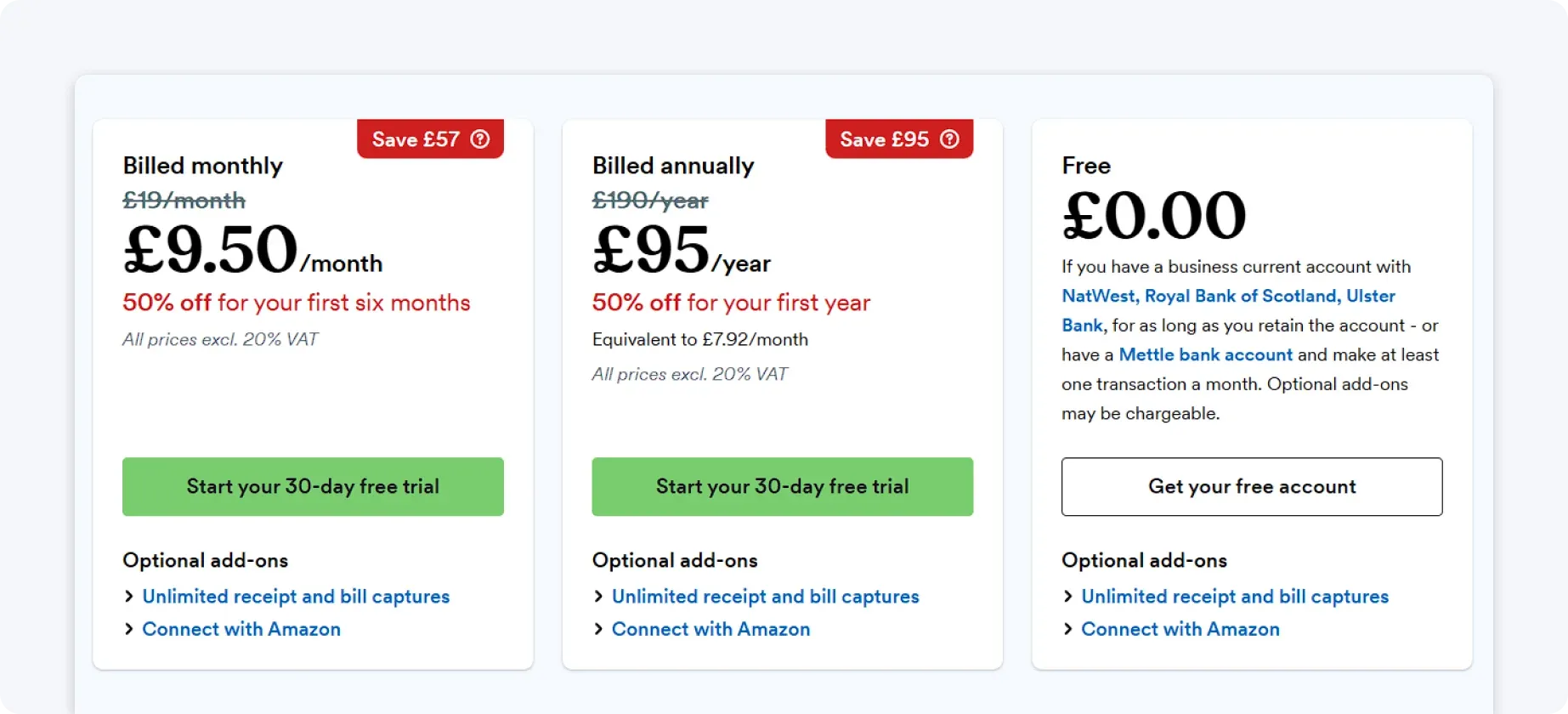
FreeAgent is available on a monthly subscription basis. Some UK business bank accounts (Mettle, NatWest, Royal Bank of Scotland, and Ulster Bank) include it at no extra cost; otherwise, a standard monthly fee applies.
Pricing is fixed regardless of usage, which can be less flexible for smaller businesses.
When to use FreeAgent:
- You’re new to accounting software and want a simple, guided experience.
- You value clear tax timelines and visibility over upcoming deadlines.
- You’re comfortable maintaining your records with regular input.
When NOT to use FreeAgent:
- You want bookkeeping and tax handled automatically in the background.
- You have complicated finances that require deeper reporting or flexibility.
- You don’t want to spend time regularly maintaining and reviewing your records.
3. Xero
Xero is one of the most widely used cloud accounting platforms in the UK. It’s designed for flexibility and is often used with an accountant’s help for more complex financial setups.
Here’s what Xero offers:
- Bank feeds: Imports and reconciles transactions automatically
- Expense tracking: Categorises and manages spending
- Advanced reporting: Provides deeper financial insights
- MTD compliance: Supports digital submissions
- Integration ecosystem: Connects with a wide range of third-party apps
Xero is highly customisable, which makes it a strong option if you don’t mind relying on additional tools.
Xero’s drawbacks:
- Requires manual bookkeeping and regular review
- Has a steeper learning curve for non-accountants
- Often requires an accountant’s involvement
- Takes time to set up and configure
With Xero, you get flexibility and control, but it can be a bit technically heavy for sole traders.
Pricing
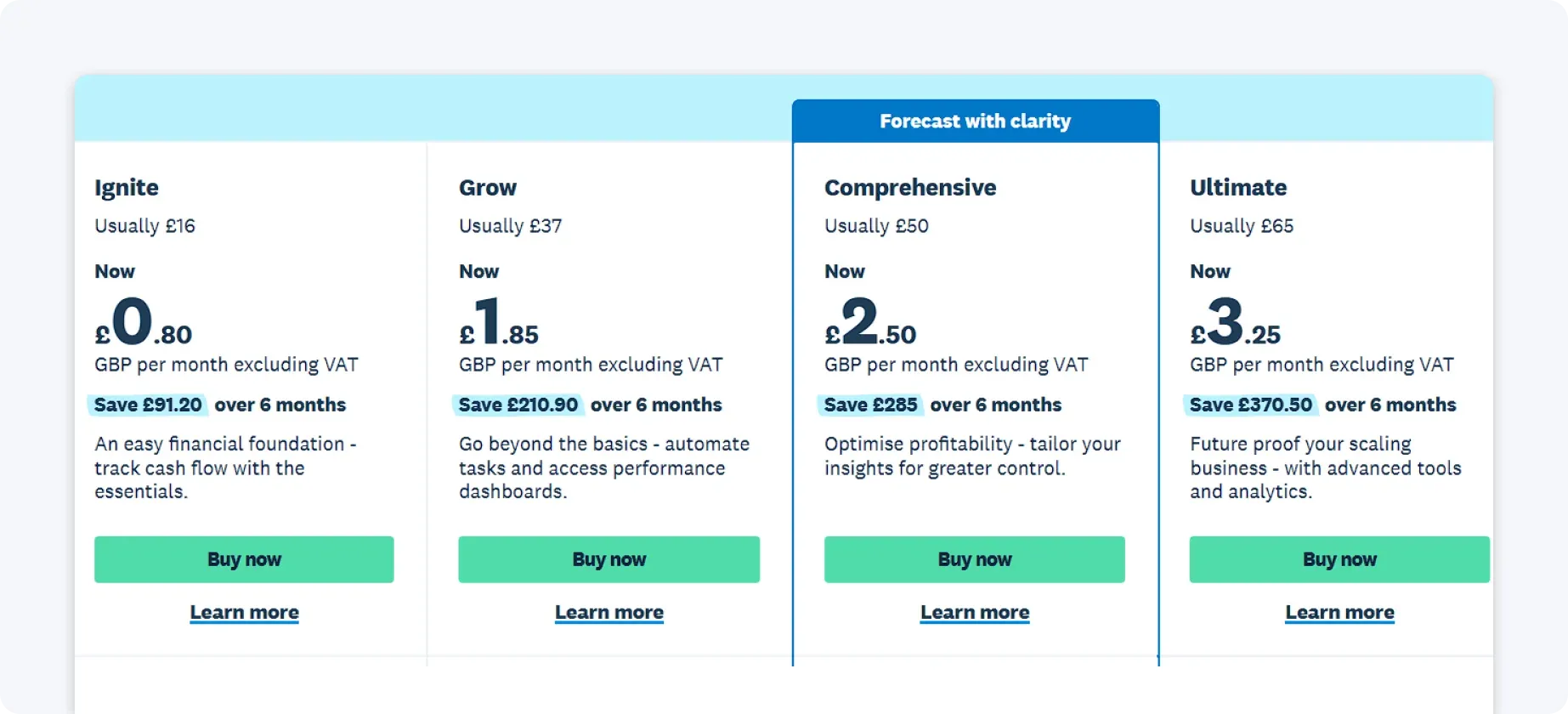
Xero offers tiered monthly subscription plans based on features and usage limits. Lower-cost plans have restrictions, while more advanced features require higher-tier subscriptions.
Additional integrations or accountant support can increase the overall cost.
When to use Xero:
- You need advanced reporting and financial visibility.
- You use multiple tools and want strong integrations.
- You work with an accountant or have more complicated financial needs.
When NOT to use Xero:
- You want a simple, plug-and-play system with minimal setup.
- You don’t have accounting knowledge or support.
- You want to avoid ongoing bookkeeping and manual reconciliation.
4. QuickBooks
QuickBooks is a well-established platform used by millions of small businesses. It offers a broad range of accounting features and is widely supported by accountants.
Here’s what QuickBooks offers:
- Automated bank feeds: Imports transactions directly
- Expense categorisation: Tracks business spending
- Invoicing tools: Manages invoices
- Reporting dashboards: Enables you to monitor financial performance
- MTD compliance: Supports digital submissions
QuickBooks offers a familiar and flexible system, especially if you already work with an accountant.
QuickBooks’ drawbacks:
- Built around traditional invoicing workflows
- Requires ongoing bookkeeping and manual review
- Includes features that may be unnecessary for simpler setups
With QuickBooks, you get a widely supported, feature-rich platform, but it’s best suited to people who are comfortable managing their own bookkeeping.
Pricing
QuickBooks uses a monthly subscription model with multiple pricing tiers.
Costs increase as you unlock more features, such as advanced reporting and multi-user access. Discounts are sometimes available for new users, but standard pricing applies long-term.

When to use QuickBooks:
- You want a widely used platform and have strong accounting support.
- You need invoicing and standard accounting features in one place.
- You’re comfortable managing your books with some manual input.
When NOT to use QuickBooks:
- You want automation to handle most of your bookkeeping.
- You have a very simple business setup and don’t need a full accounting suite.
- You don’t want to customise workflows or manage ongoing inputs.
5. Sage
Sage is one of the oldest accounting software providers in the UK and is used across businesses of all sizes.
Here’s what Sage offers:
- Income and expense tracking: Records and organises business transactions
- Financial reporting tools: Generates insights into your financial performance
- MTD-compliant submissions: Enables digital tax reporting to HMRC
- Optional payroll functionality: Supports employee payment management
Sage is reliable and widely recognised, particularly among accountants and established businesses.
Sage’s drawbacks:
- More complex interface compared to newer tools
- Requires time to learn and manage
- Ongoing bookkeeping is still manual
- Less intuitive for beginners
With Sage, you get a trusted system, but it often requires more time and effort to manage than some modern, automated solutions.
Pricing
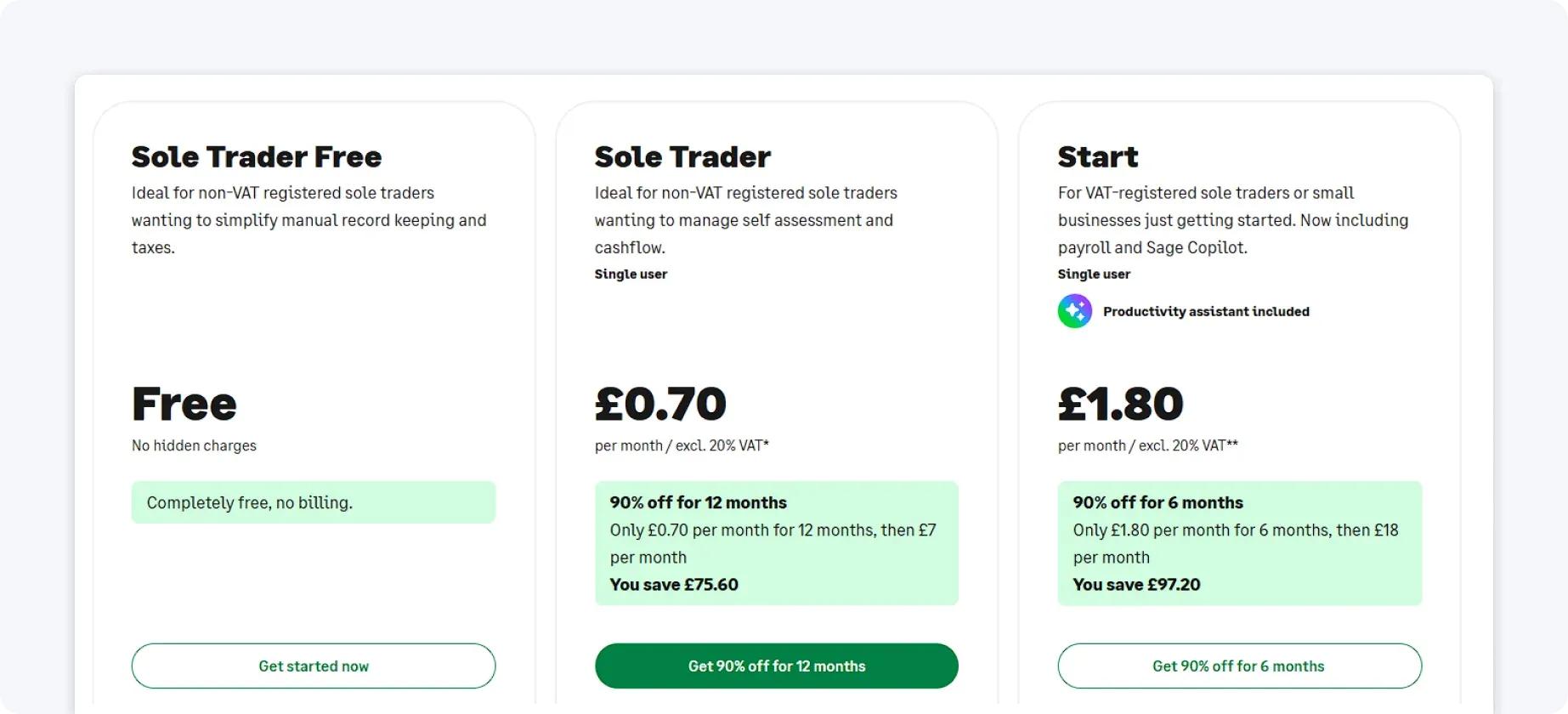
Sage operates on a subscription-based pricing model with several plan levels. More advanced tools and features are only available on higher tiers. Costs can increase if you add extras like payroll or additional users.
When to use Sage:
- You prefer structured, traditional accounting workflows.
- You need reliable reporting and established processes.
- You’re comfortable investing time into learning the system.
When NOT to use Sage:
- You want a modern, intuitive, and easy-to-use interface.
- You expect automation to reduce manual work significantly.
- You’re a beginner looking for a lightweight solution.
6. Zoho Books
Part of the wider Zoho ecosystem, Zoho Books offers a balance between cost and functionality.
Here’s what you get with Zoho Books:
- Income and expense tracking: Records and categorises financial activity
- Automation workflows: Reduces manual tasks through rule-based processes
- Invoice management: Creates and manages client invoices
- MTD-compatible submissions: Supports digital tax compliance
Zoho Books is flexible and cost-effective, particularly if you already use other Zoho products.
Zoho Books’ drawbacks:
- Requires setup and configuration
- Needs ongoing management
- Feels less intuitive than more automation-focused tools
With Zoho Books, you get an efficient solution, especially if you’re already using Zoho tools, but it works best for those willing to spend time setting up and managing their system.
Pricing
Zoho Books offers a tiered pricing structure, starting with a free plan for basic features. Overall, it’s one of the more affordable options, but the cost still scales with usage.

When to use Zoho Books:
- You want an affordable solution with flexible features.
- You already use Zoho products and want an integrated system.
- You’re comfortable setting up and managing workflows yourself.
When NOT to use Zoho Books:
- You want a system that works out of the box with minimal setup.
- You prefer simplicity over customisation.
- You don’t want to spend time configuring and maintaining your setup.
Choosing the right MTD software for sole traders
The right platform has to be compliant with HMRC requirements, reduce admin, save time, and give you a real-time view of your finances.
Here’s a more detailed breakdown of what to consider:
1. Ease of use
Look for platforms with a clean interface, simple workflows, and guided steps for key tasks such as categorising expenses, connecting bank accounts, and submitting quarterly updates.
The easier the software is to navigate, the less time you’ll spend learning it, and the fewer mistakes you’ll make. Beginners often benefit from platforms with built-in tips, visual dashboards, and prompts for upcoming deadlines.
2. Level of automation
Some software still requires manual entry, even if it’s MTD-compliant.
If your goal is to minimise repetitive work, prioritise platforms that automatically track income and expenses, connect transactions directly to your records, and generate digital reports in real time.
3. Integration needs
For sole traders, integrations with your business bank account, invoicing tools, and payment platforms are particularly valuable.
Check how well the software connects with the tools you already use. Seamless connections mean your transactions feed directly into your accounting records, saving you from double entry and potential mistakes.
4. Cost
Pricing varies widely. Free or low-cost options may be enough for simpler sole trader setups, while more advanced tools with automation and integrations often charge a subscription.
Consider not only the monthly cost but also the value you get in terms of time saved, accuracy, and real-time financial insights.
5. Support and resources
Reliable support can make a big difference, especially during your first year of MTD compliance. Look for platforms that offer clear guides, tutorial videos, responsive customer service, and in-app support.
Having easy access to help ensures that you can resolve issues quickly and avoid penalties for missed submissions.
💡 Pro tip: Before committing, check HMRC’s software-finder tool to confirm that the platform is fully compatible with MTD ITSA.
How ANNA simplifies MTD for sole traders – for free
For sole traders, ANNA goes beyond compliance. Unlike platforms that require ongoing manual work or multiple separate tools, ANNA automates the entire MTD process, from income tracking to quarterly submissions and end-of-year Self Assessment.
You also get real-time tax estimates, a built-in UK business account, and receipt capture in one app.
Best of all, ANNA’s MTD software is completely free, and your 2025/26 Self Assessment can be filed for free too. If you’ve already paid another provider to file your return, ANNA will refund you when you switch.
So, sign up with ANNA today and handle MTD with confidence. And if you need some tax advice or just have general questions, we’re in the app 24/7, ready to help.
Read the latest updates


![What Is Marginal Relief? [Everything You Need to Know]](https://storage.googleapis.com/anna-website-cms-prod/small_cover_3000_130_1ef44f67d1/small_cover_3000_130_1ef44f67d1.webp)







You may also like


![6 Best Free Making Tax Digital Software Solutions [Compared]](https://storage.googleapis.com/anna-website-cms-prod/small_cover_3067_c094560492/small_cover_3067_c094560492.webp)
![Making Tax Digital for Low-Income Taxpayers [6 Challenges]](https://storage.googleapis.com/anna-website-cms-prod/small_cover_3000_52_92d8ae130a/small_cover_3000_52_92d8ae130a.webp)
![Am I Registered for Making Tax Digital? [How to Check]](https://storage.googleapis.com/anna-website-cms-prod/small_cover_3000_37_03afa3fde7/small_cover_3000_37_03afa3fde7.webp)
![Making Tax Digital for Small Businesses [A Complete Guide]](https://storage.googleapis.com/anna-website-cms-prod/small_cover_3075_180d717fb9/small_cover_3075_180d717fb9.webp)

![6 Best Self Assessment Tax Software for UK Users [Comparison]](https://storage.googleapis.com/anna-website-cms-prod/small_cover_3009_5a6504812e/small_cover_3009_5a6504812e.webp)



![Making Tax Digital Exemptions to Know About [Guide]](https://storage.googleapis.com/anna-website-cms-prod/small_cover_3000_26_672a4e45e4/small_cover_3000_26_672a4e45e4.webp)


Open a business account in minutes
