
Making Tax Digital: The Common Challenges & Solutions



Discover the Making Tax Digital challenges and learn how you can overcome common issues, stay compliant, and simplify your reporting.


In this article
Making Tax Digital (MTD) is one of the most significant changes to the UK tax system in a long time.
If you have relied on manual bookkeeping or annual tax preparation, the switch to digital reporting can feel challenging and confusing at first.
However, with the right preparation and tools, you can overcome the most common challenges businesses face with MTD.
Read on to learn more about MTD challenges and practical solutions to help you stay compliant without unnecessary stress.
Key points
- Transition to digital early 💻
Move your records to digital, log income and expenses, and set weekly bookkeeping sessions to stay organised and avoid last-minute stress. - Choose software recognised by HMRC that fits your business 🖱️
Cloud platforms, bridging tools, or accountant-managed software solutions keep records accurate and compliant, reducing manual errors. - Use ANNA for a smooth MTD transition 📝
ANNA combines bookkeeping, invoicing, tax calculations, and HMRC filing into a single app. Automate expenses, smart money pots, VAT, Corporation Tax, and Self Assessment filings while keeping everything organised, saving both time and money.
What changes under MTD?
Making Tax Digital is part of HMRC’s long-term plan to modernise the UK tax system by moving from manual reporting to fully digital record-keeping and submissions.
Businesses will need to:
- Keep digital records of income and expenses
- Submit quarterly updates to HMRC
- Use MTD-compatible software
- Submit a final end-of-year declaration
Instead of filing one annual Self Assessment tax return, you’ll submit updates throughout the year.
The rollout for MTD for Income Tax Self Assessment (ITSA) happens in stages:
- April 2026: Self-employed individuals and landlords earning over £50,000
- April 2027: Self-employed individuals, people with property income, or a combination of both, earning £30,000
- April 2028: Part-time freelancers, small landlords, side-income businesses earning over £20,000
MTD for VAT is already mandatory for most VAT-registered businesses, so many companies have started the transition to digital reporting.
💡 Good to know:
The thresholds are based on gross income (turnover), not on profit, so HMRC looks at total revenue before expenses.
4 common MTD challenges you should know about, and tips to solve them
On paper, MTD seems simple: keep digital records and submit updates more frequently. But in practice, many businesses face real challenges when adapting to the new system.
1. Transitioning from paper to digital records
One of the biggest challenges is moving from traditional record-keeping to digital systems. Many small businesses still rely on paper receipts, manual invoices, and spreadsheet tracking.
Switching from paper to digital records can create issues such as:
- Missing historical data
- Time-consuming data entry
- Errors when transferring information
- Disorganised financial records
If you have used the same system for years, the change can feel disruptive.
How can you overcome the challenge?
The key is to transition gradually rather than waiting until the last minute.
Here are practical steps you should try:
- Start recording income and expenses digitally now
Moving your financial records to a digital format early helps you get familiar with the process before MTD reaches your income band. It also gives you time to correct mistakes and organise your records properly without the pressure of approaching deadlines.
- Use accounting software that automatically imports bank transactions
Bank feed integrations allow your accounting software to pull transactions directly from your bank account, which significantly reduces manual data entry. This saves time and also lowers the risk of human errors when recording income and expenses.
- Set aside time each week for bookkeeping
Scheduling a short weekly bookkeeping session helps prevent your records from piling up and becoming overwhelming later. Consistent updates also make it easier to prepare quarterly MTD submissions without last-minute stress.
- Digitise receipts using scanning apps
Receipt scanning apps allow you to take a photo of receipts and store them digitally, making it easier to track expenses and maintain organised records. Many of these apps can also automatically extract key information such as dates, totals, and vendor names, simplifying the bookkeeping process.
💡 Did you know?
Digitising receipts is one of the easiest ways to simplify bookkeeping, especially when preparing for Making Tax Digital.
ANNA’s Receipt Scanner enables you to snap a photo of a receipt directly from your phone and store it digitally in seconds.
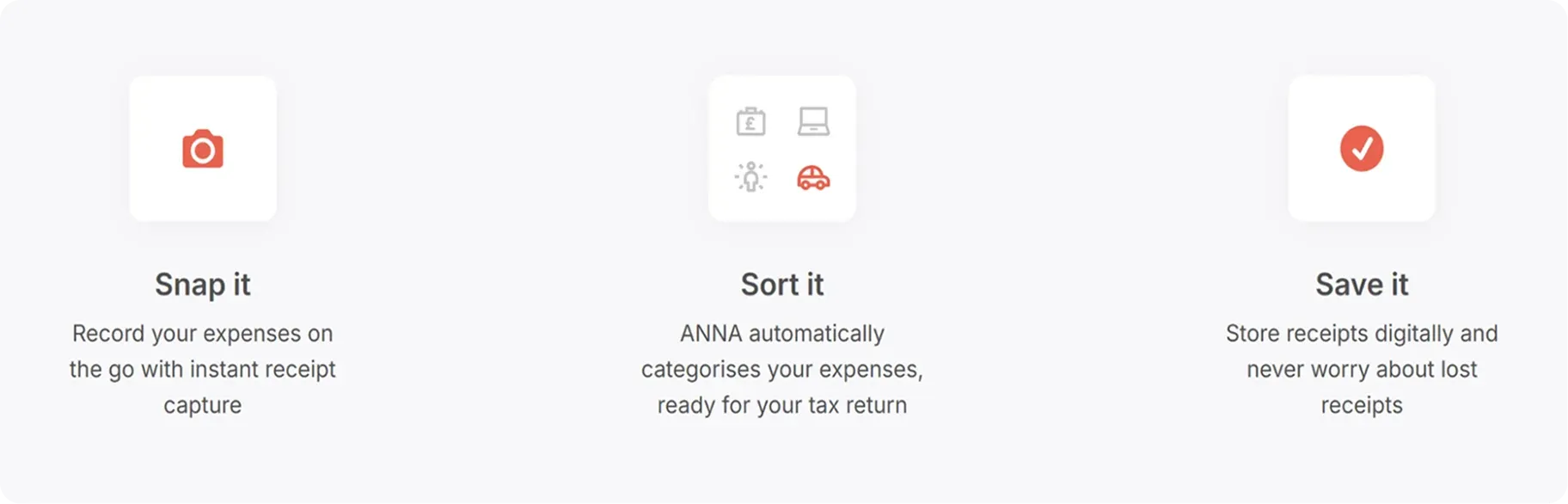
The app can automatically extract key information, such as the date, amount, and merchant details, so you don’t have to manually enter everything into your records.
It also categorises expenses for you, helping keep your accounts organised throughout the year.
Once scanned, the app securely stores receipts, so you don’t need to worry about losing paper copies.
2. Choosing the right MTD-compatible software
There are dozens of accounting tools on the market claiming to support MTD, and choosing the wrong one can create compliance risks.
Besides having to think about whether the software integrates with HMRC, businesses also worry about the price, ease of use, and compatibility with existing systems.
And if you use spreadsheets, there’s also uncertainty about switching entirely to accounting software.
How can you overcome the challenge?
You should focus on HMRC-recognised software that supports MTD submissions. Using approved software ensures you can submit your records directly to HMRC without technical issues or compliance risks.
There are usually three main options:
- Full cloud accounting platforms
They include tools that handle bookkeeping, invoicing, tax reporting, and MTD submissions in one system.
Because everything is stored in the cloud, you can access your financial data from anywhere and keep records updated in real time.
Many platforms also automate tasks such as bank transaction imports, expense tracking, and financial reporting, which reduces manual work and improves accuracy.
- Spreadsheet + bridging software
If you prefer spreadsheets, bridging software connects them to HMRC for digital submissions.
This option allows you to continue using familiar tools, such as spreadsheets, while still meeting MTD requirements.
If you choose this option, keep in mind that the data links must be digital and automated. Copying and pasting numbers isn’t allowed, as HMRC needs everything to be joined-up and traceable.
- Accountant-managed software
Some accountants provide software access as part of their services. In this setup, your accountant manages the technical side of the accounting platform while you upload documents or share financial information.
💡 Did you know?
ANNA’s Auto Accountant is an AI-powered tool recognised by HMRC and designed specifically for the UK tax system.

Here’s how it can help:
- It creates digital records automatically from bank activity
- It prepares quarterly updates for filing
- You review and approve the files, and we file them with HMRC
3. Increased admin
Under MTD, instead of one annual tax return, businesses must submit four quarterly updates plus the end-of-year statement.
Quarterly reporting means that:
- You must keep bookkeeping up to date
- Deadlines occur more frequently
- You must organise financial records throughout the year
When you're already juggling multiple responsibilities, this can feel like an extra workload and an admin headache. This is especially true if you previously handled taxes only once a year.
How can you overcome this challenge?
While quarterly updates sound like more work, they often become easier with automation.
Here are some practical tips on how to reduce admin overload:
- Using software with automatic bank feeds
Automatic bank feeds connect your business bank account directly to your accounting software and import transactions automatically.
You don’t have to manually enter every payment or expense, which saves a significant amount of time each month.
It also improves accuracy because transactions are pulled directly from the bank and not typed manually.
- Scheduling regular bookkeeping sessions
Setting aside dedicated time each week or month to review your finances can prevent your records from becoming disorganised.
Short, regular sessions make it easier to track expenses, categorise transactions, and keep everything up to date.
- Setting reminders for quarterly submissions
Quarterly updates are a key requirement of the MTD system, so missing deadlines can lead to penalties.
Setting calendar reminders or using alerts in your accounting software ensures you complete submissions on time.
Regular reminders also help you stay organised and avoid the stress of last-minute reporting.
- Automating recurring invoices
If your business charges clients the same amount regularly, automated invoicing can streamline the process.
You can schedule invoices to be sent automatically at set intervals, such as weekly or monthly, with no need to create them each time.
This way, you can ensure consistent cash flow and reduce the risk of forgetting to invoice a client.
💡 Did you know?
ANNA’s Invoicing tool helps you manage billing more efficiently.
Instead of wrangling with spreadsheets or creating invoices from scratch every time, you can handle everything in one place.
4. Implementation costs
The cost of implementing MTD systems is another challenge because new expenses may include:
- Accounting software subscriptions
- Bookkeeping services
- Staff training
- Data migration
If you operate on tight budgets, even small monthly costs can feel significant.
How can you overcome the challenge?
You can manage costs by:
- Choosing entry-level accounting software plans
Many accounting platforms offer affordable starter plans for freelancers and small businesses. These usually cover the essentials without the higher price tag. Starting small keeps costs manageable while still helping you stay organised and compliant.
- Automating tasks to reduce accounting fees
Automation can take a lot of the manual work out of bookkeeping. Features such as automatic transaction categorisation, invoice creation, and payment reminders mean less time spent organising records and fixing things.
- Selecting scalable tools that grow with the business
Many platforms let you start with basic features and add tools like payroll, advanced reporting, or tax integrations later. That way, you won’t need to switch systems every time your business takes the next step.
How to overcome MTD challenges with ANNA’s (free) help
ANNA is an all-in-one business app that can register your business, send and chase invoices, do your bookkeeping, and file your VAT, Corporation Tax, and MTD Self Assessment.
Unlike most accounting software designed for accountants, ANNA is built for business owners.
It means no onboarding headaches, no complicated setup, and no paying for features you’ll never use.
And, probably the part you’ll like the most: the MTD services are totally free for the first year. If you already submitted your 2025/26 return, we’ll even reimburse you the cost of your submission software when you open an ANNA account.
Here’s what we bring to the table:
✨ Automatic expense capture & categorisation: Log every transaction, categorise every expense, and claim every deduction.
✨ Real-time tax estimates: See what you owe, track your payments, and plan with confidence.
✨ Smart money pots: Save a portion of your income, build your tax pot, and avoid last-minute surprises.
✨ Smart invoicing: Create, send, and chase invoices, and match payments automatically.
✨ Built-in UK business account: Manage your money, make transfers, and use cards, all in one place.
✨ Automated VAT returns: Calculate and file VAT, and stay fully Making Tax Digital-compliant.
✨ Automated company accounts & Corporation Tax: Calculate taxes, prepare accounts, and file reports without hassle.
✨ Automated Income Tax Self-Assessment filings: Calculate income tax, prepare submissions, and send filings directly to HMRC.
✨ Automated reminders: Stay on top of deadlines and get alerts to keep you on schedule.
✨ 24/7 tax support: Get answers to questions and solve problems.
The best part?
You’ll pay just 10% of what most businesses spend on accounting, thanks to cutting-edge engineering, full automation, and advanced AI that replaces expensive manual work.
Sign up for ANNA today, and overcome all your Making Tax Digital challenges.
FAQ:
1. Do I need to keep physical receipts for tax purposes?
You don’t have to keep paper receipts once you’ve scanned and stored them digitally. HMRC accepts digital records as valid evidence of business expenses.
Just make sure you store your digital copies safely, as HMRC may ask to see them during an audit or review.
2. What happens if I have to join Making Tax Digital in 2026?
You’ll need to keep digital records and submit quarterly summaries of income and expenses. You’ll still pay tax on the usual dates, but the way you record and report that data changes.
HMRC plans a grace period in the first year, during which late quarterly submissions won’t incur penalties immediately, giving people time to adjust.
3. What if my income stays below the MTD thresholds?
If your combined self‑employment and property income stays below the threshold for the relevant year, you won’t have to join MTD under the existing rules.
In that case, you continue to use the traditional Self Assessment process until your income rises above the threshold or the rules change.
Read the latest updates


![What Is Marginal Relief? [Everything You Need to Know]](https://storage.googleapis.com/anna-website-cms-prod/small_cover_3000_130_1ef44f67d1/small_cover_3000_130_1ef44f67d1.webp)







You may also like
![Making Tax Digital for Low-Income Taxpayers [6 Challenges]](https://storage.googleapis.com/anna-website-cms-prod/small_cover_3000_52_92d8ae130a/small_cover_3000_52_92d8ae130a.webp)
![6 Best Free Making Tax Digital Software Solutions [Compared]](https://storage.googleapis.com/anna-website-cms-prod/small_cover_3067_c094560492/small_cover_3067_c094560492.webp)
![Making Tax Digital Exemptions to Know About [Guide]](https://storage.googleapis.com/anna-website-cms-prod/small_cover_3000_26_672a4e45e4/small_cover_3000_26_672a4e45e4.webp)


![Am I Registered for Making Tax Digital? [How to Check]](https://storage.googleapis.com/anna-website-cms-prod/small_cover_3000_37_03afa3fde7/small_cover_3000_37_03afa3fde7.webp)
![Making Tax Digital for Small Businesses [A Complete Guide]](https://storage.googleapis.com/anna-website-cms-prod/small_cover_3075_180d717fb9/small_cover_3075_180d717fb9.webp)



![Making Tax Digital Penalties Explained [+ How to Avoid Them]](https://storage.googleapis.com/anna-website-cms-prod/small_cover_3000_50_768b17a65c/small_cover_3000_50_768b17a65c.webp)



Open a business account in minutes
