
All Your MTD for Income Tax FAQs Answered [Fully Explained]



Find all your MTD for income FAQs answered and learn how you can stay compliant and manage your digital tax responsibilities with ease.


In this article
Making Tax Digital (MTD) is one of the biggest changes to the UK tax system in recent years, and as HMRC continues to roll out these changes, many people are unsure about what it means for them, when it applies, and how to stay compliant.
We’ve made a list of the most common MTD FAQs so you can understand what’s changing and what you need to do next.
1. General overview MTD FAQs
For those who run businesses that aren’t VAT-registered, MTD compliance starts to matter this year, which is why it’s essential to get familiar with the basics.
1.1. What is Making Tax Digital?
Making Tax Digital (MTD) is a UK government initiative that is changing the tax system into a fully digital process.
Instead of relying on manual record-keeping and end-of-year submissions, MTD introduces a more structured, technology-driven approach to managing tax obligations.
The process should reduce common errors related to manual processes and encourage better financial organisation.
This initiative is part of a wider HM Revenue & Customs (HMRC) effort to modernise tax admin and make it more efficient and accurate.
1.2. When does making tax digital start?
Making Tax Digital for Income Tax started on 6th April 2026.
From that date, individuals with a qualifying income of more than £50,000 from self-employment or property began moving to the new system.
As part of a gradual implementation strategy, the rollout will expand further in later years to include more taxpayers.
HMRC anticipates that 42% of the 7 million self-employed and property taxpayers will eventually comply.
This phased approach by HMRC should give businesses and the self-employed enough time to adapt, test systems, and become familiar with digital processes before the rules apply more widely.
1.3. How does Making Tax Digital work?
The basic idea is that you have to record, store, and update your financial information digitally throughout the year instead of leaving everything until the end of the tax period.
To do so, you should use HMRC-approved software. It allows you to capture your income and expenses, and keep your records organised and up to date in real time.
This way, you’ll get a clearer and more accurate view of your financial position as the year goes on.
You also have to send this information directly to HMRC at set intervals.
At the end of the tax period, you should review and confirm the information you’ve already submitted, which reduces the need for a large, end-of-year filing and makes the overall process more manageable.
2. Eligibility and registration MTD FAQs
Knowing if you’re eligible is one of the first steps, so you can get started with MTD the right way.
2.1. Who needs to register for MTD?
You need to register for MTD if:
- You’re a sole trader or a landlord registered for Self Assessment
- You earn from self-employment or property, or both
- Your qualifying income is more than £50,000
You can also register voluntarily if you’re below the threshold and want to get familiar with the system early, or if you just want to streamline your record-keeping.
Based on 2023–24 Self Assessment figures, HMRC estimates that 864,000 individuals with qualifying income over £50,000 were required to join MTD for Income Tax from April 2026. Of these, 780,000 sole traders and landlords are expected to join in the first phase.
Over 259,000 of these taxpayers are landlords, including 118,000 whose property income is their only qualifying income and 141,000 who have both property and self-employment income.
2.2. How to sign up for MTD?
To sign up for Making Tax Digital for Income Tax, you have to be registered for Self Assessment, and you must have submitted a tax return in the last two years.
When you sign up, you’ll need to tell HMRC about your active sole trader or property income.
HMRC will ask for:
- Your business start date or the date when you began receiving property income, if within the last two tax years
- The tax year you plan to start using Making Tax Digital for Income Tax
If you’re a sole trader, you’ll also need:
- Your business name, which is the one on your invoices
- Your business address
- A brief description of what your business does
You’ll sign in using the same user ID and password as your Self Assessment account, and HMRC may ask you to further verify your identity.
💡 Good to know:
If you have more than one source of self-employment or property income, you’ll need to check each one in the online service and add any missing ones.
2.3. What is qualifying income for Making Tax Digital?
Qualifying income is the total gross income you earn from self-employment and property combined, before any expenses or allowances are deducted.
This includes income from sole trader work and rental income from UK or overseas property, but it doesn’t include income from employment (PAYE), dividends, or savings interest.
HMRC uses qualifying income to determine whether you fall within the MTD rules for Income Tax. If your combined qualifying income exceeds the required threshold in a tax year, you’ll need to follow MTD rules from the relevant start date.
Keep in mind that it’s based on your total turnover from relevant sources, not your profit. This means that even businesses with relatively low profits may still need to comply if their turnover is high enough.
💡 Good to know:
If you stopped one of your self-employment or property income sources after your last tax return, the income it generated up to that moment will still count towards your qualifying income – as long as you have other income sources ongoing.
2.4. Who can opt out of Making Tax Digital?
You may qualify for an exemption if:
- You can’t use digital technology due to age, disability, or a health condition
- You live in a remote area with limited or no internet access
- Your religious beliefs prevent you from using digital systems
In these situations, you’ll need to apply to HMRC and explain your circumstances. If they approve your request, you’ll be allowed to continue using alternative methods instead of MTD.
HMRC evaluates the above exemptions on a case-by-case basis, so you won’t be automatically excluded. You need to request approval.
There are also automatic exemptions when your qualifying income is £20,000 or less, or if you don’t have a National Insurance number.
Exemptions can either be permanent, lasting unless your circumstances change, or temporary, lasting until April 2027 at the earliest.
For example, you don’t need to use Making Tax Digital for Income Tax until the 2027–2028 tax year at the earliest, if in your 2024 to 2025 tax return you included the SA109 supplementary page – and you think there’s a big chance you’ll include it again for the 2026–2027 tax year.
2.5. What is the threshold for MTD?
For Income Tax, HMRC introduces MTD in three phases based on your qualifying income.
| Phase | Start date | Who must register for MTD |
| Phase 1 | 6th April 2026 | Sole traders & landlords with qualifying income over £50,000 |
| Phase 2 | 6th April 2027 | Sole traders & landlords with qualifying income over £30,000 |
| Phase 3 | 6th April 2028 | Sole traders & landlords with qualifying income over £20,000 |
For VAT, MTD already applies to all VAT-registered businesses with a turnover above the £90,000 threshold.
3. Requirements and compliance MTD FAQs
Being clear on the rules and deadlines helps you stay on top of MTD, meet every deadline, and avoid penalties.
3.1. Does my tax return have to be digital?
With MTD, you need to track your business or property income digitally using HMRC-compatible software.
You’ll submit updates every quarter, then send a final declaration digitally through the software.
3.2. Do I have to use accounting software?
HMRC doesn’t require a full accounting package, but the software you use must be HMRC-approved. It should be able to store records digitally and send returns directly to HMRC.
Spreadsheets aren’t enough unless they’re connected to compatible bridging software. The data links must be digital and automatic, as copying and pasting numbers isn’t allowed.
Paper-only systems or manual spreadsheets that aren’t connected to HMRC won’t meet the legal requirement.
| Type of software | Main pro | Main con | MTD compliance |
| Full accounting software | Handles all record-keeping, VAT/Income Tax submissions, and reports | Has complex and steep learning curve for small businessesComes with features you may not need at allCan be pricey | Fully compliant |
| MTD-compatible apps | Are easy to use, mobile-friendly, and cheaper than full software yet robust | May lack advanced reporting | Fully compliant |
| Spreadsheets + bridging tools | Can be low-cost if you know spreadsheets | Can cause compliance issues because of mistakes | Compliant if connected properly |
| Paper-only or standalone spreadsheets | Sometimes easier for very small businesses | Can’t submit digitallyIsn’t connected to HMRC | Not compliant |
3.3. What records do I have to keep for Making Tax Digital?
To comply with MTD, you need to:
- Keep digital records of all business or property income and expenses
- Include all required transaction details, such as dates, amounts, customers, sources, and suppliers
- Use software that can submit data to HMRC
- Keep records for at least six years
- Make your records clear and organised, and make sure that every entry is accurate, clear, and traceable
3.4. Does MTD apply to limited companies?
If a limited company is VAT-registered and above the £90,000 VAT threshold, it must follow MTD rules for VAT, which means:
- Keeping VAT records digitally
- Submitting VAT returns using MTD-compatible software
- Making sure all transactions are stored in a digital format that HMRC can access
Currently, MTD doesn’t apply to Corporation Tax.
Limited companies will continue to file their corporation tax returns in the usual way until HMRC introduces digital filing for Corporation Tax.
💡 Good to know:
Directors of limited companies may be indirectly affected by MTD.
If they have self-employment income outside the company, they may need to follow MTD rules for Income Tax, depending on thresholds.
3.5. What kind of penalties could I face under MTD?
You could face penalties in the following situations:
Late submissions
HMRC has introduced a points-based penalty system for late submissions
Instead of receiving an immediate fine for a missed deadline, you’ll get a penalty point each time you fail to submit on time.
Once you reach 4 points, you’ll get a £200 fine, and if you continue to miss deadlines, you may receive additional penalties. You can only receive one penalty point per deadline, regardless of how many businesses you have.
Points don’t last forever. If you stay below the 4-point limit, any penalty points you get will automatically drop off after 24 months.
But once you hit 4 points, they won’t disappear automatically. To clear them, you’ll need to:
- Stay fully compliant for 12 months by submitting everything on time
- Catch up on any missing updates or tax returns from the past 24 months
💡Important to know: There are no penalties for missing a quarterly update deadline for the 2026–2027 tax year.
Late payment of tax owed
HMRC will charge you a penalty if you don’t pay the full amount by the deadline. This can include:
- A final balancing payment on your tax bill
- Any extra amounts due after changes or adjustments to your tax return
The late payment penalties aren’t points-based and will apply to each late payment.
Here’s a more detailed look at payment penalties, according to the UK government’s site:
| Late payment | 2026-2027 tax year | 2027-2028 tax year |
| Up to 15 days late | No penalty | No penalty |
| 16–30 days late | 3% of tax owed at day 15, or no penalty if it’s your first year | 4% of tax owed at day 15, or no penalty if it’s your first year |
| 31 days or more late | 3% of tax owed at day 15 and 3% at day 30, plus 10% annual interest on the remaining balance, charged daily from day 31 until payment (up to 2 years) | 4% of tax owed at day 15 and 4% at day 30, plus 10% annual interest on the remaining balance, charged daily from day 31 until payment (up to 2 years) |
Failure to keep proper digital records
If you don’t maintain these records properly, HMRC may see this as non-compliance. Over time, this could lead to penalties, especially if it affects the accuracy of your submissions.
Submitting inaccurate information
If you submit incorrect figures, HMRC may charge penalties depending on the nature of the error.
Honest mistakes may result in lower penalties, but careless or deliberate inaccuracies can lead to more serious consequences.
How to stay MTD-compliant with ANNA, for free
If you run a small business, keeping up with bookkeeping, tax deadlines, and cash flow can easily feel like a job in itself.
With ANNA, it doesn’t have to be like that.
ANNA is an all-in-one HMRC-approved app that takes care of the complicated details behind the scenes, including setting up your business and handling tax filings.
Many accounting tools are designed with accountants in mind, which can mean unnecessary complexity and rising costs.
ANNA takes a different approach, focusing on simplicity, automation, and clarity for business owners.
Our MTD services are free for the first year, and you’ll get your 2025/26 Self Assessment prepared and filed for free as well! If you’ve already submitted your return using other software, it’s no problem. When you switch to ANNA, we’ll refund what you paid.
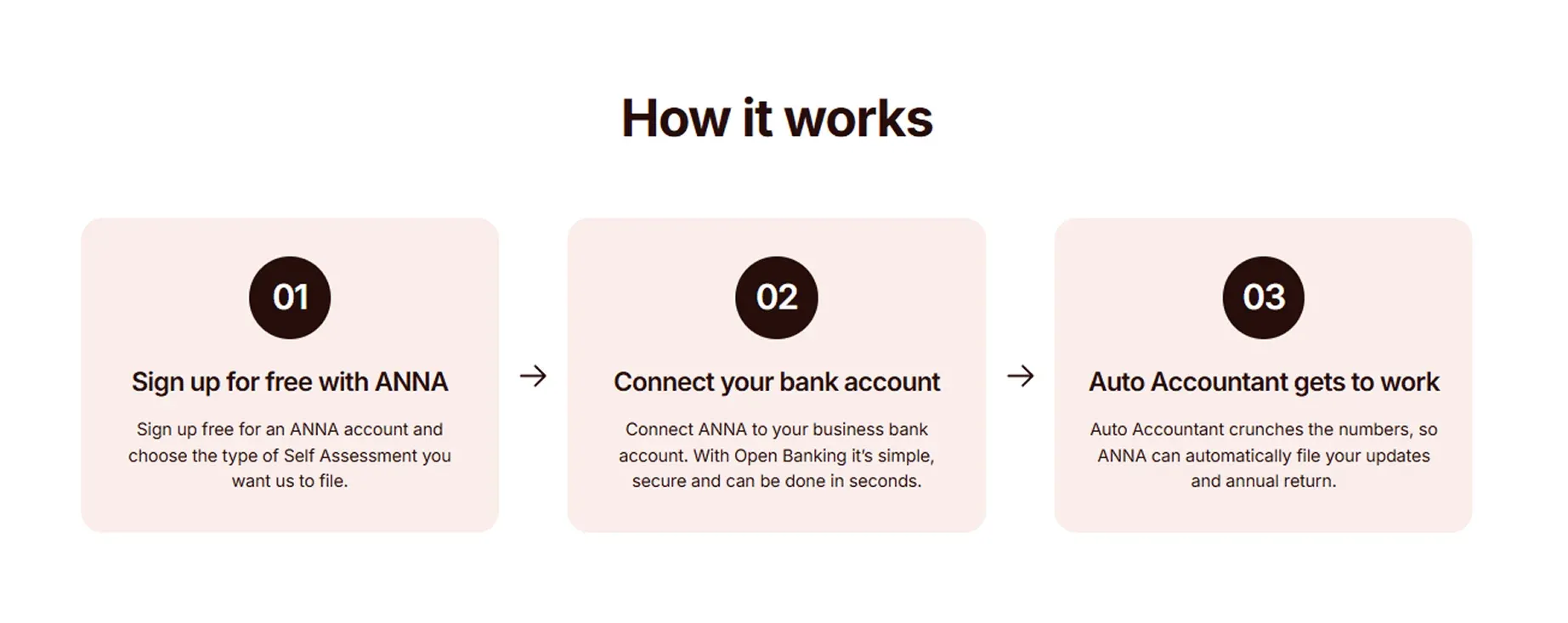
Instead of switching between different tools, spreadsheets, and pricy advisers, you can manage everything in one place, at a fraction of the cost.
Our AI-powered Auto Accountant is made specifically for the UK tax system, and it will file your MTD for you. It automatically creates digital records from your financial activity and prepares quarterly updates, ready for filing.
Once you review and approve the updates, we file them with HMRC.
What else can we help you with?
✨ Automatic expense capture and categorisation: Transactions are sorted for you, with eligible expenses identified and claimed, no manual input needed.
✨ Real-time tax estimates: See what you owe HMRC at any time, so there are no surprises at the end of the year.
✨ Smart Money Pots: You can automatically set aside a portion of your income for tax so you can stay prepared.
✨ Smart invoicing: You can create and send invoices, with automatic reminders and payments matched as they come in.
✨ Built-in UK business account: You can manage cards and transfers in one place, fully connected to your bookkeeping.
✨ Automated VAT returns: VAT is calculated and submitted in line with Making Tax Digital rules.
✨ Year-End Self Assessment: We help you prepare and submit your final tax return directly to HMRC.
✨ Automated reminders: Stay on top of key deadlines and avoid penalties.
✨ 24/7 tax support: Get quick help whenever you need it, even during busy filing periods.
Sign up for ANNA to see how you can take the stress out of bookkeeping, MTD compliance, and tax filings.
Read the latest updates


![What Is Marginal Relief? [Everything You Need to Know]](https://storage.googleapis.com/anna-website-cms-prod/small_cover_3000_130_1ef44f67d1/small_cover_3000_130_1ef44f67d1.webp)







You may also like
![What Is Qualifying Income for MTD? [Fully Explained]](https://storage.googleapis.com/anna-website-cms-prod/small_cover_3037_1bb2e59623/small_cover_3037_1bb2e59623.webp)
![What are the MTD Deadlines for 2026? [Fully Explained]](https://storage.googleapis.com/anna-website-cms-prod/small_cover_3015_0a5cbf467b/small_cover_3015_0a5cbf467b.webp)

![Making Tax Digital for Low-Income Taxpayers [6 Challenges]](https://storage.googleapis.com/anna-website-cms-prod/small_cover_3000_52_92d8ae130a/small_cover_3000_52_92d8ae130a.webp)
![Am I Registered for Making Tax Digital? [How to Check]](https://storage.googleapis.com/anna-website-cms-prod/small_cover_3000_37_03afa3fde7/small_cover_3000_37_03afa3fde7.webp)
![5 Best MTD Self Assessment Software for HMRC [Compared]](https://storage.googleapis.com/anna-website-cms-prod/small_cover_3005_b1c87e930d/small_cover_3005_b1c87e930d.webp)
![Making Tax Digital for Small Businesses [A Complete Guide]](https://storage.googleapis.com/anna-website-cms-prod/small_cover_3075_180d717fb9/small_cover_3075_180d717fb9.webp)



![Self Assessment Tax Return for 2026 [Complete Guide]](https://storage.googleapis.com/anna-website-cms-prod/small_cover_3039_3d3bf5c979/small_cover_3039_3d3bf5c979.webp)
![6 Best Self Assessment Tax Software for UK Users [Comparison]](https://storage.googleapis.com/anna-website-cms-prod/small_cover_3009_5a6504812e/small_cover_3009_5a6504812e.webp)
![Making Tax Digital Penalties Explained [+ How to Avoid Them]](https://storage.googleapis.com/anna-website-cms-prod/small_cover_3000_50_768b17a65c/small_cover_3000_50_768b17a65c.webp)
Open a business account in minutes
