
6 Best Free Making Tax Digital Software Solutions [Compared]



Discover the best free Making Tax Digital software to stay compliant, reduce admin, and choose the right tool for your business needs.


In this article
Free Making Tax Digital (MTD) software solutions are HMRC-compatible tools that let you keep digital records and submit tax updates without a paid subscription.
However, most of them come with feature limits or upgrade options.
From April 2026, MTD for Income Tax is mandatory for those earning over £50,000, expanding to those earning £30,000 in 2027 and £20,000 in 2028. That means millions of sole traders and landlords need compliant software.
In this article, we’ll present the best free MTD software options, so you can choose the one that suits your business the most.
Key points
- Free MTD software helps you stay compliant, but often comes with trade-offs ✅
These tools allow digital record-keeping and tax submissions without a subscription, but most free plans include limitations such as reduced automation, feature restrictions, or upgrade prompts as your needs grow. - MTD for Income Tax is mandatory for millions 📊
From April 2026, sole traders and landlords earning over £50,000 must comply, with thresholds dropping to £30,000 in 2027 and £20,000 in 2028, making software adoption unavoidable for many. - Free tools vary significantly in automation and effort required 📉
Some platforms offer basic bookkeeping or bridging only, requiring manual input and regular upkeep, while others include partial automation but still rely on user involvement to stay compliant. - Free often means paying with time, not money 🛠️
Although there’s no upfront cost, many tools require manual categorisation, spreadsheet management, or ongoing checks, increasing admin time and the risk of errors. - All tools must be HMRC-recognised ⚠️
MTD compliance requires software that can keep digital records, connect directly to HMRC, and submit updates electronically, making official compatibility essential. - Ease of use and scalability are critical when choosing software 📈
A simple interface, minimal setup, and the ability to grow with your income are key factors, as switching tools later can be time-consuming and disruptive.
How we chose the best free MTD software
We selected these tools based on:
- Verified HMRC compatibility
- Availability of a genuinely free plan or free access route
- Suitability for sole traders and landlords
- Ease of use and setup requirements
- Level of automation vs manual input
Here’s a quick comparison table:
| Tool | Best for | MTD support | Automation level | Free access type |
| ANNA | All-in-one solution | Full | Very high | Free 2025/26 filing + free MTD functionality |
| QuickFile | Full accounting (DIY users) | Yes (bridging) | Medium | Free |
| Pandle | Small business bookkeeping | VAT (ITSA limited) | Medium | Free plan |
| FreeAgent | Freelancers | Full | High | Free via banks |
| MyTaxDigital | Spreadsheet users | VAT only | Low | Free tier |
| MTDsorted | Spreadsheet bridging | VAT / ITSA | Low | Free tier |
The best free MTD software options
Here are the six best free MTD options on the market right now:
1. ANNA – Best for eliminating admin completely
ANNA is designed for sole traders and landlords who want to stay compliant with MTD without dealing with bookkeeping at all.
Instead of having to worry about separate tools for banking, accounting, and tax, ANNA brings everything together into one cohesive system.
Your business account, bookkeeping, tax calculations, and MTD submissions are all connected, and the Auto Accountant handles day-to-day financial admin in the background.
Here’s why ANNA stands out:
- Built-in MTD compliance: Quarterly updates and submissions are included with no additional fees or extra software required.
- Fully automated bookkeeping: Income and expenses are recorded and categorised automatically as transactions happen.
- Always-ready quarterly reporting: Your MTD updates are continuously prepared, so deadlines don’t require any extra work.
- End-of-year filing included: Self Assessment is handled within the same system, without switching tools or manual steps.
- Live tax visibility: Your estimated tax position is updated in real time based on your activity.
- Integrated UK business account: Banking and accounting sit together in one place, removing the need for third-party integrations.
- Built-in invoicing and payments: You can issue invoices and receive payments directly through the platform, fully linked to your records.
ANNA even has some special benefits for the MTD 2026 rollout:
- Your 2025/26 Self Assessment return is filed for free
- If you’ve already paid to file elsewhere, ANNA will refund the cost when you switch
Most accounting tools still rely on you to categorise transactions, check records, and prepare submissions. ANNA removes those steps entirely by keeping everything updated automatically in real time.
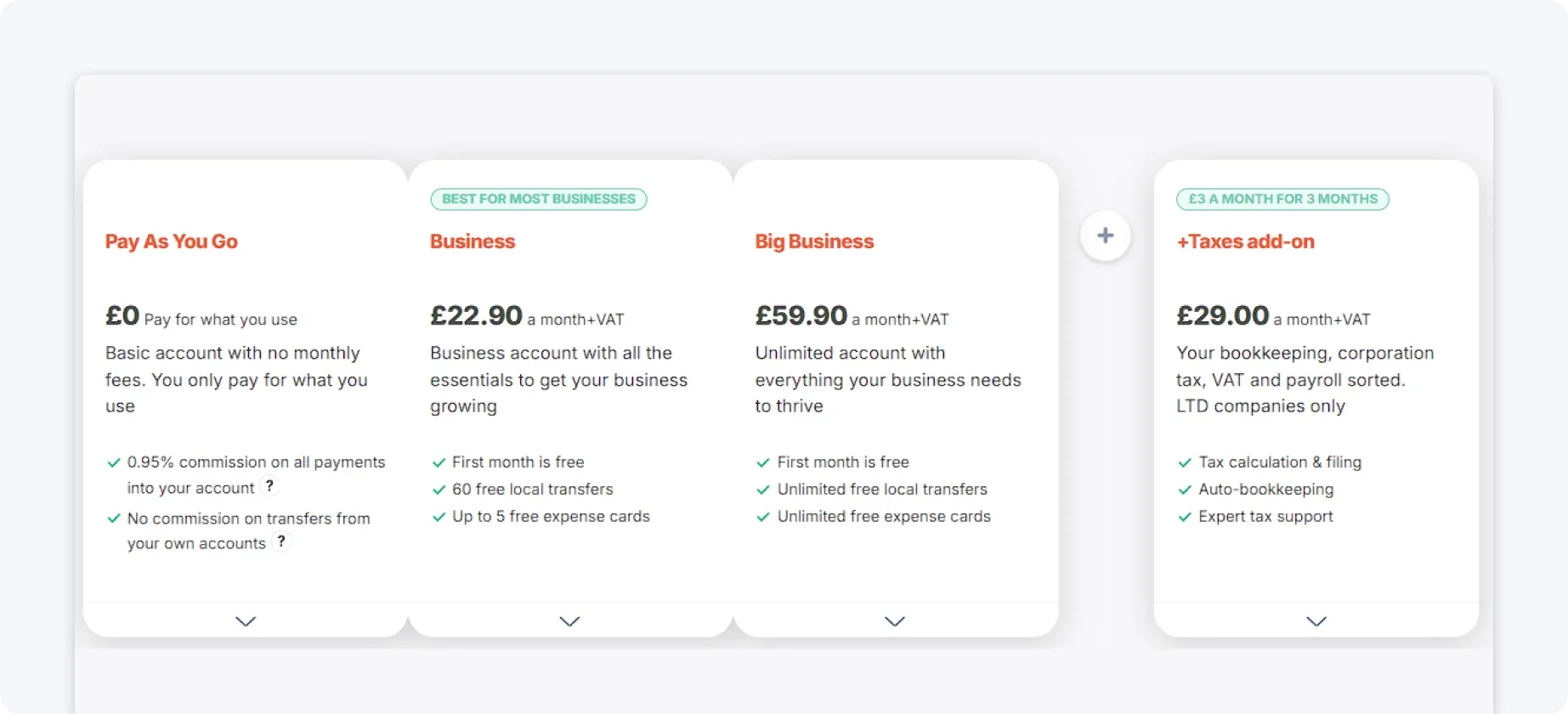
Pricing
ANNA operates on a simple subscription model, with all MTD functionality included by default.
With free Self Assessment filing for 2025/26, compliance becomes more cost-efficient overall.
2. QuickFile – Best free option for full DIY accounting
QuickFile is best for users who are comfortable managing everything themselves. It provides full bookkeeping features and supports MTD through bridging, making it one of the most capable free tools available.
Here’s what QuickFile offers:
- Invoicing and bank feeds
- Full accounting functionality
- MTD submissions via bridging
- Detailed financial tracking
QuickFile gives you full control over your finances, but that comes with more responsibility.
QuickFile’s drawbacks:
- Manual categorisation required: Transactions need to be reviewed and categorised by the user to ensure accuracy.
- Time-consuming setup: Initial configuration and ongoing management can take significant time.
- Not beginner-friendly: The interface and features can feel complex without accounting knowledge.
- Consistent upkeep: Staying compliant depends on regular manual bookkeeping.
When not to use QuickFile
QuickFile may not be the right choice if:
- You don’t want to handle manual bookkeeping or categorisation
- You prefer a simple, guided system instead of full DIY accounting
- You don’t have time for ongoing maintenance and reconciliation
- You want a fully automated, hands-off MTD solution
Pricing
QuickFile is free to use for core accounting features, including invoicing, bookkeeping, and reporting.
However, some functionality is usage-based or paid, such as bank feed automation and certain integrations. This makes it one of the most generous free options, but not entirely cost-free as you scale.

3. Pandle – Best free option for simple bookkeeping
Pandle is best for small businesses that want straightforward bookkeeping with built-in automation. It offers a clean interface and supports MTD for VAT, making it a good entry-level option.
Here’s what Pandle offers:
- Bank feeds with basic automation
- Expense tracking and invoicing
- VAT submissions
Pandle strikes a balance between simplicity and functionality, without being overwhelming.
Pandle’s drawbacks:
- Manual effort for ITSA compliance: MTD for Income Tax is supported, but relies heavily on user-managed records and input.
- Limited automation on free plan: Many time-saving features are only available in paid versions.
- Ongoing manual input required: Users still need to review, categorise, and maintain records themselves.
When not to use Pandle
Pandle may not be the right choice if:
- You need full automation for MTD for ITSA
- You want to avoid manual data entry and ongoing checks
- You rely on advanced reporting or deeper financial insights
- You want a system that fully replaces bookkeeping rather than supports it
Pricing
Pandle offers a free plan that includes basic bookkeeping features like expense tracking and invoicing.
However, key automation features, bank feeds, and more advanced tools are only available on paid plans. To fully support MTD workflows and reduce manual effort, most users will need to upgrade.

4. FreeAgent – Best free option via banking
FreeAgent is best for freelancers and landlords who can access it for free through an eligible bank account (NatWest, Royal Bank of Scotland, Ulster Bank, or Mettle).
It’s a full accounting platform with strong tax visibility and MTD support.
Here’s what FreeAgent offers:
- Automated expense categorisation
- Real-time tax forecasting
- MTD-compatible submissions
- Clean, user-friendly dashboard
FreeAgent is one of the most complete ‘free’ options, if you qualify.
FreeAgent’s drawbacks:
- Restricted free access: It’s only free if you work with eligible providers.
- Requires active bookkeeping: Users still need to review and manage transactions regularly.
- Dependent on integrations for flexibility: More complex setups may require additional tools or integrations.
When not to use FreeAgent
FreeAgent may not be the right choice if:
- You’re not eligible for free access
- You want a completely hands-off system with no transaction review
- You need flexibility outside of its supported ecosystem
- You’re looking for deeper customisation or enterprise-level features
Pricing
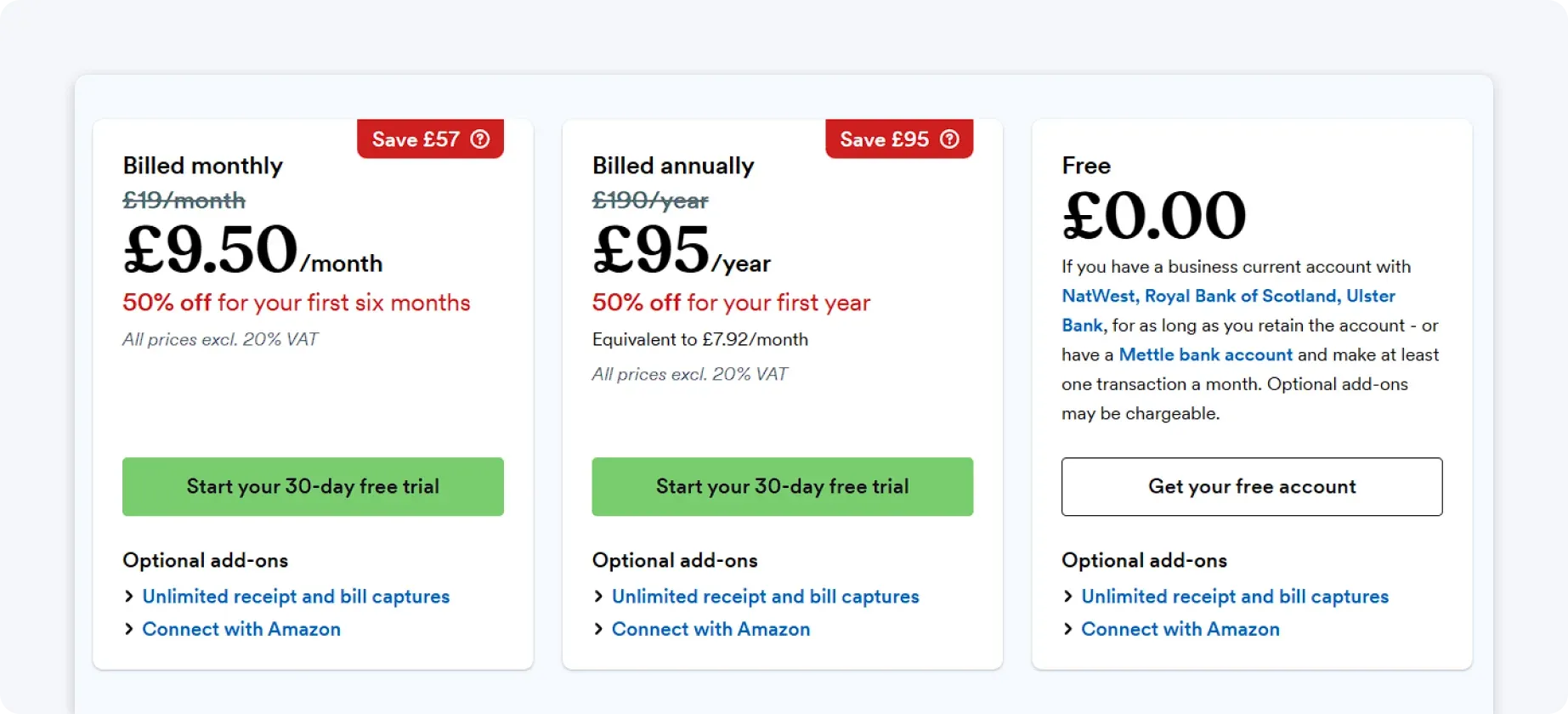
FreeAgent typically costs around £19 per month for sole traders and £10 per month for landlords. They offer a 50% discount and a 30-day free trial of their plans.
5. MyTaxDigital – Best for spreadsheet users
MyTaxDigital is best for users who want to keep using spreadsheets while adding MTD compliance. It acts as a bridging tool rather than a full accounting system.
Here’s what MyTaxDigital offers:
- Spreadsheet uploads
- VAT submissions to HMRC
- Simple, focused interface
It’s a minimal solution for staying compliant without changing your workflow.
MyTaxDigital’s drawbacks:
- Basic bookkeeping only: Includes simple record-keeping, but lacks full accounting features like bank feeds, advanced reporting, or financial insights
- Limited automation: Relies heavily on manual input or spreadsheet imports rather than fully automated workflows
- Designed around bridging: Works best if you already use spreadsheets, rather than replacing your bookkeeping system
- Less advanced ITSA support: Supports MTD for Income Tax, but with fewer features and less automation than full accounting platforms
When not to use MyTaxDigital
MyTaxDigital may not be the right choice if:
- You want a full accounting system rather than a bridging tool
- You need automation for bookkeeping, not just submissions
- You don’t want to rely on spreadsheets or manual uploads
- You’re looking for scalable features for growing businesses
Pricing
MyTaxDigital is completely free to use for core MTD features, including VAT and Income Tax submissions. There are no mandatory subscription fees, making it a cost-effective option for compliance.
However, the trade-off is that it offers limited features and minimal automation, so the ‘cost’ is mostly in manual effort.
6. MTDsorted – Best for simple compliance
MTDsorted is best for users who want a way to submit MTD data without switching tools. It focuses on bridging spreadsheet data into compliant submissions.
Here’s what MTDsorted offers:
- Spreadsheet integration
- Basic MTD submission tools
It’s quick to set up and easy to use.
MTDsorted’s drawbacks:
- Very limited functionality: It focuses on data submission, with no broader accounting features.
- No automation: All data preparation must be handled manually before submission.
- Not scalable: It lacks the tools needed to handle growth or more complex financial situations.
When not to use MTDsorted
MTDsorted may not be the right choice if:
- You need more than basic MTD submission functionality
- You want automation for bookkeeping and record-keeping
- You don’t want to prepare data manually before submitting
- You need a long-term accounting solution rather than a bridging tool
Pricing
MTDsorted offers a free tier that covers basic MTD submission needs. However, additional features, higher usage limits, or expanded functionality may require a paid upgrade.
Like most bridging tools, the free version is designed for simple use cases rather than long-term scalability.

How to choose your MTD software
Choosing MTD software isn’t just about compliance; it directly affects how much time you spend on admin, how accurate your records are, and how stressful quarterly reporting becomes.
The key is to pick a tool that fits how you actually run your business, not just one that ticks the HMRC box.
Here’s how to go about the process:
1. Make sure your choice is HMRC-recognised
This is non-negotiable.
MTD requires you to use software that can:
- Keep digital records
- Connect directly to HMRC
- Submit updates electronically
If the software isn’t officially recognised, you can’t use it for MTD compliance.
2. Decide how much work you want to do yourself
This is where most people get it wrong.
There are three main types of tools:
- Bridging tools: You keep spreadsheets, software just submits data
- Basic apps: You track income and expenses manually
- Full automation tools: Everything is handled in the background
MTD increases reporting frequency (quarterly and final submission), so manual tools can quickly become time-consuming.
3. Match the software to your income type
Not all tools handle every situation.
Ask yourself:
- Do you have self-employment income, property income, or both?
- Do you need support for multiple income streams?
Some tools are limited, especially simpler or mobile-first apps.
4. Look at ease of use
A tool can have 100 features and still be a bad choice.
What actually matters:
- Clear dashboard
- Simple categorisation
- Minimal setup
- Mobile access
If software is complicated, you’re more likely to fall behind on bookkeeping, make more errors, and experience stress before deadlines.
This is why ease of use should be one of your top decision factors.
5. Choose something that will still work next year
MTD for Income Tax started in April 2026 and will expand over time.
Switching software later can be time-consuming and disruptive to your business, so before making your choice, ask yourself these two questions:
- Will this still work if my income grows?
- Will it handle more complex finances later?
Scalability is often overlooked, but it’s one of the main reasons businesses regret their initial choice.
If you want MTD handled for you, choose ANNA
For sole traders and landlords facing the new MTD for Income Tax rules, compliance doesn’t have to mean extra admin and stress.
ANNA is designed to handle everything automatically. With a built-in business account, automated bookkeeping, real-time tax tracking, and HMRC-recognised submissions, it takes the work off your plate. Transactions are categorised, quarterly updates are prepared, and your year-end Self Assessment is filed – all without you needing to lift a finger.
Unlike other free or basic tools, ANNA isn’t just about ticking the compliance box. It removes the need to manage MTD at all, saving hours of admin every month and reducing the risk of errors. Its intuitive app, connected invoicing, and real-time dashboards keep you in control without adding complexity.
And don’t forget – your 2025/26 Self Assessment is FREE, with the cost of your filing refunded if you already submitted via another software.
If you want to stay compliant while spending less time on bookkeeping, ANNA is the simplest, most complete solution for MTD in 2026 and beyond.
Read the latest updates


![What Is Marginal Relief? [Everything You Need to Know]](https://storage.googleapis.com/anna-website-cms-prod/small_cover_3000_130_1ef44f67d1/small_cover_3000_130_1ef44f67d1.webp)







You may also like
![Making Tax Digital Exemptions to Know About [Guide]](https://storage.googleapis.com/anna-website-cms-prod/small_cover_3000_26_672a4e45e4/small_cover_3000_26_672a4e45e4.webp)


![Making Tax Digital for Low-Income Taxpayers [6 Challenges]](https://storage.googleapis.com/anna-website-cms-prod/small_cover_3000_52_92d8ae130a/small_cover_3000_52_92d8ae130a.webp)
![Am I Registered for Making Tax Digital? [How to Check]](https://storage.googleapis.com/anna-website-cms-prod/small_cover_3000_37_03afa3fde7/small_cover_3000_37_03afa3fde7.webp)
![5 Best MTD Self Assessment Software for HMRC [Compared]](https://storage.googleapis.com/anna-website-cms-prod/small_cover_3005_b1c87e930d/small_cover_3005_b1c87e930d.webp)
![Making Tax Digital for Small Businesses [A Complete Guide]](https://storage.googleapis.com/anna-website-cms-prod/small_cover_3075_180d717fb9/small_cover_3075_180d717fb9.webp)



![6 Best Self Assessment Tax Software for UK Users [Comparison]](https://storage.googleapis.com/anna-website-cms-prod/small_cover_3009_5a6504812e/small_cover_3009_5a6504812e.webp)
![Making Tax Digital Penalties Explained [+ How to Avoid Them]](https://storage.googleapis.com/anna-website-cms-prod/small_cover_3000_50_768b17a65c/small_cover_3000_50_768b17a65c.webp)


Open a business account in minutes
