
6 Best Accounting Software for Startup Businesses in 2026


Explore the best accounting software for startup businesses so you can simplify bookkeeping and keep your finances organised from day one.

In this article
The best accounting software for startup businesses helps you automate bookkeeping, track expenses, manage invoices, and maintain a clear view of your cash flow from day one.
When you're early-stage, bookkeeping can take valuable time away from growing your business. Poor record-keeping can also create problems when year-end accounts and tax returns are due.
This guide covers the top accounting software solutions on the market. You’ll learn what each one does well and who it's best suited for.
Key points
- Choose software based on how involved you want to be in bookkeeping ⚙️
Some accounting tools require more manual work than others. Ideally, they should automate most of the bookkeeping process, freeing up your time to focus on growing your startup. - Free accounting software can work in the early stages 💷
Options like Zoho Books and FreeAgent help keep costs down while your business is small. As transaction volumes grow, you may need more advanced tools that offer automation, reporting, or tax features. - Think beyond the advertised monthly price 📊
Entry-level plans often exclude features such as payroll, additional users, multi-currency support, or advanced reporting. Compare the costs based on the features you'll need, not just the headline price. - Making Tax Digital (MTD) compliance matters as your business grows 📑
If your taxable turnover exceeds £90,000, you'll need MTD-compatible software to submit VAT returns to HMRC digitally. Choosing software that already supports VAT and tax compliance can prevent disruption later. - ANNA is the best all-in-one solution 🚀
Many accounting platforms require separate bank feeds, setup work, and ongoing reconciliation. ANNA combines everything a startup needs in a single app, helping founders keep accurate records from day one with far less admin.
The best accounting software for startup businesses
Top 6 startup accounting software options
| Software | Best for | Automation level | Starting price |
| ANNA | Business owners who want everything in the same app | Very high | From £0/month |
| Xero | Startups working with an accountant | Medium | From £15/month |
| QuickBooks Online | Detailed reporting and investor updates | Medium | From £10/month |
| FreeAgent | Freelancers and sole traders | High | Free via specific banks |
| FreshBooks | Service-based businesses billing clients | Medium | From £15/month |
| Zoho Books | Startups already in the Zoho ecosystem | Medium | From £0/month |
We selected these tools based on:
- Ease of setup and use for non-accountants
- Level of automation across bookkeeping, expenses, VAT, and tax
- Pricing transparency and value at lower transaction volumes
- UK compliance, including HMRC and Making Tax Digital (MTD) compatibility
1. ANNA – Best for startups that want an automated, all-in-one solution
ANNA combines a UK business account with automated bookkeeping, VAT tracking, and tax filing in a single app.
Rather than connecting a bank to a separate accounting platform and configuring rules yourself, you only need to sign up. ANNA records and categorises transactions as they happen, helping keep your records accurate with less admin.
The platform is ideal for founders managing multiple responsibilities at once. There's no setup time, no month-end bank reconciliation, and no separate tool needed for VAT or taxes.
Here’s what ANNA offers:
- Automatic categorisation of income and expenses
- Built-in invoicing with real-time payment tracking
- VAT tracking and MTD-compliant VAT returns
- Receipt capture and expense management
- Tax deadline reminders
- Self Assessment and Corporation Tax filing support
- Business account and accounting in one place
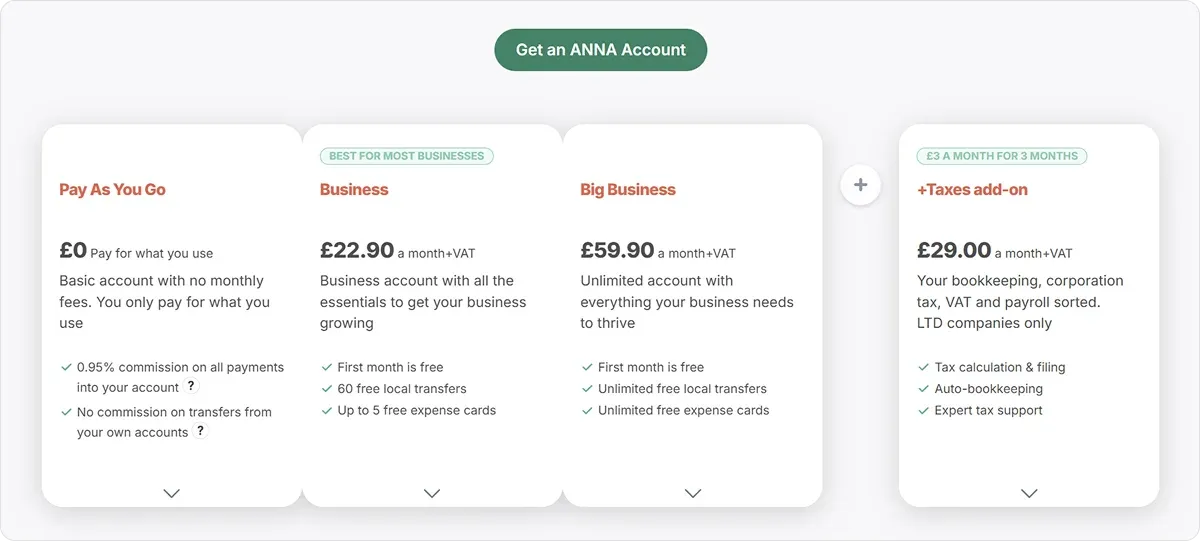
Pricing
ANNA offers tiered monthly plans based on features and transaction volume. Core tools, including expense categorisation, VAT tracking, and tax reminders, are included in all plans.
There's also a free tier, which makes ANNA one of the most accessible options for businesses in the earliest stages.
2. Xero – Best for startups working with an accountant
Xero is a widely used cloud accounting platform in the UK, covering bank feeds, invoicing, reconciliation, and reporting. Since many UK accountants already use Xero, choosing it could simplify collaboration, allowing your accountant to access your books without migrating data or reconciling between systems.
Here’s what Xero covers:
- Automatic bank feeds and transaction matching
- Invoicing and bill management
- Expense tracking and reconciliation
- Payroll on higher-tier plans
- A large third-party app marketplace
Xero’s pros include:
- Popularity among UK accountants, so collaboration may be straightforward
- Broad feature set that scales as the business grows
- Strong third-party integrations for tax specialist needs
The trade-off is that Xero requires more active involvement than some alternatives. Bank rules need to be set up, transactions require regular review, and features like payroll and multi-currency are available on higher-tier plans or as add-on costs.
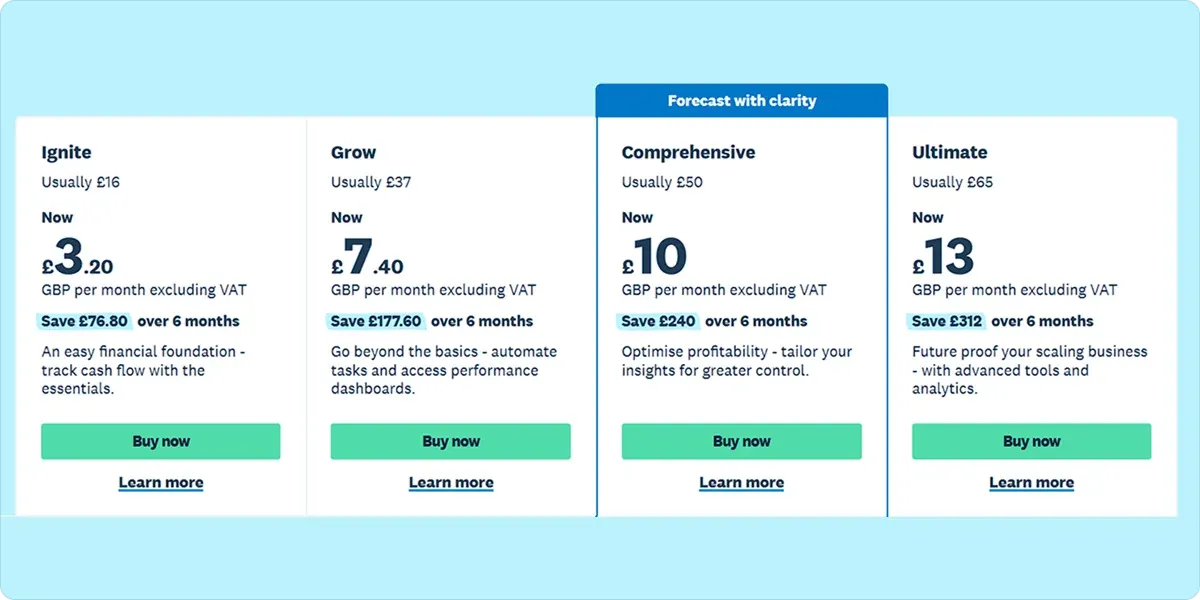
Pricing
Xero uses tiered monthly pricing, with paid plans starting at £16/month (or £3.20/month with a discount). Lower tiers cover the basics, while higher plans unlock payroll and multi-currency functionality.
Total costs can grow as you add integrations or need more advanced features.
3. QuickBooks Online – Best for startups that need detailed reporting
QuickBooks Online is a well-established platform used across small businesses and accounting firms. Its depth of reporting makes it particularly useful for startups that need to produce regular financial summaries for investors, advisors, or lenders.
Here’s what QuickBooks covers:
- Automated expense categorisation using bank rules
- Receipt capture and bill tracking
- Invoicing with payment reminders
- Customisable profit and loss, cash flow, and balance sheet reports
- Payroll and third-party integrations
QuickBooks’ pros include:
- Strong financial reporting, useful for investor or advisor updates
- Widely adopted by accountants, making collaboration easier
- Broad integration ecosystem
Like Xero, QuickBooks works best when someone is actively managing it. Automation depends on correctly configured rules, and the most useful features often require higher-tier plans.
For founders who want accounting to run in the background without much involvement, it can feel like more work than expected.
Pricing
QuickBooks Online starts at £10/month, with higher tiers unlocking more advanced reporting, additional users, and payroll.
Payroll and some integrations are priced separately from tiers. Businesses that need the full feature set may end up with a significantly higher monthly spend than what the entry-level price suggests.
4. FreeAgent – Best for freelancers and sole traders in early-stage businesses
FreeAgent is a straightforward accounting tool built for freelancers, contractors, and small business owners. It covers invoicing, expense tracking, bank reconciliation, and tax estimates, and its interface doesn't require accounting knowledge to navigate.
Here’s what FreeAgent covers:
- Income and expense tracking
- Invoicing and payment reminders
- Bank reconciliation
- Self Assessment tax estimates
- MTD-compatible VAT returns
FreeAgent’s pros include:
- Clean, accessible interface that's easy to get the hang of
- Free via eligible bank accounts
- Real-time tax estimates reduce year-end surprises
The main limitation of FreeAgent is that it's lighter on automation than all-in-one solutions, so you'll still need to review transactions and keep records up to date yourself.
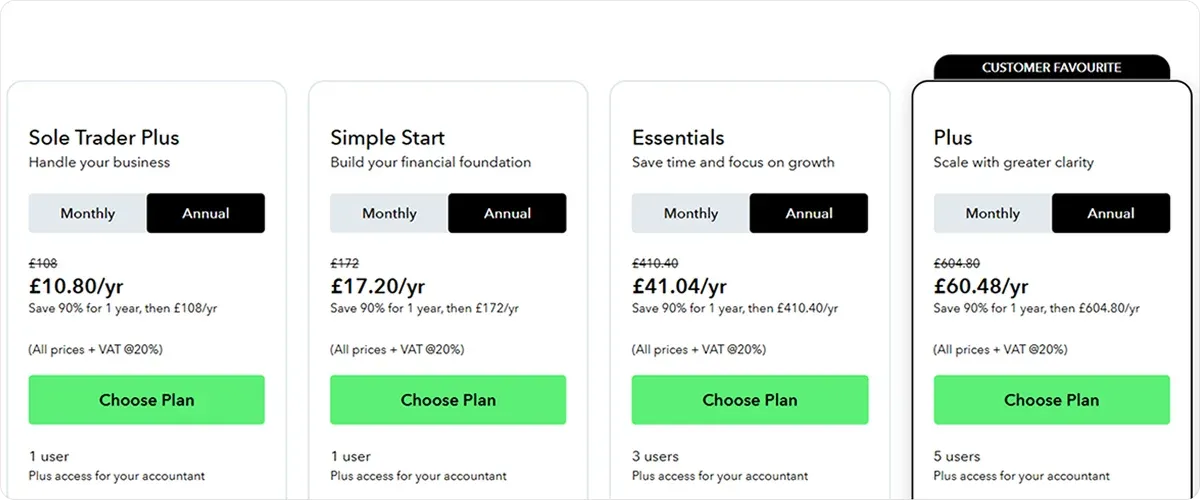
Pricing
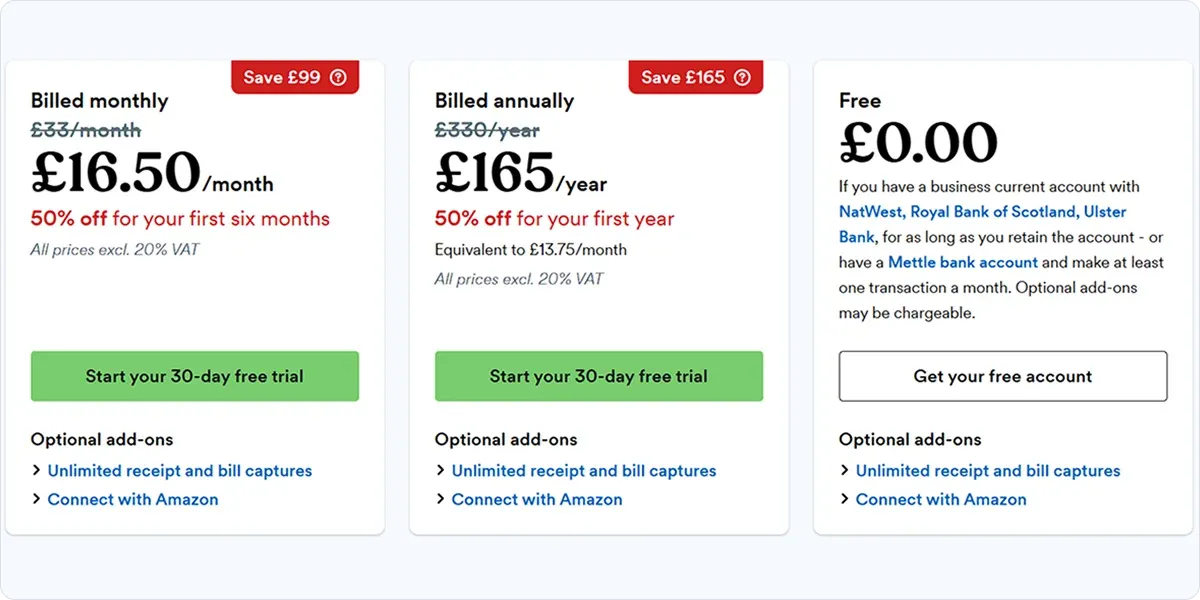
FreeAgent costs £33/month for limited companies, £19/month for sole traders, and £10/month for landlords, with a 50% introductory discount for the first six months and a 30-day free trial.
For businesses banking with NatWest, Royal Bank of Scotland, Ulster Bank, or Mettle, access is included free as part of the account.
5. FreshBooks – Best for service-based startups billing clients for time or projects
FreshBooks is built around client invoicing and time tracking.
If you charge clients by the hour, day, or project, the platform handles the billing workflow well: you can log time, generate an invoice, and track payment status all in one place.
Here’s what FreshBooks covers:
- Automated invoicing and late payment reminders
- Time tracking with billable hours
- Expense capture and categorisation
- Basic profit and loss reporting
- Client management
FreshBooks’ pros include:
- Excellent invoicing workflow for project-based or hourly billing
- Time tracking and billable hours are built in
- Clean and easy to use with no accounting knowledge needed
Where FreshBooks falls short is in broader accounting and tax coverage. VAT support and compliance automation are more limited than on full-featured platforms, and costs increase noticeably as you add clients or team members.
For startups with more complex accounting needs, it works better as a billing tool than as a complete solution.
Pricing
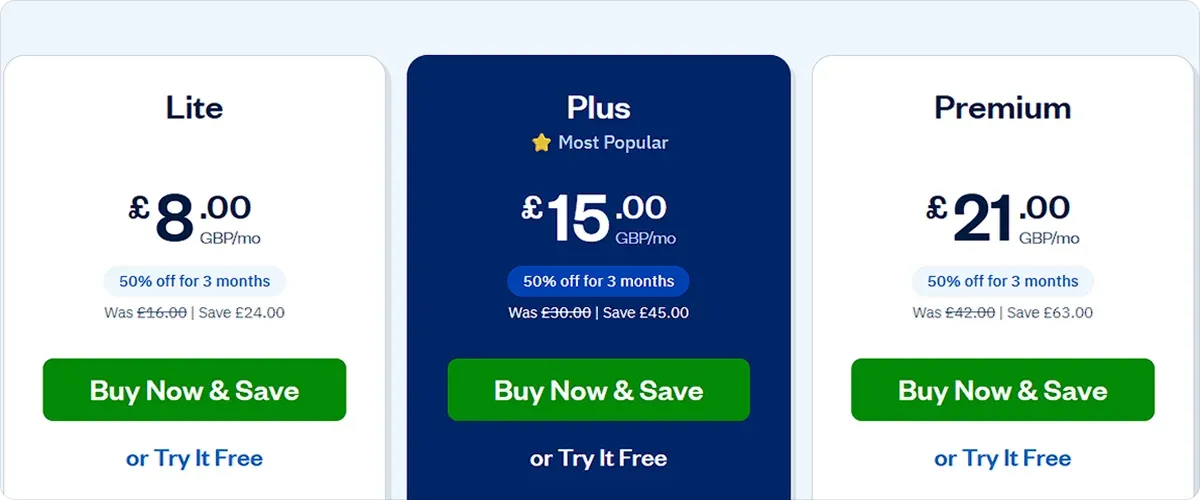
FreshBooks has tiered monthly pricing that scales with the number of billable clients you manage, starting from £15/month for up to five clients.
As your client base grows, you’ll need to move into higher-priced tiers. Additional user seats also increase the cost.
The pricing is reasonable if you're running a small business with only a few clients. However, once your business expands, costs will increase quickly, and the higher tiers may not add enough accounting or tax functionality to justify the price jump.
6. Zoho Books – Best for startups already using Zoho products
Zoho Books is part of the wider Zoho ecosystem, which covers customer relationship management (CRM), project management, human resources, and more.
For startups already using other Zoho tools, the accounting integration can be particularly useful: customer records, invoices, and financial data are connected across the platform without manual exports or third-party connectors.
What Zoho Books covers:
- Invoicing and payment tracking
- Expense management and bank reconciliation
- VAT and compliance tools
- Custom automation rules
- Integration with Zoho CRM and other Zoho apps
Zoho Books’ pros include:
- Strong fit for businesses already using other Zoho products
- Free plan available for businesses under the revenue threshold
If you're not already in the Zoho ecosystem, the benefit is less obvious. It works as standalone accounting software, but requires more configuration than some other alternatives, and more advanced automation and reporting are locked behind higher tiers.
Pricing
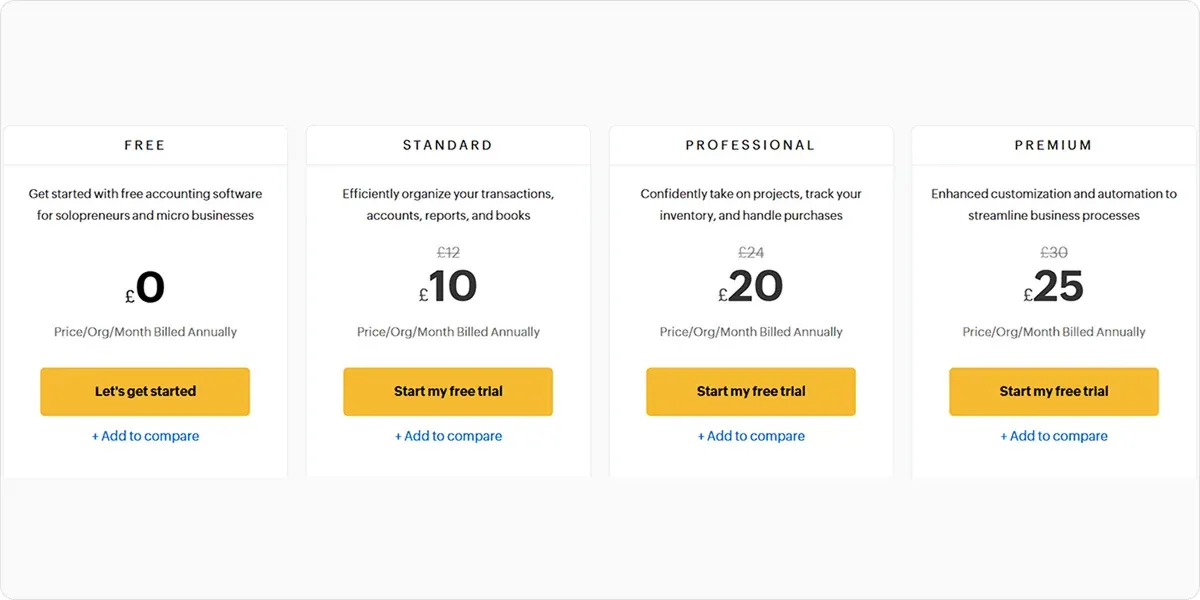
Zoho Books offers a free plan for businesses with annual revenue under £35,000, which covers invoicing, expense tracking, and basic reporting.
Paid plans start at £10/month and include higher transaction limits, more automation, additional users, and advanced reporting features.
How to choose the right accounting software for your startup
The right choice depends more on how you run your business day-to-day than on the software’s particular features.
Here are a few things to think through before deciding:
- How much time you have for admin: Some platforms automate most tasks for you, while others need regular involvement to ensure accuracy. Be honest about how much time you can realistically set aside for financial admin each week.
- Your VAT registration status: MTD compliance is mandatory once you cross the £90,000 taxable turnover threshold. Having VAT support built in from the start is much less disruptive than retrofitting it later.
- Collaboration with an accountant: If you have an accountant, ask them what they prefer before choosing. Many accountants have a default platform, and using something different creates friction on both sides.
- The real monthly cost: Entry-level pricing often looks affordable until you factor in payroll, multi-currency functionality, or extra users.
Why ANNA is the perfect choice for startups
Most accounting software solutions are designed for businesses with established financial workflows. Startups typically operate with simpler processes and fewer resources. As a founder, you're establishing financial habits and processes while running the business, so you may not have the bandwidth for complex software configuration.
ANNA closes this gap. Because the business account and accounting are the same product, every transaction is recorded and categorised as it happens. There's no bank feed to configure, no monthly reconciliation, and no separate system to maintain.
That means your books are accurate from day one, VAT is tracked without you having to think about it, and tax deadlines are flagged in advance, with filing handled through the app.
Open an ANNA business account and get your startup’s accounting sorted from the get-go.
FAQ
Bookkeeping apps typically focus on recording transactions, categorising expenses, and reconciling accounts. Accounting software usually adds invoicing, VAT filing, tax estimates, and reporting to that baseline.
Yes, but free options tend to be limited on automation, VAT support, and scalability, so they work best in the very early stages.
Yes. Most accounting platforms allow you to export your financial data and import historical records into a new system. The process is usually easiest at the end of a financial year or VAT period.
At a minimum, you'll want expense tracking, invoicing, bank feeds, financial reports, and tax support. As your business grows, features such as payroll, cash flow forecasting, and multi-user access may become more important.
Read the latest updates


![What Is Marginal Relief? [Everything You Need to Know]](https://storage.googleapis.com/anna-website-cms-prod/small_cover_3000_130_1ef44f67d1/small_cover_3000_130_1ef44f67d1.webp)



You may also like
![10 Best Accounting Software for Small Businesses [Comparison]](https://storage.googleapis.com/anna-website-cms-prod/small_cover_3000_14_d1471dd859/small_cover_3000_14_d1471dd859.webp)
![5 Best ClearBooks Alternatives for UK Businesses [Comparison]](https://storage.googleapis.com/anna-website-cms-prod/small_cover_3000_47_5ce9c9d466/small_cover_3000_47_5ce9c9d466.webp)
![How to Choose Accounting Software for Your Business? [Guide]](https://storage.googleapis.com/anna-website-cms-prod/small_cover_3013_f47de4d283/small_cover_3013_f47de4d283.webp)
![How Will Automation Affect Accounting in 2026? [Full Guide]](https://storage.googleapis.com/anna-website-cms-prod/small_cover_3000_11_514d5404c1/small_cover_3000_11_514d5404c1.webp)
![What Is Process Automation in Accounting? [Explained]](https://storage.googleapis.com/anna-website-cms-prod/small_cover_3000_12_7b691ef177/small_cover_3000_12_7b691ef177.webp)
Open a business account in minutes
