
10 Best Accounting Software for Small Businesses [Comparison]


Discover the best accounting software for small businesses to automate financial tasks, improve cash flow visibility, and simplify everyday bookkeeping.


In this article
In today’s fast-moving business environment, small businesses can no longer afford to rely on manual accounting processes. Spreadsheets, paper receipts, and manual data entry may work at the very beginning, but as soon as a business starts to grow, these systems quickly become a bottleneck.
More transactions mean more admin. More admin means more time spent reconciling accounts, chasing invoices, categorising expenses, and worrying about tax deadlines. With manual processes, the risk of errors, missed payments, or compliance issues increases dramatically.
This is why accounting automation software has become essential for modern small businesses.
In this guide, we’ll explore the best accounting software for small businesses, explain what accounting automation is, and compare the leading tools on the market.
What is accounting software for small businesses?
Accounting software for small businesses refers to digital tools that help manage, record, and automate financial activities that would otherwise be done manually.
Modern accounting software goes far beyond simple bookkeeping. The best tools automate everyday financial tasks, connect directly to bank accounts, and provide real-time visibility into a business’s financial health.
These are the common tasks handled by accounting software:
- Accounts payable and receivable: Automatically records bills and invoices, tracks what you owe and what customers owe you, and sends reminders to reduce late payments and cash-flow gaps.
- Bank reconciliation: Syncs transactions directly from your bank account and automatically matches them with income and expenses, eliminating manual checks.
- Invoicing and payment tracking: Creates invoices, sends them to clients, tracks payment status, and issues reminders when invoices are overdue.
- Expense management: Captures expenses through receipt uploads or card transactions, categorises them automatically, and keeps records ready for reporting and tax.
- VAT and tax calculations: Tracks VAT automatically, calculates liabilities, and stores records in line with local tax rules to reduce stress at filing time.
- Financial reporting: Generates reports such as profit and loss statements, cash flow summaries, and balance sheets, giving business owners a clear picture of performance.
Top 10 accounting software for small businesses
There’s no single accounting tool that works for every business. A freelancer sending a handful of invoices each month has very different needs from a growing company with multiple teams, complex tax obligations, or international payments.
Some platforms focus on simplicity and automation, while others prioritise control, reporting, or scalability. Here’s an overview of some of the most popular accounting solutions for small businesses today:
Top 10 accounting software for small businesses
| Software | Best Suited For | Core Strengths |
| ANNA | Freelancers & small businesses | Fully automated accounting, invoicing, VAT tracking, tax reminders, business account |
| Xero | Small businesses using traditional accounting | Bank feeds, invoicing, payroll, large integration marketplace |
| QuickBooks Online | Small businesses working with accountants | Expense automation, advanced reporting, extensive app ecosystem |
| Zoho Books | Businesses in the Zoho ecosystem | Invoicing, expense tracking, compliance tools, custom automation |
| FreshBooks | Service-based businesses & freelancers | Invoicing, time tracking, expense capture |
| Wave | Very small businesses on a budget | Free bookkeeping, invoicing, basic reporting |
| FreeAgent | Freelancers & micro-businesses | Simple invoicing, tax estimates, income and expense tracking |
| KashFlow | UK businesses focused on VAT | VAT tools, HMRC integration, MTD compliance |
| Bonsai | Self employed professionals & consultants | Invoicing, contracts, basic accounting |
| ZipBooks | Businesses with very simple needs | Lightweight invoicing, auto categorisation, basic reports |
Here’s a closer look at all the options:
1. ANNA
ANNA is designed for freelancers and small business owners who want their accounting handled automatically. Instead of behaving like traditional accounting software, ANNA combines a business account with automated accounting, so financial admin happens in the background.
Here are ANNA’s key features:
- Automatic categorisation of income and expenses
- Built-in invoicing with real-time payment tracking
- Automated VAT tracking with deadline reminders
- Receipt capture and expense management
- Tax deadline reminders to prevent missed filings
- Business account management and accounting in one place
With ANNA, your records stay up to date in real time without manual reconciliation, spreadsheets, or constant checking.
Why ANNA stands out
ANNA is built for people who don’t want to do accounting at all. There’s no need to configure rules, connect third-party apps, or review transactions every week.
For small businesses, this means less admin, fewer errors, and no ongoing setup or maintenance.
Pricing
ANNA offers clear, tiered pricing based on usage and features, making costs predictable for small businesses.
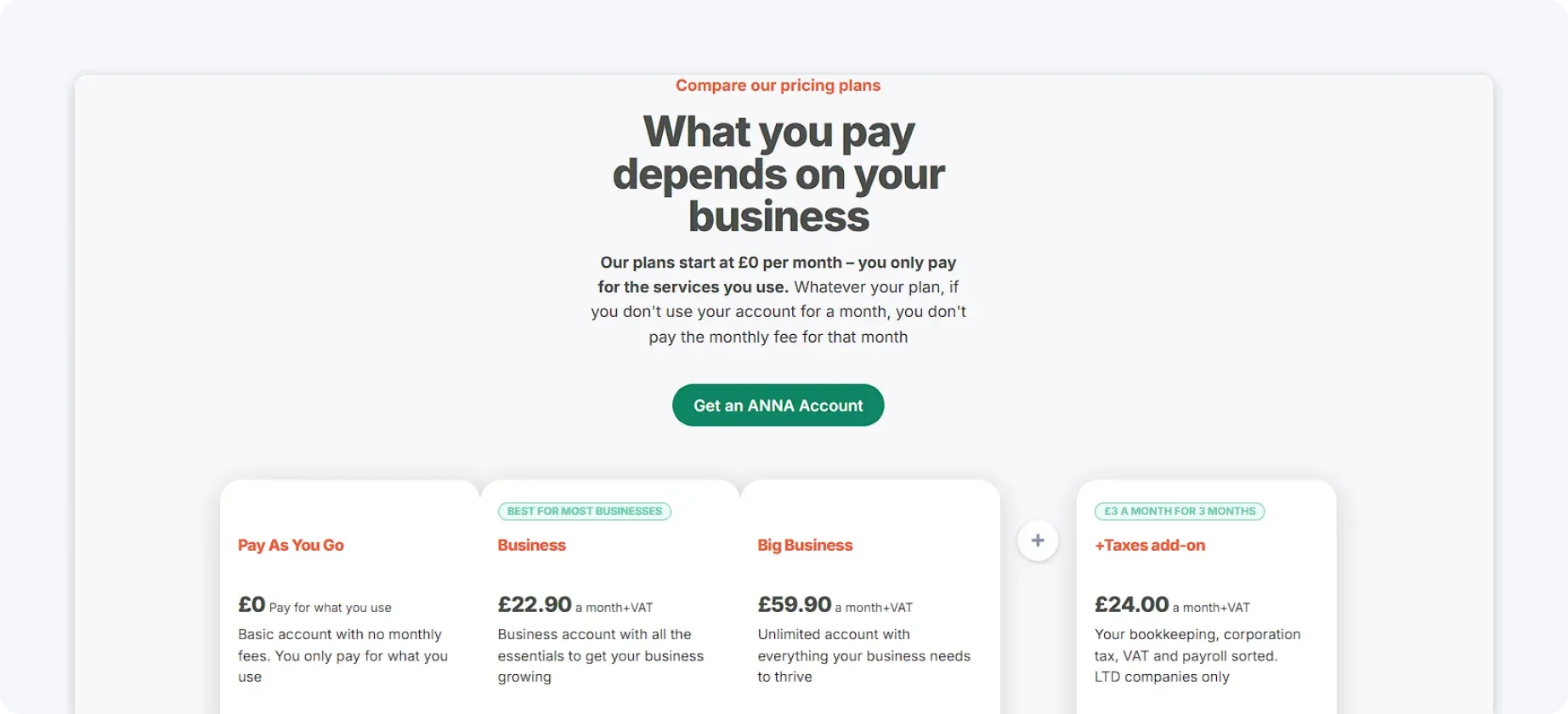
Core tools like expense categorisation, VAT tracking, and tax reminders are included as standard rather than locked behind premium upgrades. This transparency makes budgeting for ANNA easier than it is for many traditional accounting platforms.
2. Xero
Xero is a cloud-based accounting platform aimed at small businesses that prefer a more traditional accounting setup. It offers a broad range of features but typically requires initial configuration and ongoing involvement to work efficiently.
Here are Xero’s key features:
- Bank feeds and transaction reconciliation
- Invoicing and bill management
- Expense tracking
- Payroll support on higher plans
- Large marketplace of third-party integrations
Xero provides a centralised hub for managing transactions, invoices, and bills, allowing small businesses to keep accounts organised in one place.
Why choose Xero?
Xero is well-suited to small businesses that are comfortable working with accounting software and often collaborate with accountants. However, certain features, such as advanced inventory management and multi-currency support, aren’t fully included, meaning many businesses must rely on add-ons. This can increase both complexity and overall costs over time.
Pricing
Xero uses tiered monthly pricing, with higher plans unlocking features like payroll and multi-currency support.
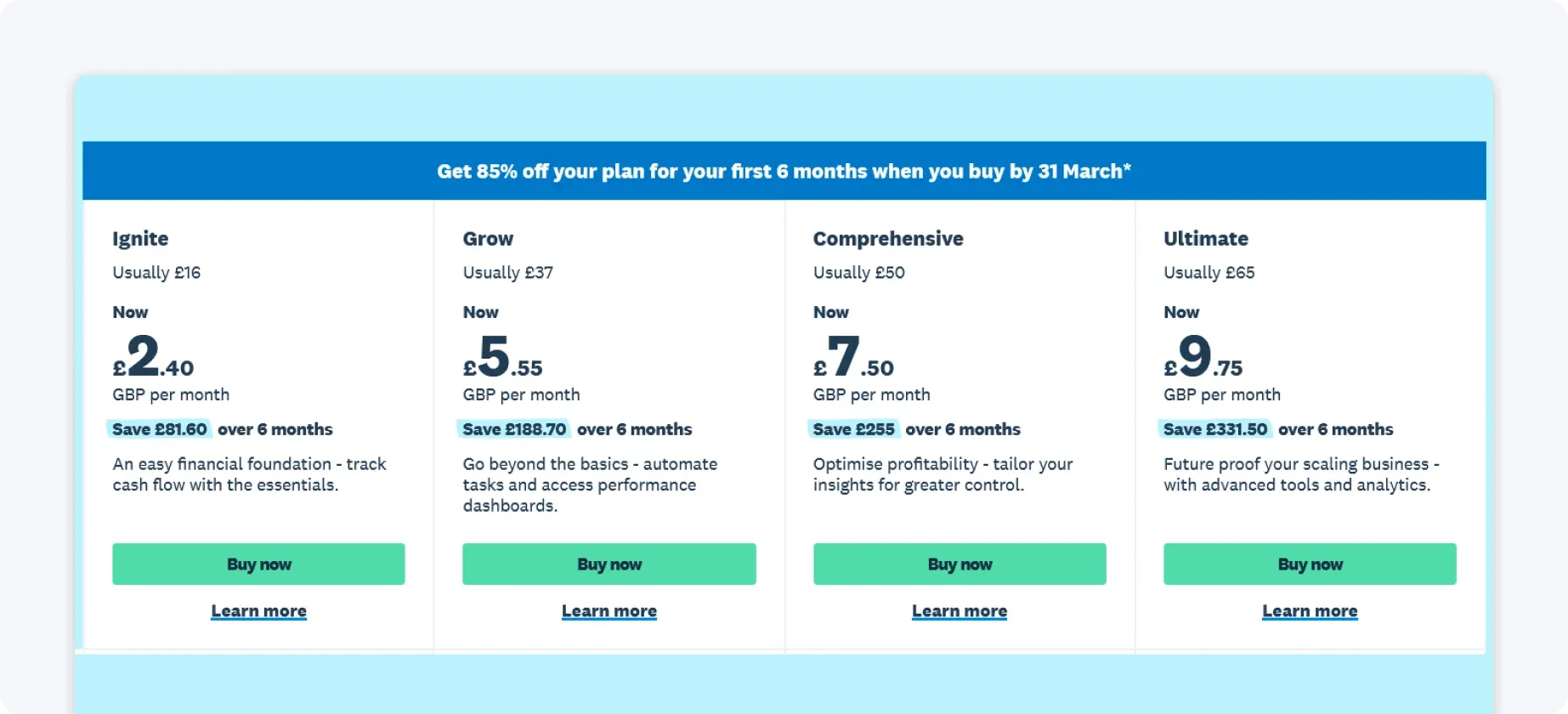
While entry-level plans are reasonably priced, growing businesses often need upgrades or paid integrations, making total costs less predictable as needs expand.
3. QuickBooks Online
QuickBooks Online is one of the most widely used accounting platforms among small businesses. It offers powerful functionality, but automation often depends on manual rules and ongoing setup.
Here are QuickBooks’ key features:
- Automated expense categorisation using bank rules
- Receipt capture and bill tracking
- Invoicing and payment reminders
- Customisable financial reports
- Payroll and third-party app integrations
QuickBooks’ strong reporting features make it especially useful for businesses that work closely with financial advisors or accountants.
Why choose QuickBooks Online?
QuickBooks is popular for its depth of reporting and widespread adoption among accountants. That said, for small business owners who want accounting to ‘just work’ without regular oversight, it can feel complex and time-consuming.
Pricing
QuickBooks Online offers tiered monthly plans, with more advanced features available on higher-priced subscriptions.
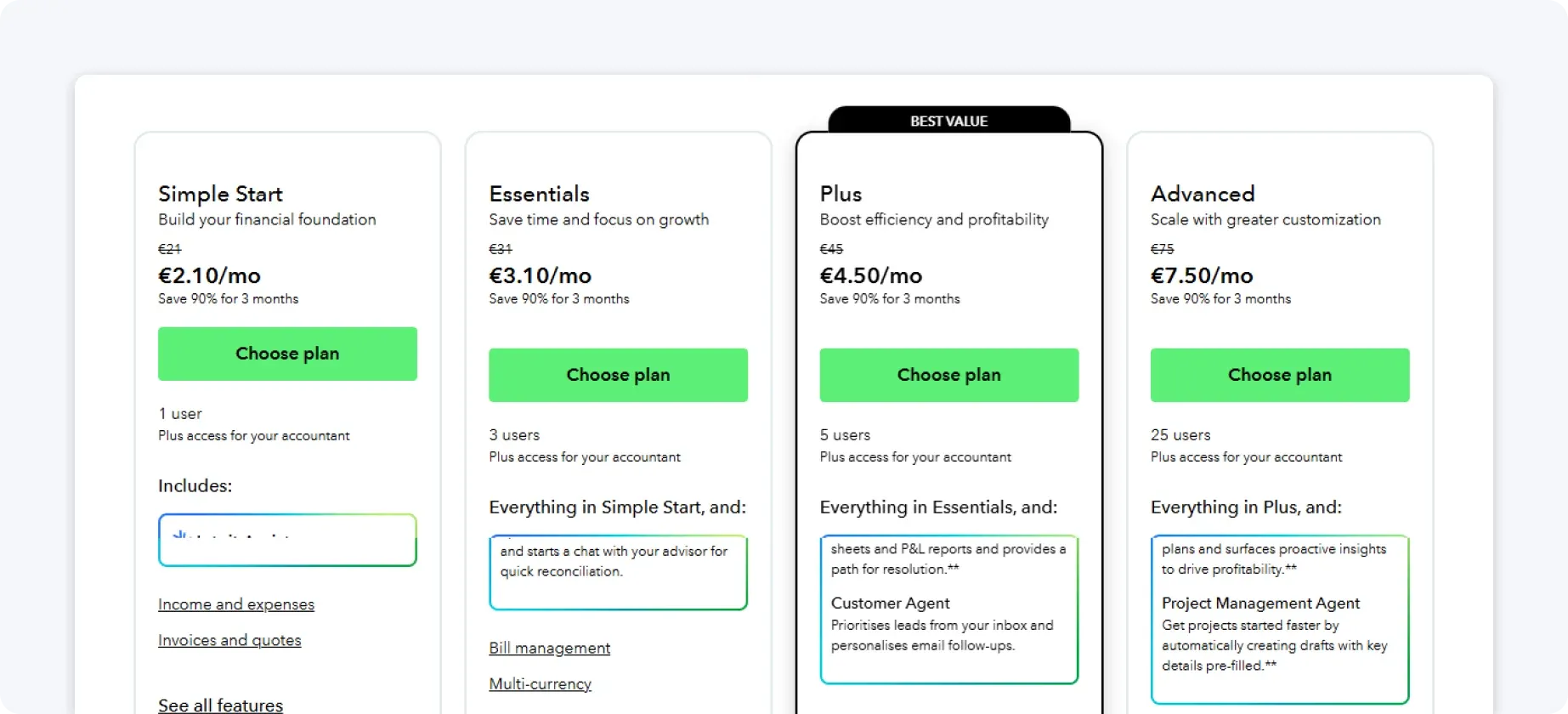
Payroll, tax tools, and some integrations are priced separately, which can increase costs as a business grows.
4. Zoho Books
Zoho Books is a small business accounting tool that works best for companies already using other Zoho products, such as Zoho CRM or Zoho Invoice.
Here are Zoho Books’ key features:
- Invoicing and payment tracking
- Expense management
- Bank reconciliation
- Tax and compliance tools
- Custom automation rules
Zoho Books helps small businesses automate routine accounting tasks and keep finances organised, especially when used alongside other Zoho apps.
Why choose Zoho Books?
Zoho Books is flexible and competitively priced, especially within the Zoho ecosystem. However, many automation features require hands-on configuration, which can require more ongoing effort than more automated solutions.
Pricing
Zoho Books offers multiple pricing tiers, including lower-cost plans for small businesses with simple needs.
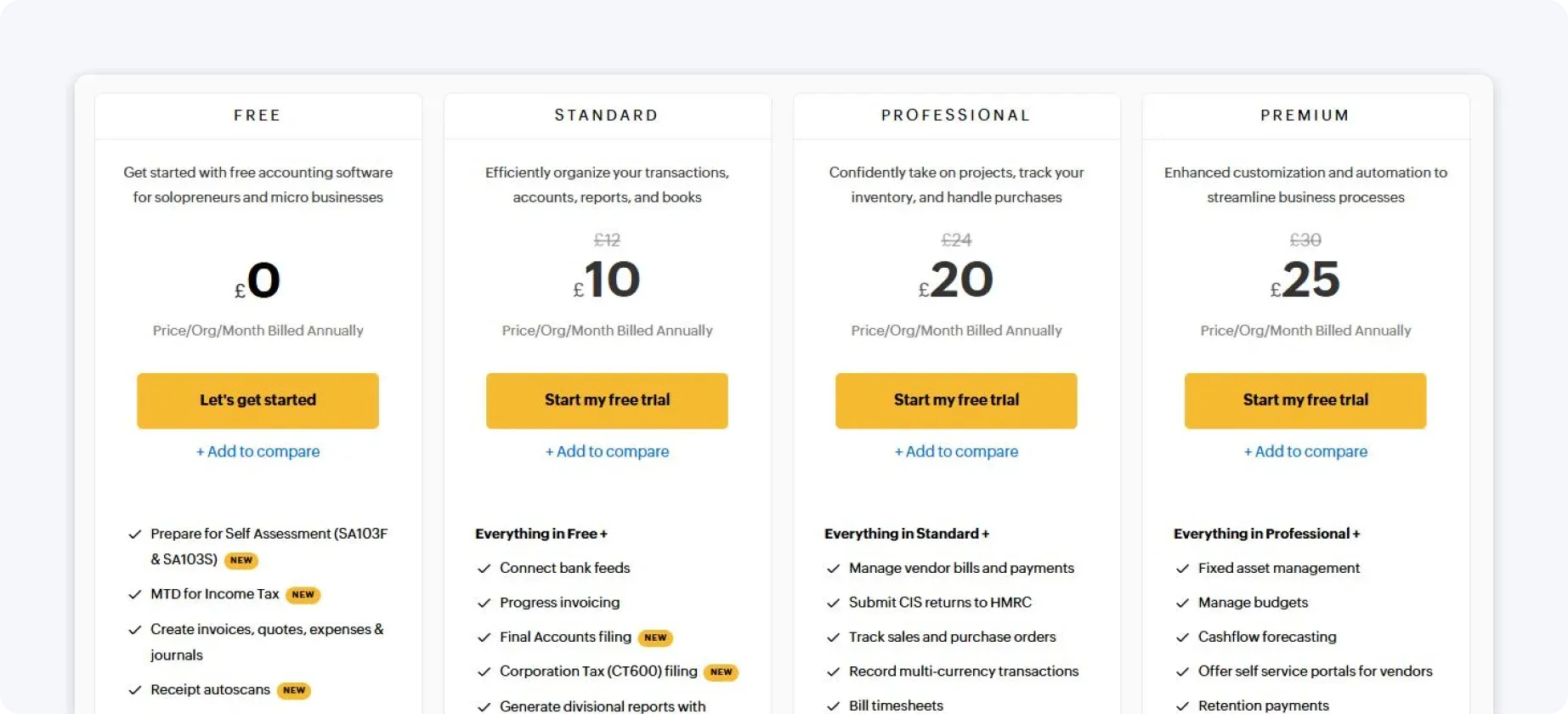
Pricing increases as you unlock advanced automation, reporting, or user access, making it affordable initially but more complex at scale.
5. FreshBooks
FreshBooks is designed primarily for service-based small businesses and freelancers who focus on billing clients rather than managing complex financial operations.
Here are FreshBooks’ key features:
- Automated invoicing and late payment reminders
- Time tracking with billable hours
- Expense capture and categorisation
- Basic financial reporting
Why choose FreshBooks?
FreshBooks is intuitive and excels at invoicing, making it a good fit for client-based work. However, it offers limited automation for VAT, tax, and compliance, which can become restrictive as a business grows.
Pricing
FreshBooks uses tiered monthly pricing based on the number of clients and the features included.
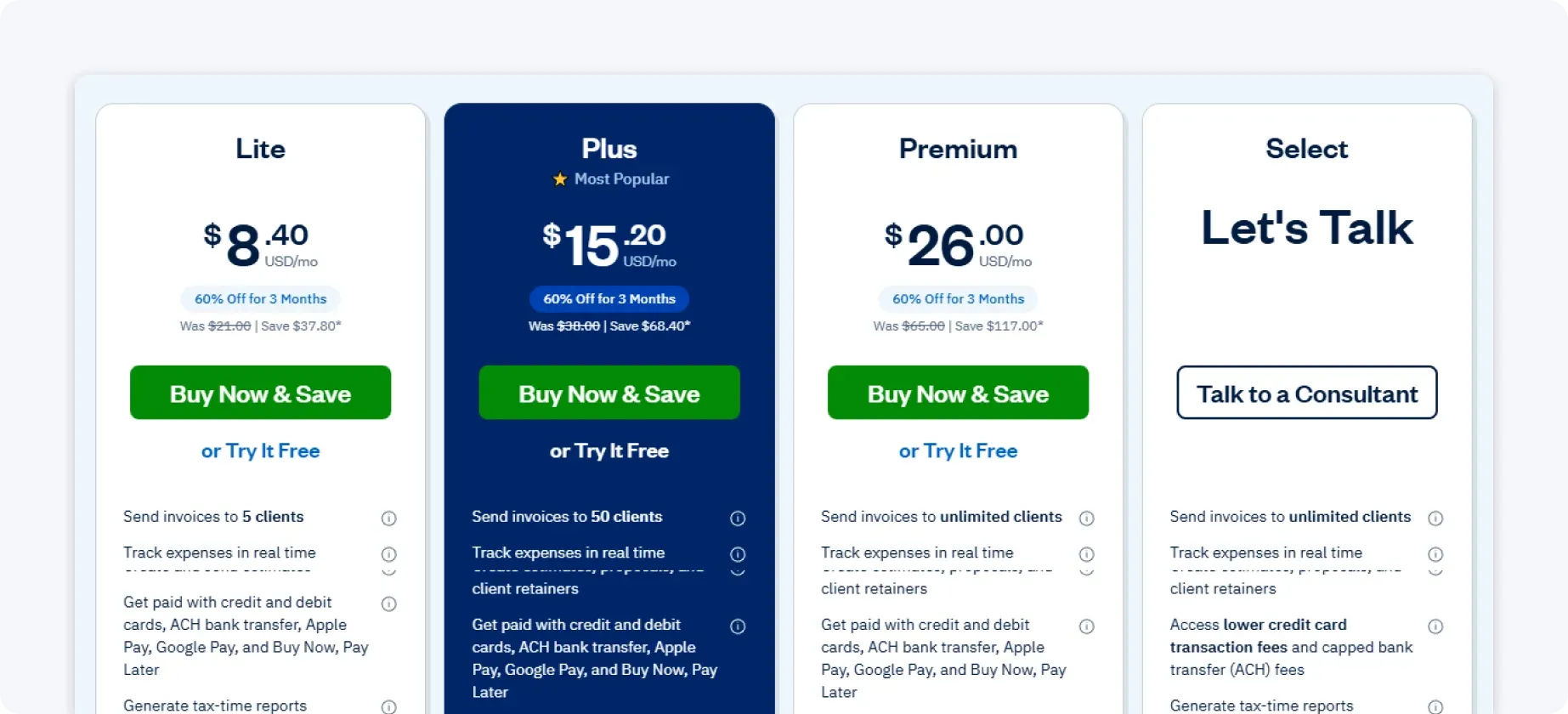
While entry-level plans are affordable, costs increase as you add clients or team members, and you may require additional tools for tax or compliance.
6. Wave
Wave is a popular option for very small businesses and sole traders looking for a low-cost or free accounting solution.
Here are Wave’s key features:
- Basic bookkeeping and reporting
- Invoicing
- Expense tracking
- Simple financial reports
Wave provides a straightforward interface, making it easy for business owners to get started quickly.
Why choose Wave?
Wave is accessible and budget-friendly, but its automation and compliance features are limited. It’s best suited to businesses with very simple financial needs.
Pricing
Wave offers free core accounting and invoicing features, with optional paid add-ons for payments and payroll.
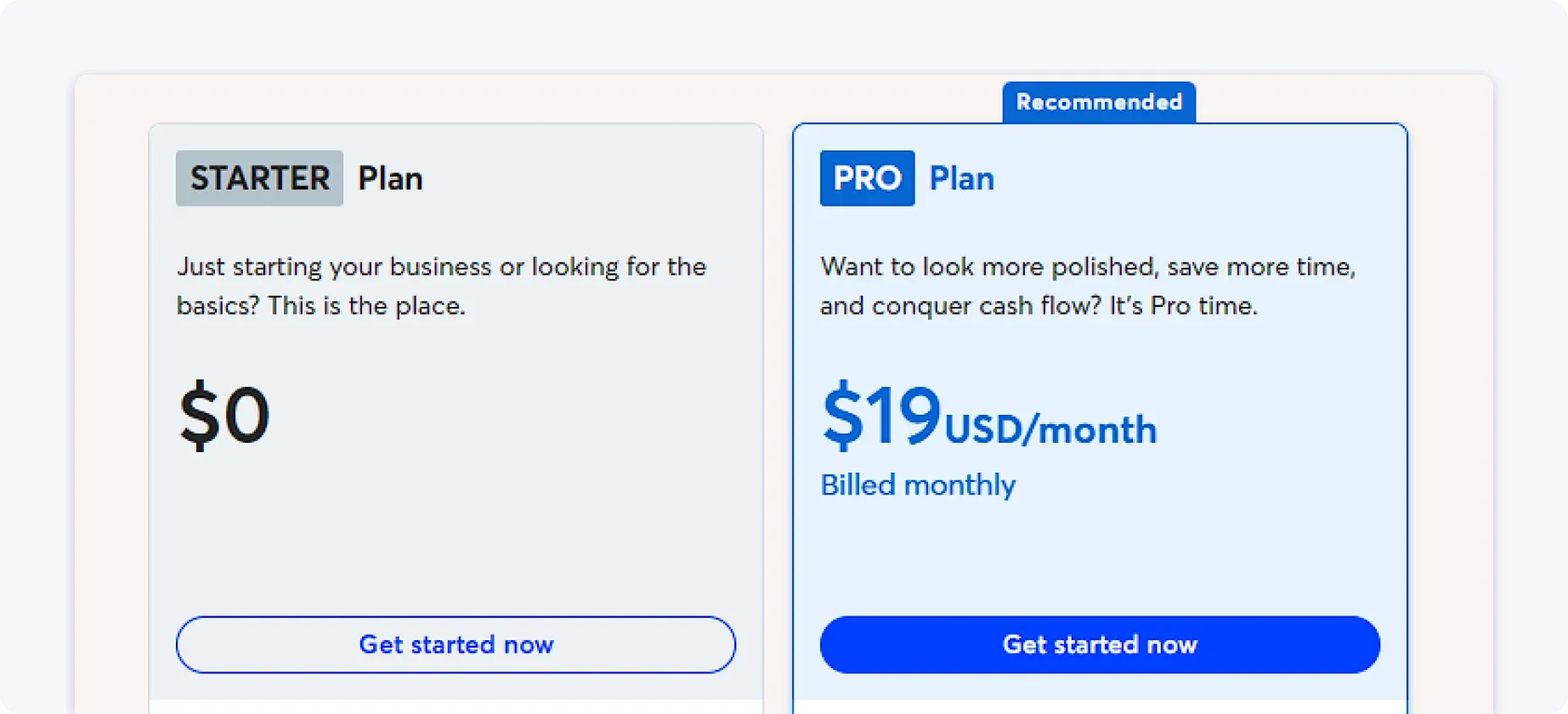
While attractive for cost-conscious users, more advanced functionality requires upgrading or switching tools.
7. FreeAgent
FreeAgent is designed for freelancers and micro-businesses that want straightforward accounting without enterprise-level complexity.
Here are FreeAgent’s key features:
- Simple income and expense tracking
- Invoicing
- Tax estimates and summaries
- Basic financial reporting
FreeAgent allows small business owners to manage invoices, track income and expenses, and stay on top of tax obligations, all in one simple interface.
Why choose FreeAgent?
FreeAgent keeps accounting simple and accessible, but its automation and flexibility are more limited than those offered by all-in-one solutions.
Pricing
FreeAgent uses a fixed monthly subscription model:
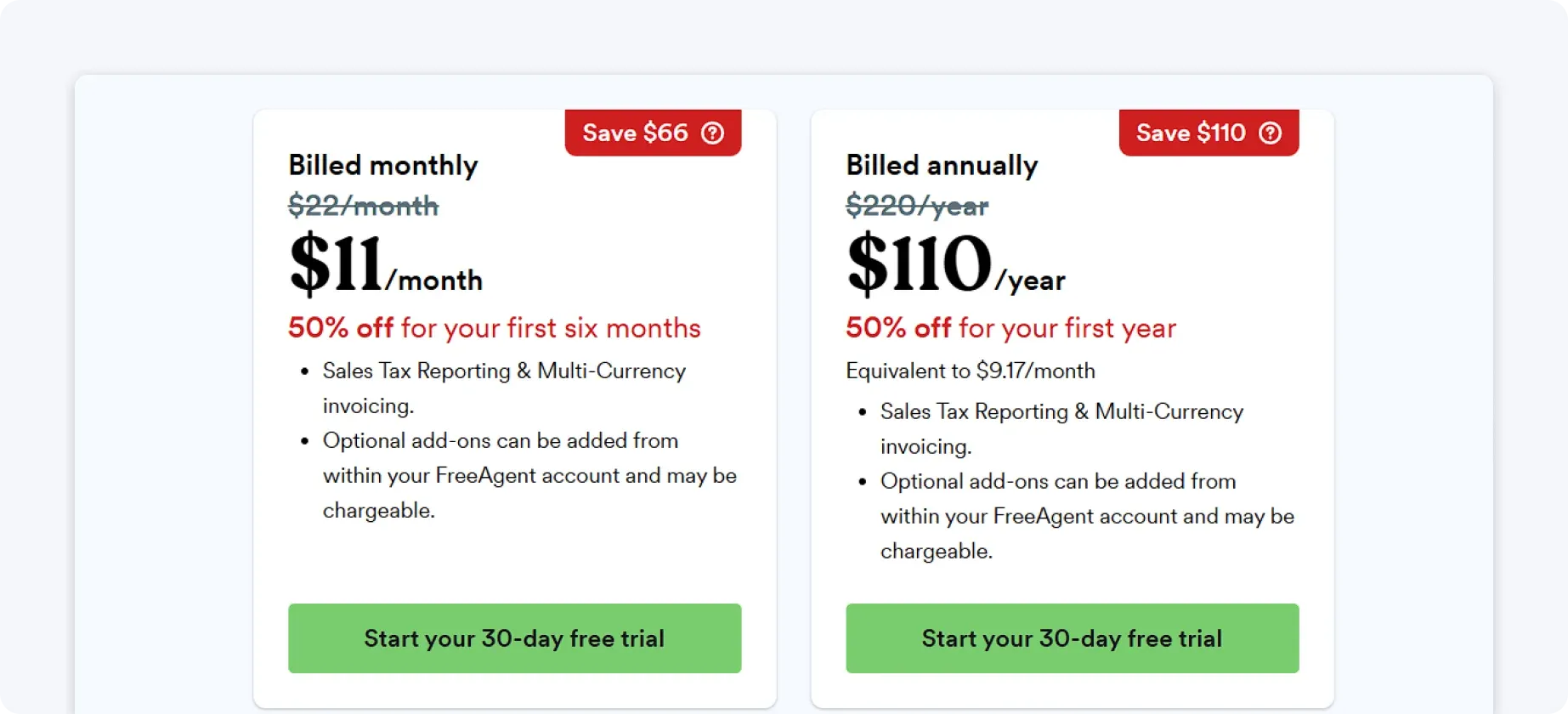
Some users can access it for free through certain business bank accounts (e.g., NatWest, RBS, or Lloyds), but otherwise, pricing remains consistent regardless of business size.
8. KashFlow
KashFlow is aimed at UK-based small businesses and places a strong emphasis on VAT and HMRC integration.
Here are KashFlow’s key features:
- VAT tools and reporting
- Invoicing and expense tracking
- HMRC integration
KashFlow allows businesses to automate compliance tasks, such as VAT calculation and MTD-compliant return generation, reducing manual work during tax season.
Why choose KashFlow?
KashFlow is useful for UK compliance but can feel dated in terms of interface and automation.
Pricing
KashFlow offers tiered monthly pricing, with VAT and reporting features available on higher plans.
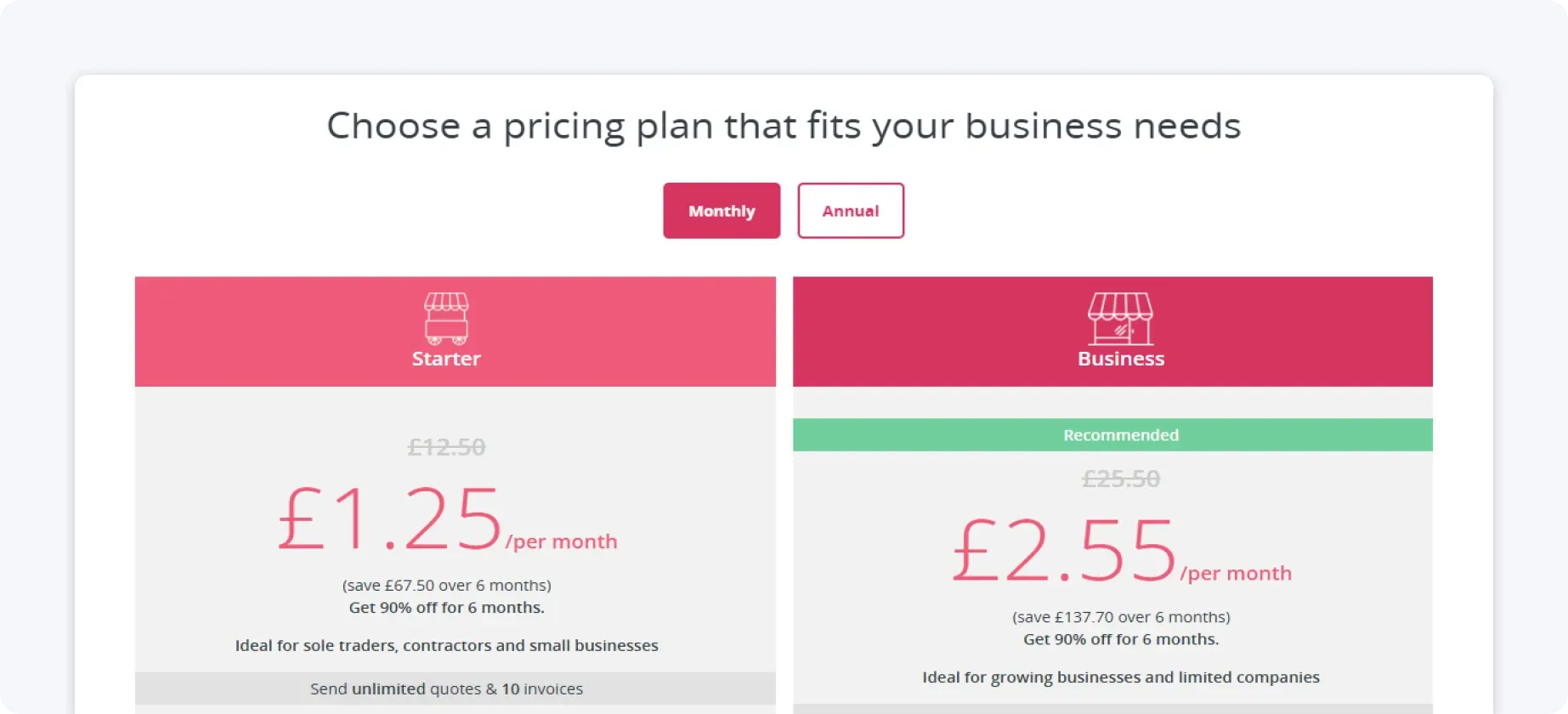
Costs are predictable, but the feature set is narrower than that of more modern alternatives.
9. Bonsai
Bonsai is built for self employed professionals and consultants who want lightweight financial tools alongside client management features.
Here are Bonsai’s key features:
- Invoicing and contracts
- Expense tracking
- Basic accounting tools
Bonsai lets freelancers manage invoices, contracts, and basic bookkeeping on a single platform, reducing the need for multiple tools.
Why choose Bonsai?
Bonsai is helpful for managing client work, but it doesn’t provide full accounting automation or strong tax support.
Pricing
Bonsai uses tiered subscription pricing, with higher plans unlocking additional client and financial tools.
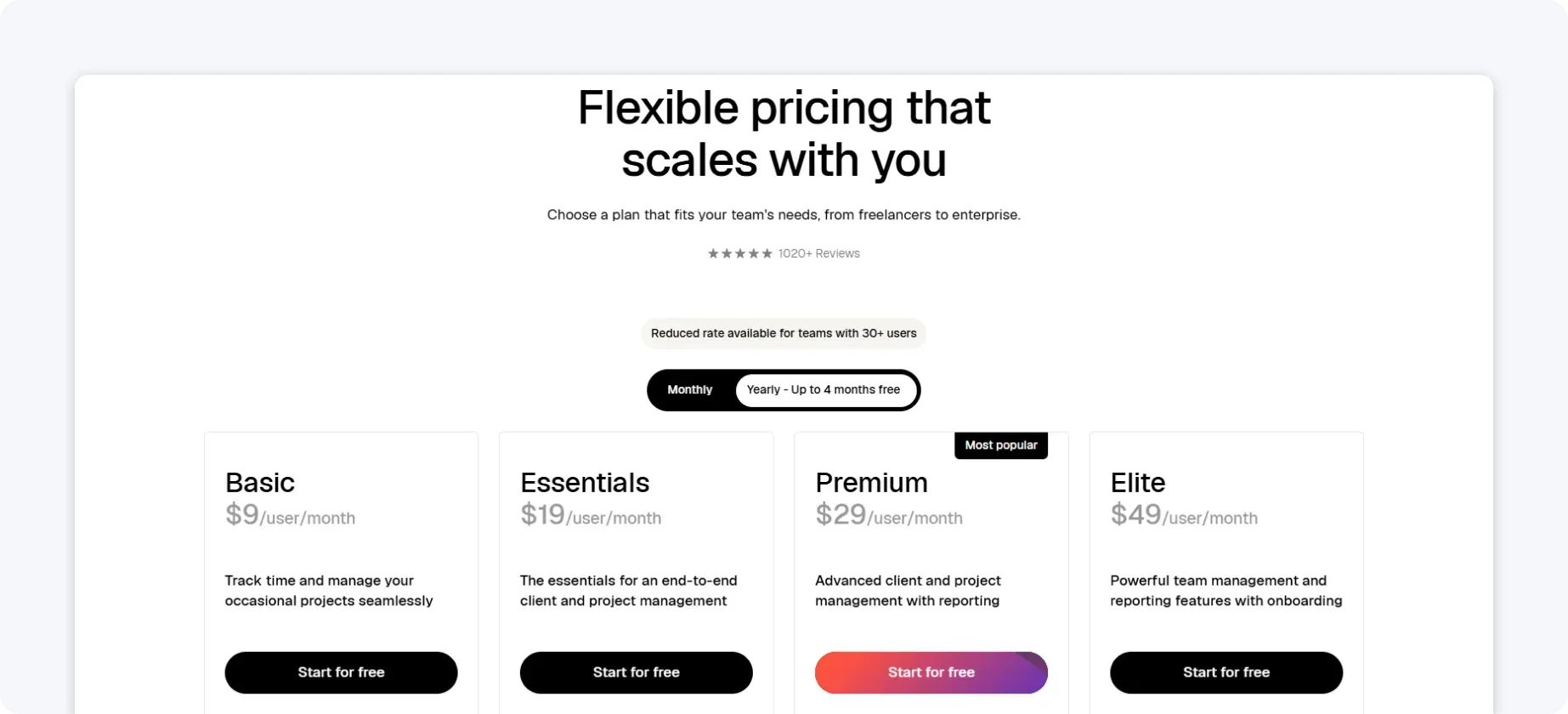
It’s affordable for solo professionals but less comprehensive for growing businesses.
10. ZipBooks
ZipBooks is a lightweight accounting option designed for small businesses with simple bookkeeping needs.
Here are ZipBooks’ key features:
- Invoicing
- Automatic transaction categorisation
- Basic financial reports
ZipBooks provides a simple interface for invoicing and expense tracking.
Why choose ZipBooks?
ZipBooks is easy to use and quick to set up, making it a good option for small businesses with very simple accounting needs. However, it lacks depth in areas like tax, VAT, and compliance automation, which means growing businesses may eventually need to add other tools or switch to a more comprehensive solution.
Pricing
ZipBooks offers a free basic plan with paid tiers for advanced features.
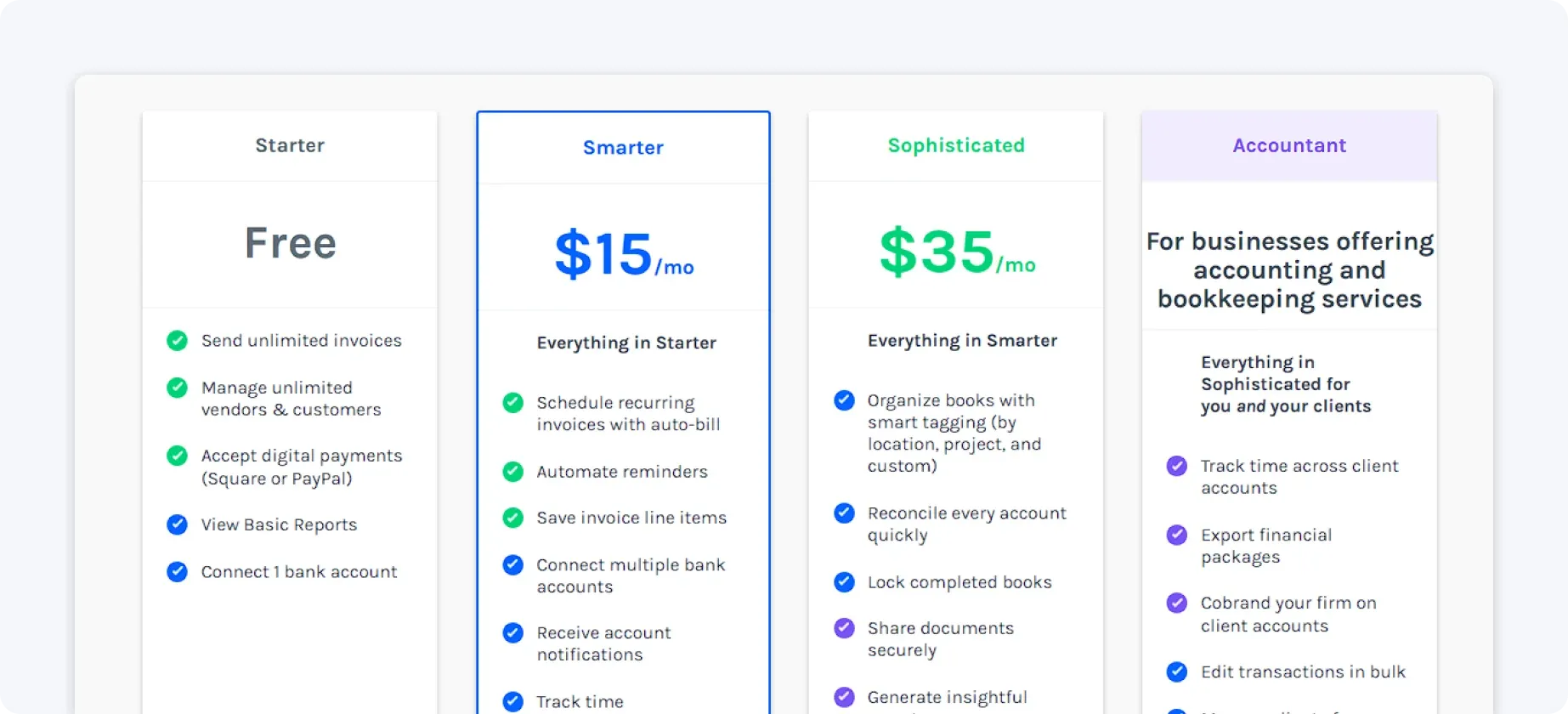
While suitable for very small businesses, most companies outgrow its capabilities quickly.
How to choose the best accounting software
Not all accounting tools are created equal. Before choosing a platform, small business owners should consider:
- Ease of use: Does it work out of the box, or does it require complex setup?
- Automation level: How much work is handled automatically?
- Tax and VAT support: Does it help with compliance and deadlines?
- Integrations: Does it rely on third-party apps to function properly?
- Pricing transparency: Are essential features included, or locked behind upgrades?
For many small businesses, the ideal solution is software that runs quietly in the background, without constant configuration or manual intervention.
One platform that embodies this is ANNA.
Why ANNA is the best accounting software for small businesses
Many accounting tools promise automation, but still rely on manual setup, integrations, or regular attention from business owners or accountants.
ANNA takes a different approach.
By combining a business account with fully automated accounting, ANNA eliminates the need for manual bookkeeping. Transactions are recorded, categorised, and tracked automatically, giving you a real-time view of your finances with minimal effort.
With ANNA, small businesses benefit from:
- Business account management and accounting in one place
- Automated expense tracking and categorisation
- Simple invoicing and payment visibility
- Built-in VAT tracking and deadline reminders
- Clear, real-time insight into cash flow and performance
Experience stress-free accounting – sign up for ANNA today and let your small business finances manage themselves.
Read the latest updates


![What Is Marginal Relief? [Everything You Need to Know]](https://storage.googleapis.com/anna-website-cms-prod/small_cover_3000_130_1ef44f67d1/small_cover_3000_130_1ef44f67d1.webp)







You may also like
![5 Best ClearBooks Alternatives for UK Businesses [Comparison]](https://storage.googleapis.com/anna-website-cms-prod/small_cover_3000_47_5ce9c9d466/small_cover_3000_47_5ce9c9d466.webp)
![How to Choose Accounting Software for Your Business? [Guide]](https://storage.googleapis.com/anna-website-cms-prod/small_cover_3013_f47de4d283/small_cover_3013_f47de4d283.webp)
![What Is Process Automation in Accounting? [Explained]](https://storage.googleapis.com/anna-website-cms-prod/small_cover_3000_12_7b691ef177/small_cover_3000_12_7b691ef177.webp)
Open a business account in minutes
