
How to Choose Accounting Software for Your Business? [Guide]


Learn how to choose accounting software so you can compare features, simplify your finances, stay compliant, and find the right fit for your business.

In this article
Running a business is already a multi-tasking ordeal: sales, customers, marketing, staffing, compliance, and, of course, accounting. From VAT returns to invoicing, there’s a lot to handle.
Not to mention that manual accounting processes increase the risk of errors, HMRC penalties, and missed insights that could actually help your business grow.
On top of that, with the upcoming Making Tax Digital (MTD), using outdated systems is inconvenient and risky, as it can put you on the wrong side of compliance.
The right accounting software can take a huge weight off your shoulders and keep you compliant with UK regulations.
But how do you know what to look for in accounting software if you’ve never used one?
Read on to learn how to choose accounting software to automate routine tasks and get real-time visibility into your finances.
Key points
- Keep your finances organised in one place 💰
Accounting software removes the need to juggle spreadsheets, emails, and bank statements. By automatically recording sales, expenses, and payments, you always have a clear, up-to-date picture of how your business is performing.
- Choose software that fits your business needs 💼
Not all businesses require the same features. Sole traders might need basic invoicing and expense tracking, while SMEs may require payroll, VAT, and multi-user access. Picking software that scales with your business saves time and prevents costly switches later.
- Look for automation and HMRC compliance ⚙️
A good platform reduces errors and simplifies compliance by automating tasks such as VAT submissions and bookkeeping. This keeps your records accurate and takes the stress out of tax season.
- Make ease of use and integration a priority 🧩
Software should be intuitive and mobile-friendly, letting you send invoices, track expenses, and check cash flow without confusion. Integrations with tools like payment gateways, e-commerce platforms, and payroll systems save hours of manual work.
- Test and simplify with a solution that does the heavy lifting 🚀
Trying software before committing is key, and you want a solution that handles the bulk of accounting and tax work for you. ANNA automatically handles bookkeeping, VAT, and tax filings, and lets you link your accounts, track expenses, and send invoices with payment links or QR codes.
What does accounting software actually do?
Accounting software keeps your finances in order.
Instead of tracking money coming in and going out across spreadsheets, emails, and bank statements, everything lives in one place.
When money comes in, it records it; when you spend money, it tracks where it went. Over time, this creates a clear, up-to-date view of how your business is actually performing.
Accounting software also helps you keep things consistent and accurate. Sales, expenses, bills, payments, and balances are organised automatically, so you’re not constantly piecing together the bigger picture yourself.
Automating routine tasks also reduces the risk of errors that can cause confusion, cash flow issues, or problems with HMRC.
How to choose accounting software for your business: 7 key aspects and features to look for
The right accounting software can save you time, money, and stress, but only if you know what to look for.
Here are seven key things you should pay attention to before making your decision:
1. Understand your business needs
Accounting software isn’t one-size-fits-all. Before you even start comparing features or pricing, you need clarity on your business structure and needs:
- Sole traders and freelancers often need simple invoicing, expense tracking, and basic tax reporting.
- Small to medium-sized businesses usually require VAT handling, payroll processing, bank reconciliations, and more detailed reporting.
- Growing or established businesses may need multi-user access, inventory management, and advanced analytics.
You should also consider the following:
- Do you charge VAT?
- Do you have employees?
- Do you sell online or internationally?
- Do you manage inventory?
The more ‘yes’ answers you have, the more robust your accounting software needs to be.
Also, while it’s tempting to choose the cheapest option that works right now, switching software later can be complex. For that reason, you should look for a platform that can scale with your business as it grows.
2. Look for the must-have features for your business
While every business is different, there are some non-negotiable features your software should have.
HMRC & VAT compliance
UK accounting software has to be HMRC-approved. The software should support Making Tax Digital (MTD) by keeping digital records and submitting VAT returns electronically, exactly as HMRC requires.
Good software will guide you through this process rather than leaving you to figure it out on your own.
You should also be able to:
- Track VAT automatically on sales and expenses
- Generate accurate VAT calculations
- Submit VAT returns directly to HMRC from the software
If a platform still relies on manual uploads or complicated workarounds, that’s a sign it’s not keeping up.
Did you know?
ANNA offers an HMRC-approved business account that relies on robust automation to do your books, returns, and filings.
You just need to upload your documents, and we’ll:
- Calculate the most tax-efficient amount you owe
- Prepare and file Corporation Tax directly with HMRC
- Calculate and submit your VAT returns
- Prepare and file your Self Assessment income tax
Invoicing and payments
You should look for software that lets you create professional, customisable invoices that reflect your brand.
However, it’s the practical features that really matter:
- Automatic invoice numbering
- Clear payment terms
- The ability to send invoices straight from the system
Automatic payment reminders are also useful. Chasing late payments is never pleasant, and it’s time-consuming. Having the software send polite nudges for you can save a lot of time and effort.
How ANNA can help
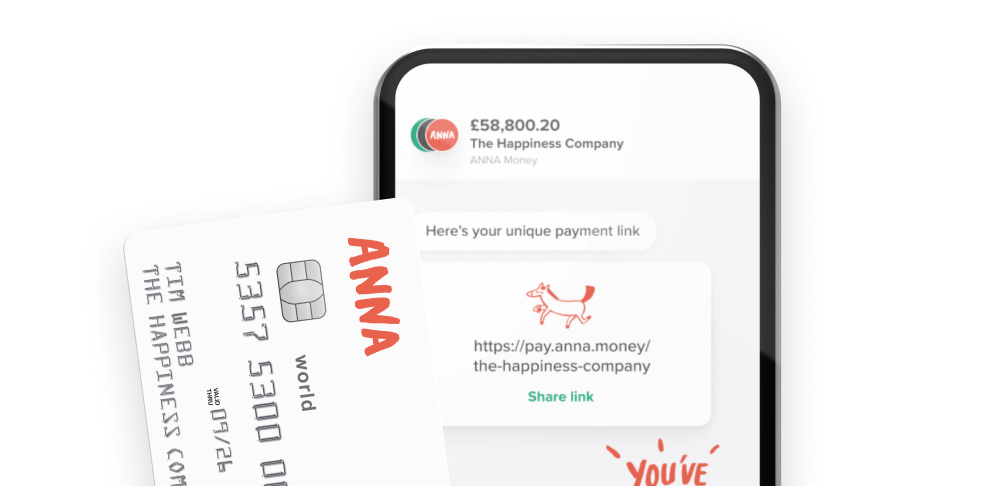
With ANNA, you can create and send professional invoices in minutes, personalise them with your logo, and include payment links or QR codes so customers can pay instantly.
Our solution automatically matches payments to the right invoice, and we send polite reminders if something goes overdue, saving you from follow-ups.
You also get instant notifications when money hits your account, so there’s no guessing or constant checking.
The result is:
- Faster payments
- Cleaner records
- Far less time spent on admin
Expense tracking
Expense tracking is one of those tasks that sound small but eat up time fast, especially if you leave it for the end of the month (or worse, the end of the year).
Good accounting software lets you record expenses as you go.
That might mean snapping a photo of a receipt on your phone, automatically categorising the expense, and attaching it to the right transaction.
For example, ANNA scans your photo receipt, stores the details, and assigns an expense category.
This way, all your expenses, invoices, and transactions are kept together.
For VAT-registered businesses, accurate expense tracking also means you’re reclaiming the VAT you’re entitled to without guessing or digging through bank statements.
Bank reconciliation
Instead of manually ticking off lines on a statement, reconciliation provides a quick review.
With automatic bank feeds, your software connects directly to your UK business bank account and pulls in transactions daily. From there, it can match those transactions to invoices, bills, and expenses you’ve already recorded.
It translates to fewer errors, less time spent, and much more confidence that your numbers are actually correct.
Reporting
Your accounting software should give you easy access to:
- Profit and loss reports
- Cash flow summaries
- VAT reports
These reports help you understand what’s really happening in your business.
Are you actually making money? Where is it being spent? Can you afford that next investment?
When reports are clear and up to date, you’re doing accounting for compliance as well as using it to make better business decisions.
Check this out
ANNA enables you to see exactly how your business is performing, with a detailed breakdown of gross profit, margins, and where your money is really going.
All your accounts are combined into one live profit and loss view, so you’re never relying on outdated numbers.
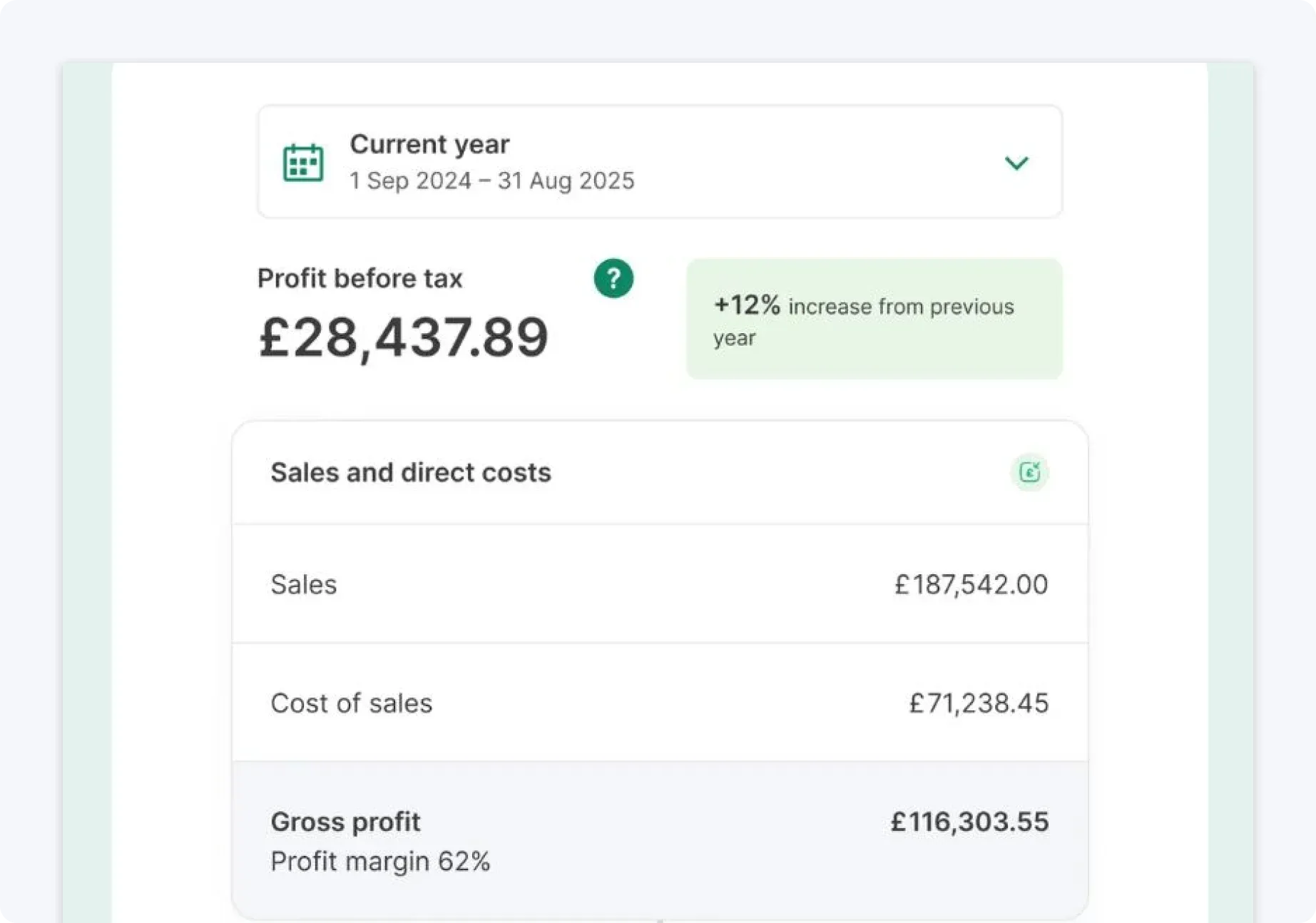
You’ll also get a monthly summary that shows how this month compares to previous months, making trends easier to spot.
3. Check integrations with your existing tools
The more your tools talk to each other, the less manual work you do. Your top choice should integrate with:
- Payment gateways like Stripe and PayPal
- Ecommerce platforms such as Shopify and WooCommerce
- CRM systems
- Payroll software
- Time-tracking tools
For example, if you run an online shop, automatic syncing of sales data can save hours each week.
4. Go for accounting software that’s easy to use
Most business owners aren’t accounting experts, and they shouldn’t have to be.
You’re choosing accounting software to make life easier, not to add another obligation you have to learn from scratch.
That’s why ease of use matters just as much as features do.
Good accounting software should feel intuitive from the moment you log in. Clear dashboards, plain-English labels, and logical workflows all make a big difference.
If you can glance at your screen and quickly understand what’s happening with your money, the software is doing its job.
Other aspects worth checking out include:
- Can you access the software over your mobile phone to send invoices, record expenses, check cash flow, and more?
- Can you easily contact support if you run into any issues?
- Does the software offer helpful learning resources?
Good to know
A lot of accounting software is built for accountants, not business owners.
That usually means extra features you’ll never use, plenty of setup, and more time spent figuring things out than actually running your business.
ANNA keeps things much simpler
Our solution is built for small business owners who want their finances handled without fuss, long setup processes, or second-guessing forms.
The result is less admin, fewer mistakes, and more time to focus on the work that actually matters to you.
5. Opt for software that keeps your data secure and protected
Robust software usually uses:
- Strong data encryption to make sure your information can’t be read if it’s intercepted
- Secure login systems that prevent unauthorised access.
- Two-factor authentication that provides extra protection, especially if you’re logging in from different devices
Regular backups are another key aspect. With the right software, your data is backed up automatically to keep everything safe.
If something does happen, you can pick up where you left off without losing months of records.
Because accounting software handles personal and financial information, it also has to comply with UK GDPR.
A good provider should clearly explain how your data is stored, where it’s held, and how it’s used. You shouldn’t have to dig through pages of fine print to understand what’s happening to your information.
Quick tip:
Pay attention to who actually owns your data and how easy it is to access or export it. Trustworthy providers are upfront about this, making it clear that your data belongs to you and explaining what happens if you ever decide to switch platforms.
6. Compare pricing and long-term costs
At first glance, accounting software pricing can feel straightforward. You see a monthly fee, compare a few options, and assume that’s the full story.
However, pricing is often more complex.
Most accounting software in the UK works on a monthly subscription model, which means you pay an ongoing fee rather than a one-off cost.
Many providers offer tiered plans, where the price increases based on the number of features you need or the number of people who will use the software.
A basic plan might be perfect when you’re just starting out, but as your business grows, you may find that key features sit behind a higher-priced tier.
That’s not necessarily a bad thing as long as you know what you’re signing up for.
The tricky part is:
- Some providers charge extra for payroll, even if it’s something you expect to be included.
- Some require paid add-ons for more advanced reporting, multi-currency support, or extra automation.
Individually, these costs might seem small, but they can add up quickly, which is why it’s important not to focus only on the headline price.
Think about what you’ll realistically need, both now and over the next couple of years, and check whether those features are included or cost extra.
How ANNA can help
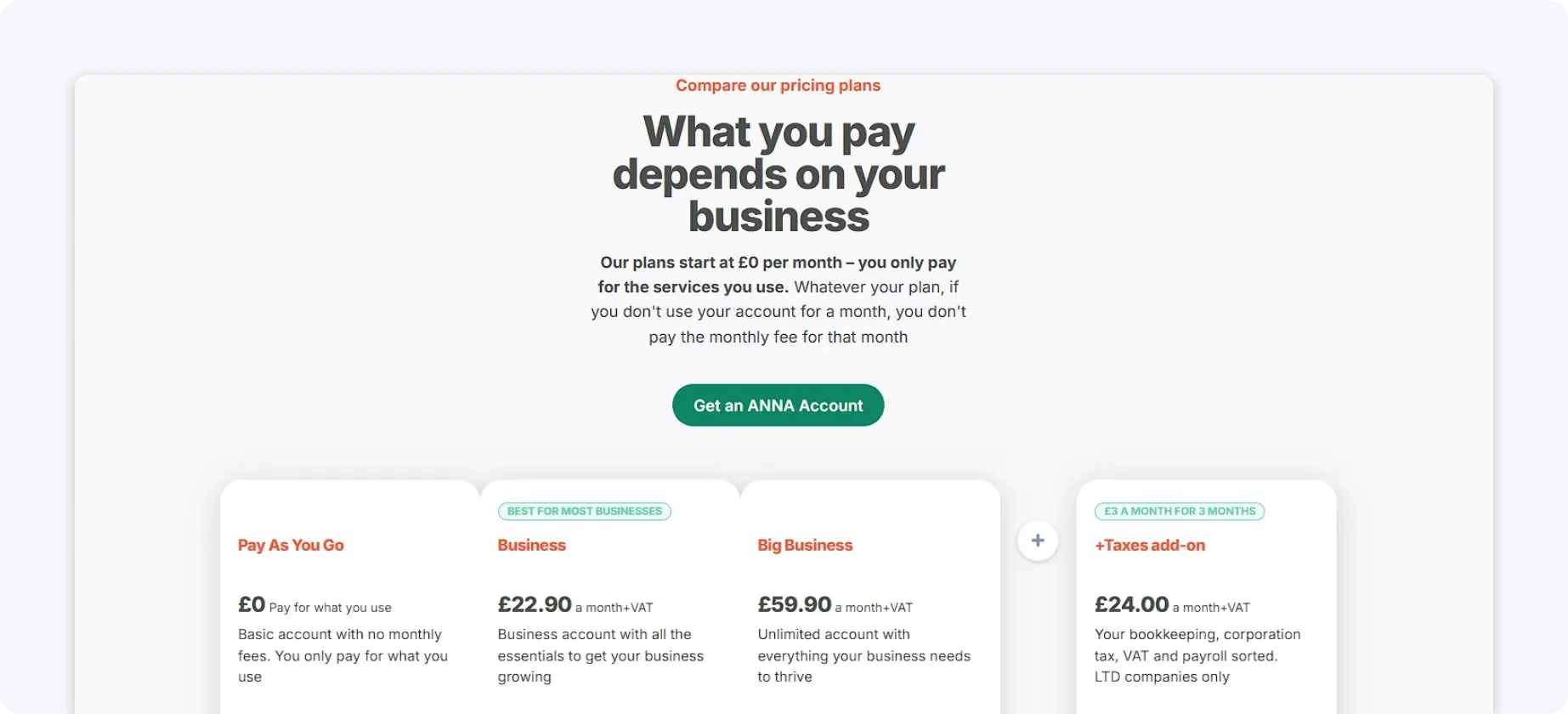
ANNA provides clear, transparent pricing with no hidden fees. Most small businesses spend far more on accounting than they really need to.
By automating the heavy lifting and removing a lot of manual work, ANNA keeps costs low without cutting corners.
That means you can pay just 10% of what traditional accounting often costs, while still getting everything handled properly and not paying for features you’ll never use.
7. Try before you commit
No matter how good accounting software looks on paper, you really don’t know if it’s right for your business until you actually use it.
That’s why free trials and demos are so valuable.
A trial gives you the chance to see how the software fits into your day-to-day business routine and how it actually feels when you’re sending invoices, checking figures, or trying to find something quickly.
Try doing the things you’ll need most often – create an invoice, add VAT, and imagine sending it to a real customer. Does it feel smooth and logical, or are you clicking back and forth trying to work out what comes next?
The same goes for connecting your bank account. Bank feeds should be reliable and easy to understand, not something you have to fix or recheck constantly.
If you work with an accountant, involving them during the trial can be helpful. They can often spot limitations or advantages straight away and tell you whether the software will actually make things easier at year-end.
Why should you choose ANNA as your accounting software?
ANNA is an all-in-one business account for money, Self Assessment, Corporation Tax, VAT, payroll, and company registration.
Built with business owners and not accountants in mind, ANNA offers an intuitive platform that automates accounting and tax tasks.
Here’s what you can do with ANNA:
🔥 Open a business account in less than 10 minutes
🔥 Link your bank accounts and see everything in one place, track your expenses as they happen, and keep your money organised using ANNA’s handy pots
🔥 Create quotes, send invoices, and get paid instantly with your own unique payment link or QR codes
🔥 Let us handle your bookkeeping, calculate your taxes, and file with HMRC
Try ANNA today to see how you can take the stress out of accounting and get back to growing your business.
FAQ
Most modern accounting platforms can link up with the services you already use, like your business bank account, payment gateways, and online stores.
This means your sales, expenses, and customer data flow into one place without you having to enter everything manually.
You can usually access accounting software right in your browser, which makes it super easy to work from a laptop, tablet, or phone without installing apps.
Because it’s cloud‑based, updates happen automatically, and you don’t need to worry about backups. Everything is stored securely online and stays in sync across devices.
Robust accounting software uses encrypted logins, secure servers, two-factor authentication, and automatic backups to keep your information safe.
In addition, it complies with UK GDPR, so your financial data is handled transparently and responsibly.
Read the latest updates

![What Is Marginal Relief? [Everything You Need to Know]](https://storage.googleapis.com/anna-website-cms-prod/small_cover_3000_130_1ef44f67d1/small_cover_3000_130_1ef44f67d1.webp)


You may also like
![10 Best Accounting Software for Small Businesses [Comparison]](https://storage.googleapis.com/anna-website-cms-prod/small_cover_3000_14_d1471dd859/small_cover_3000_14_d1471dd859.webp)
![How Will Automation Affect Accounting in 2026? [Full Guide]](https://storage.googleapis.com/anna-website-cms-prod/small_cover_3000_11_514d5404c1/small_cover_3000_11_514d5404c1.webp)
![What Is Process Automation in Accounting? [Explained]](https://storage.googleapis.com/anna-website-cms-prod/small_cover_3000_12_7b691ef177/small_cover_3000_12_7b691ef177.webp)
Open a business account in minutes
