
Accounting Automation Software: Top 8 Tools Compared



Discover the best accounting automation software to reduce manual bookkeeping, improve financial accuracy, and keep your business finances organised.


In this article
As businesses grow, manual accounting processes like spreadsheets, paper invoices, and repetitive data entry can quickly become a nuisance. The increasing volume and complexity of financial data make these workflows harder to manage, more error-prone, and unnecessarily time-consuming.
This is where accounting automation software comes into play. By using advanced algorithms, artificial intelligence (AI), and integrations with banking and operational systems, these tools streamline financial operations, reduce human error, and free up finance teams to focus on strategic priorities.
This guide will break down the top accounting automation tools on the market. We’ll compare their key features, pricing, strengths, and ideal use cases, helping you choose the right software for your business needs.
Key points
- Accounting automation reduces manual work and errors 🤖
Automation software handles repetitive accounting tasks, which saves time, reduces human error, and helps businesses stay compliant without constant manual checks. - Different tools are built for different types of businesses 🏢
Some platforms are designed for freelancers and small businesses, while others are built for finance teams or large enterprises. Choosing the right tool depends on whether you want simple automation that runs quietly in the background, or deep control with hands-on management. - Complex tools often come with hidden effort and costs 💷
Platforms like Xero, QuickBooks, and enterprise systems offer powerful features, but they often require setup, integrations, upgrades, or accountant involvement. Over time, this can add complexity and make pricing less predictable. - Not all automation covers tax and compliance equally ⚠️
Many tools focus on bookkeeping or invoicing but offer limited automation for VAT, tax deadlines, or compliance. As a business grows, gaps in these areas often mean adding more tools or external support.
What is accounting automation software?
Accounting automation software refers to digital systems that streamline and manage repetitive financial tasks that are traditionally handled manually. These tools use automation, rules, and integrations to keep financial records accurate and up to date with minimal human input.
Common tasks done by accounting automation software include:
- Accounts payable and receivable: Automatically recording bills and invoices, tracking what you owe and what you’re owed, and scheduling payments or reminders to avoid late fees and cash flow gaps
- Bank reconciliation: Syncing transactions directly from bank accounts and matching them against recorded income and expenses, reducing errors and eliminating the need for time-consuming manual checks
- Invoice generation and tracking: Creating and sending invoices automatically, tracking payment status in real time, and issuing reminders when invoices are overdue
- Expense management: Capturing expenses through receipt scanning or card integrations, categorising them correctly, and ensuring they are ready for reporting or tax purposes
- Tax calculations: Automatically calculating VAT or sales tax, tracking liabilities, and keeping records compliant with local tax regulations to reduce stress at filing time
- Financial reporting and analytics: Generating real-time reports such as profit and loss, cash flow, and balance sheets, providing business owners with a clear view of their financial health at any moment
By automating these processes, businesses can significantly reduce manual errors, stay compliant with regulations, and speed up month-end and year-end close cycles.
Top accounting automation tools
There’s no shortage of accounting automation software on the market, but not all tools are built with the same goal in mind. Some focus purely on bookkeeping, while others prioritise enterprise-scale finance teams.
The leading accounting automation tools you should consider include:
Top accounting automation tools
| Tool | Best For | Key Features |
| ANNA | Freelancers & small businesses | Automated expense tracking, invoicing, VAT tracking, tax reminders, business account |
| Xero | Small to medium businesses | Bank feeds, invoicing, payroll, integrations |
| QuickBooks Online | SMBs & accountants | Automated expenses, reporting, large app ecosystem |
| NetSuite | Mid-market to enterprise | Full ERP, advanced automation, compliance |
| Sage Intacct | Scaling companies | API automation, deep financial reporting |
| FreshBooks | Freelancers & small teams | Time tracking, invoicing automation, expenses |
| Botkeeper | Businesses outsourcing bookkeeping | AI bookkeeping with human review |
| Tipalti | Companies with complex payables | AP automation, global payments, tax compliance |
1. ANNA
ANNA is more than just accounting software – it combines a business account with powerful accounting automation. Unlike traditional tools that require manual setup and ongoing maintenance, ANNA automates key financial tasks as transactions occur, giving you a clear, real-time picture of your business finances.
ANNA’s key accounting features are:
- Automatic categorisation of income and expenses
- Free and automated 2025/26 Self Assessment filing
- Built-in invoicing with payment tracking
- VAT tracking and reminders to help you stay compliant
- Receipt capture and expense management
- Tax deadline reminders so nothing gets missed
- Business account and accounting automation
Why choose ANNA?
ANNA is designed for people who don’t have the time to manage accounting at the level their business requires. Transactions are organised automatically, VAT is tracked in the background, and admin is reduced to a minimum.
There’s no need to connect multiple tools or rely on spreadsheets, which makes ANNA ideal for freelancers, sole traders, contractors, and small business owners who want accounting automation that works straight out of the box.
Pricing
ANNA offers tiered subscription plans based on your business needs. Pricing scales with transaction volume, automated features, and access to premium support.
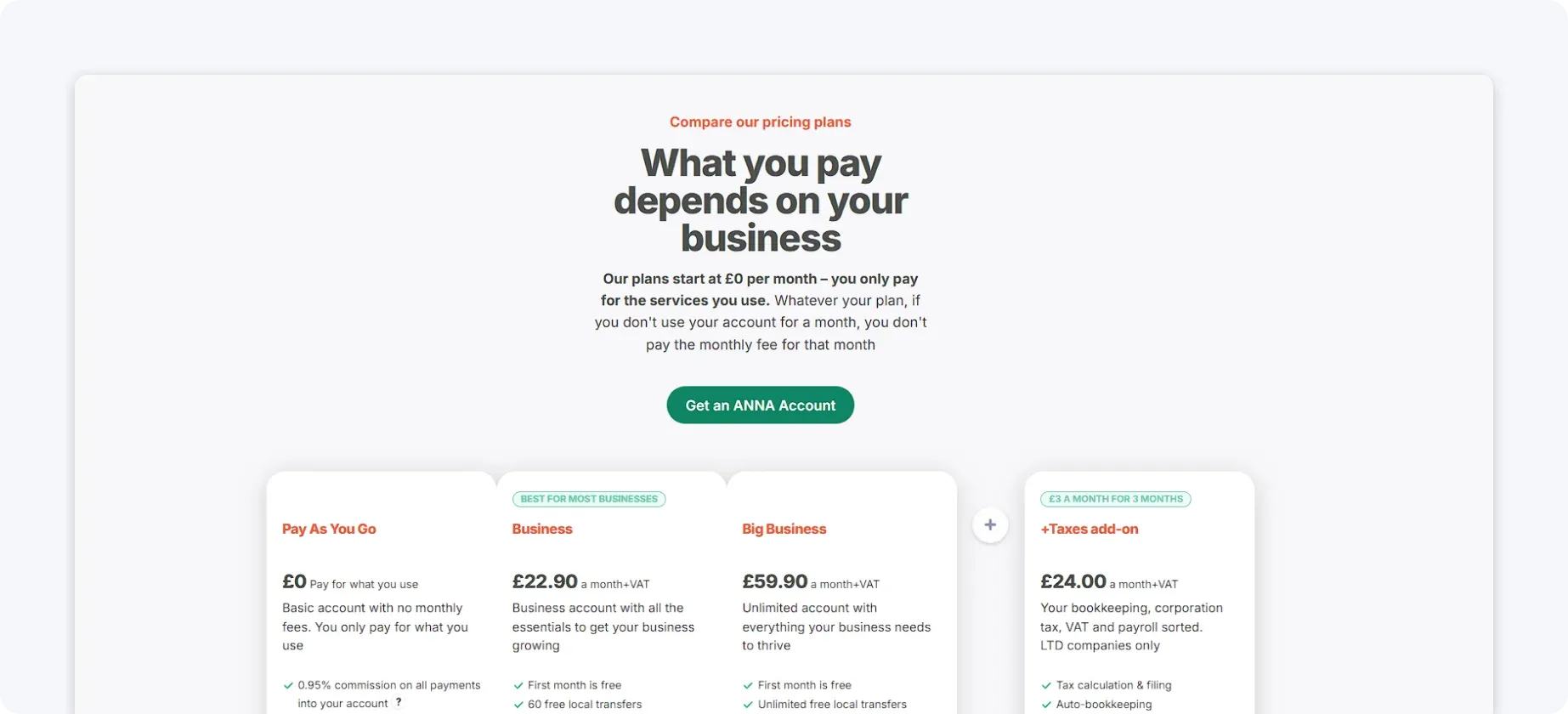
ANNA’s pricing is transparent and straightforward; there are no hidden costs for essentials like VAT reminders or expense categorisation.
2. Xero
Xero is a cloud-based accounting platform built for small to medium-sized businesses. It focuses on automating core accounting tasks, such as invoicing, reconciliation, and reporting. However, it has a steeper learning curve around the initial setup and ongoing management.
Xero’s key accounting features are:
- Automatic bank feeds and transaction matching
- Invoicing and bill management
- Expense tracking and reconciliation
- Payroll and multi-currency support on higher plans
- Large app marketplace for added functionality
Why choose Xero?
Xero works well for businesses that are comfortable using a traditional accounting platform and don’t mind connecting multiple tools to cover gaps. However, many features require add-ons or accountant involvement, which can increase complexity.
Pricing
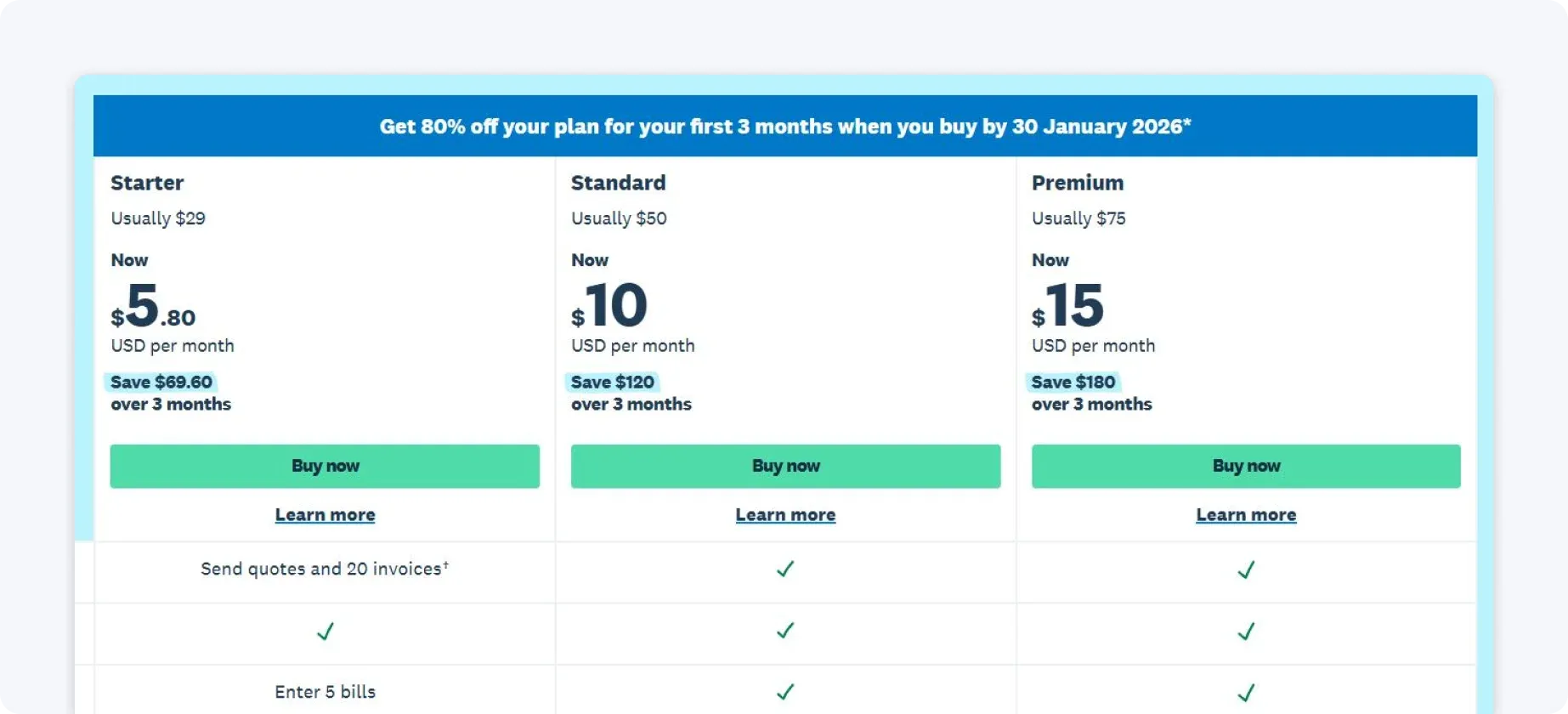
Xero offers monthly subscription plans, with pricing increasing as you unlock more features such as payroll, multi-currency, and higher transaction limits. This makes pricing less predictable compared to more bundled solutions. Lower-tier plans are relatively affordable, but businesses often need to upgrade or add integrations as they grow.
3. QuickBooks Online
QuickBooks Online is one of the most widely used accounting platforms, offering a broad range of tools for bookkeeping, reporting, and tax preparation. It provides automation features but often requires manual rules and configuration to work efficiently.
QuickBooks Online’s key accounting features are:
- Automated expense categorisation using bank rules
- Receipt capture and bill tracking
- Invoicing and payment reminders
- Customisable financial reports
- Integration with payroll and third-party apps
Why choose QuickBooks Online?
QuickBooks Online is a good fit for businesses that work closely with accountants or already use QuickBooks as part of their financial workflow. It offers powerful reporting, broad automation capabilities, and widespread adoption, making collaboration with finance professionals easy.
However, while powerful, it can feel complex for freelancers and small business owners who just want their finances organised automatically, without ongoing setup and adjustments.
Pricing
QuickBooks uses tiered monthly pricing, with higher plans unlocking more automation, reporting, and user access. Entry-level plans are affordable, but essential features like advanced reporting or project tracking require upgrades.
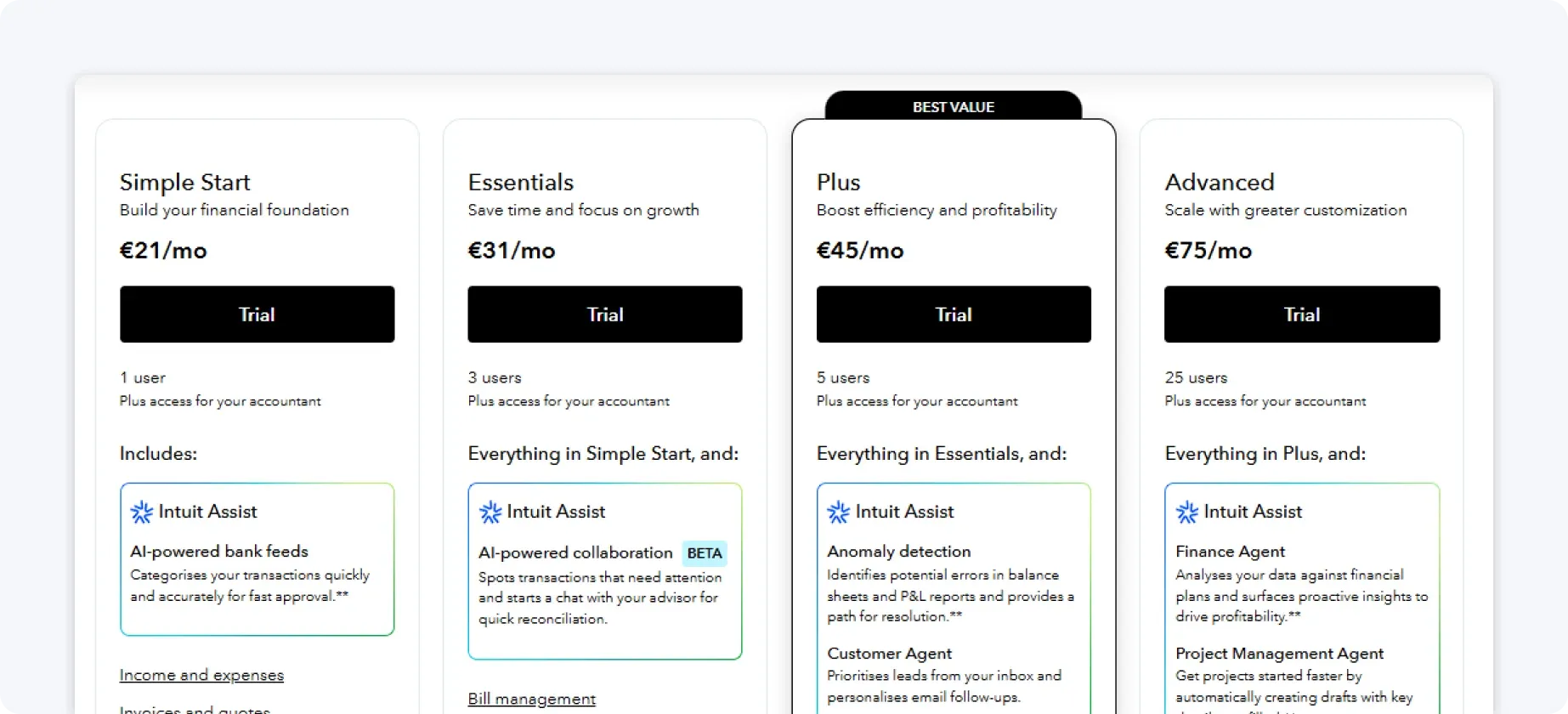
Payroll, tax tools, and integrations are usually priced separately. As a result, costs can grow quickly when your business needs to expand.
4. NetSuite
NetSuite is a full enterprise resource planning (ERP) system that includes advanced accounting automation. It’s designed for organisations with complex structures, large teams, and high transaction volumes.
NetSuite’s key accounting features are:
- End-to-end financial management
- Automated revenue recognition
- Multi-entity and multi-currency accounting
- Advanced compliance and audit controls
- Custom workflows and reporting
Why choose NetSuite?
NetSuite is designed for large or rapidly scaling organisations that need advanced financial control across multiple entities, currencies, and regions. Its strength lies in handling complexity, compliance, and transactions within a single ERP system.
But for smaller businesses, that power comes at the cost of longer implementation times and higher ongoing overhead. It generally offers more than most small teams need for day-to-day accounting automation, meaning that they are unlikely to use it to its full potential.
Pricing
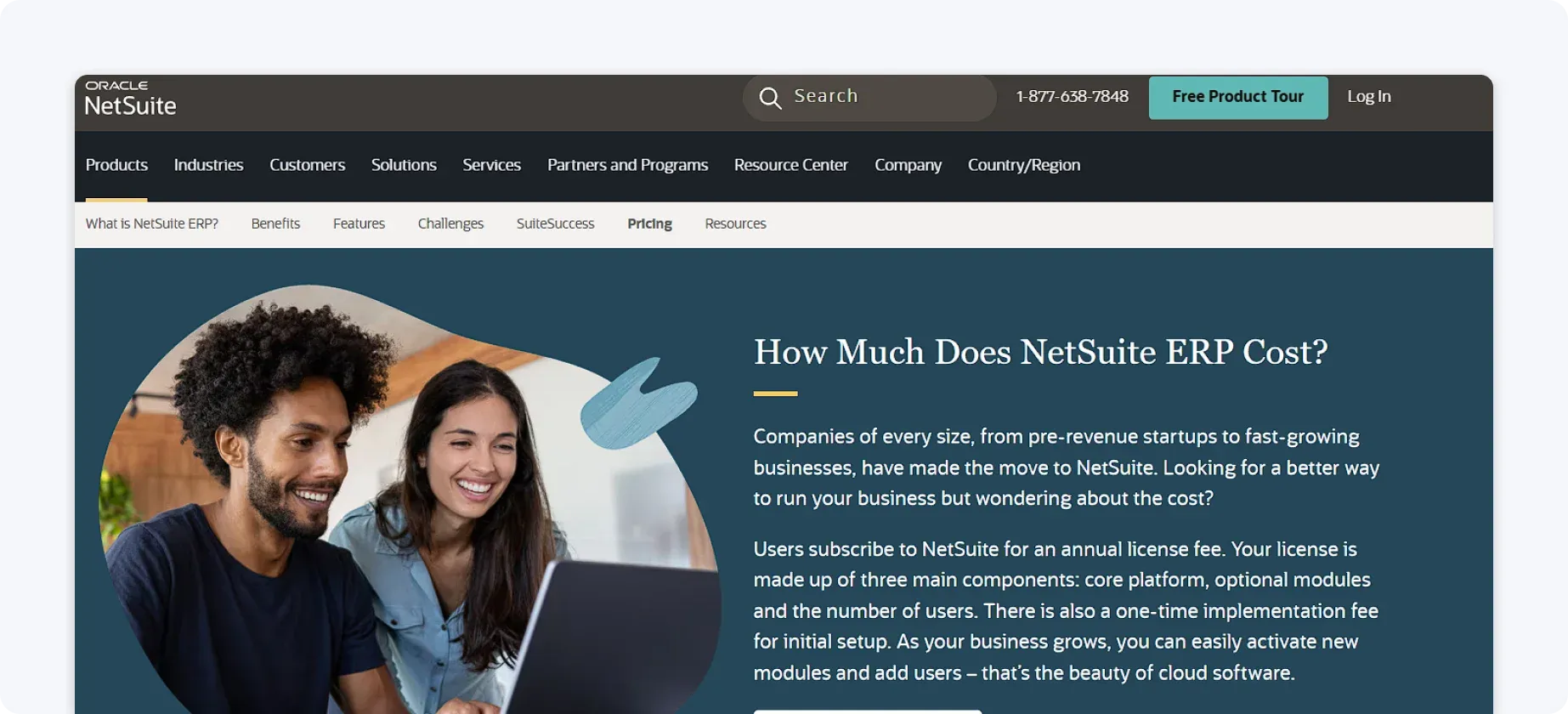
NetSuite pricing is fully custom and based on company size, number of users, and required modules.
Costs typically include licensing, implementation, and ongoing support fees. As a result, it represents a significant investment rather than a lightweight subscription. Because of all this, NetSuite is best suited to large or rapidly scaling organisations with complex financial needs.
5. Sage Intacct
Sage Intacct is a cloud-based financial management system known for strong reporting and automation capabilities. It focuses on providing finance teams with detailed control and visibility into accounting processes.
Sage Intacct’s key accounting features are:
- Automated general ledger and journal entries
- Multi-entity accounting
- Approval workflows and controls
- Real-time financial reporting
- Strong audit trails and compliance features
Why choose Sage Intacct?
Sage Intacct is ideal for finance teams that need detailed reporting, strong audit trails, and robust internal controls. It’s particularly popular with organisations that prioritise visibility and governance as they scale.
That depth makes it less suitable for solo founders or small businesses who prefer accounting to run quietly in the background. The setup and ongoing use typically require accounting expertise, which can be more than some businesses wish to manage.
Pricing
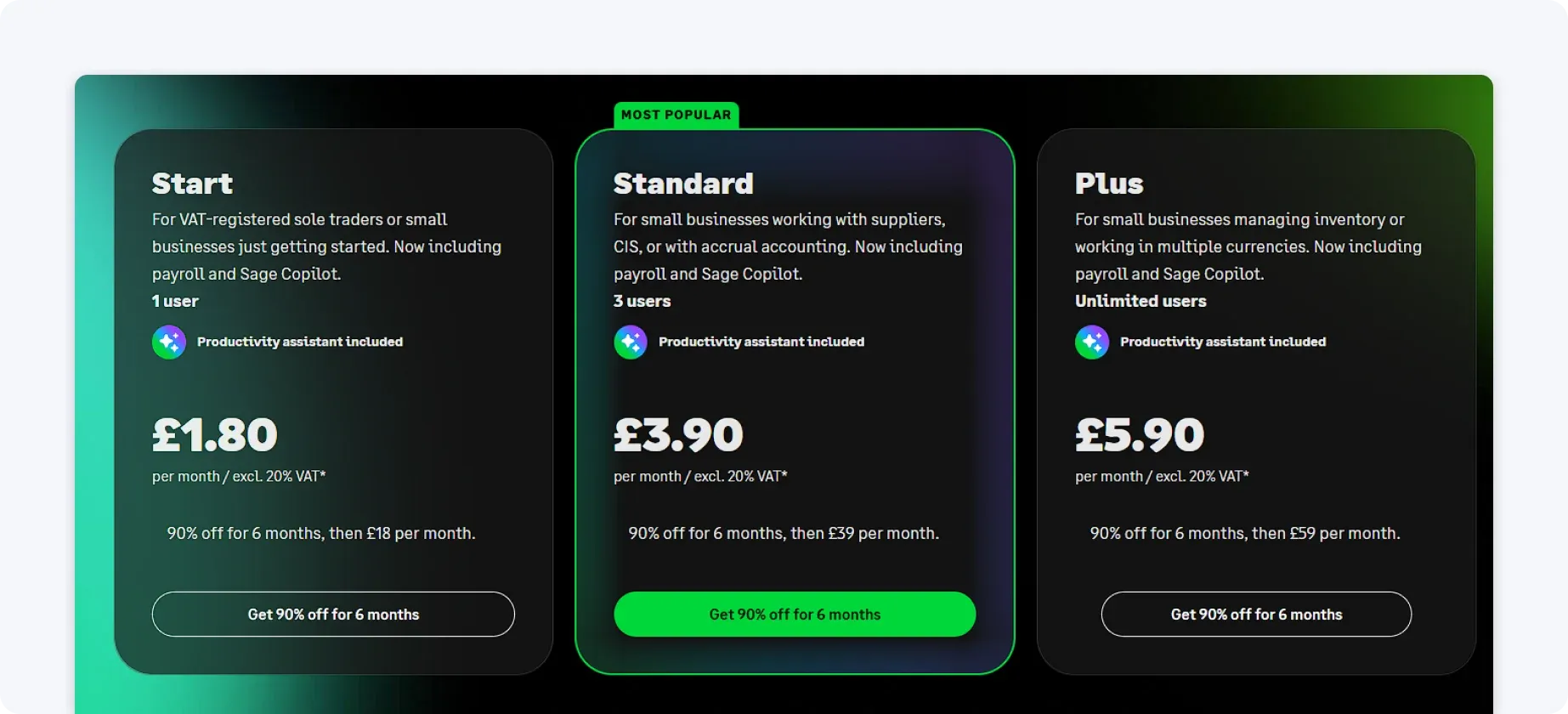
Pricing for Sage Intacct is modular and usage-based. Costs depend on the number of users, legal entities, and the specific modules selected.
Businesses choose contract length (monthly, 6-month, or annual), core accounting modules, and any advanced features they need. Discounts typically apply to longer-term contracts, while shorter commitments offer more flexibility at a higher monthly cost.
6. FreshBooks
FreshBooks is designed primarily for freelancers and service-based businesses. It focuses on simpler administrative tasks rather than full accounting workflows.
FreshBooks’ key accounting features are:
- Automated invoicing and late payment reminders
- Time tracking with billable hours
- Expense capture and categorisation
- Basic financial reports
Why choose FreshBooks?
FreshBooks is easy to use and works well for billing-focused businesses. Its interface is simple, and automation around billing and reminders is easy to use.
That said, it offers limited automation for tax, VAT, and broader compliance needs, so some users may need additional tools as their finances become more complex.
Pricing
FreshBooks offers tiered monthly plans, starting with lower-cost options for solo users and increasing as you add clients or team members.
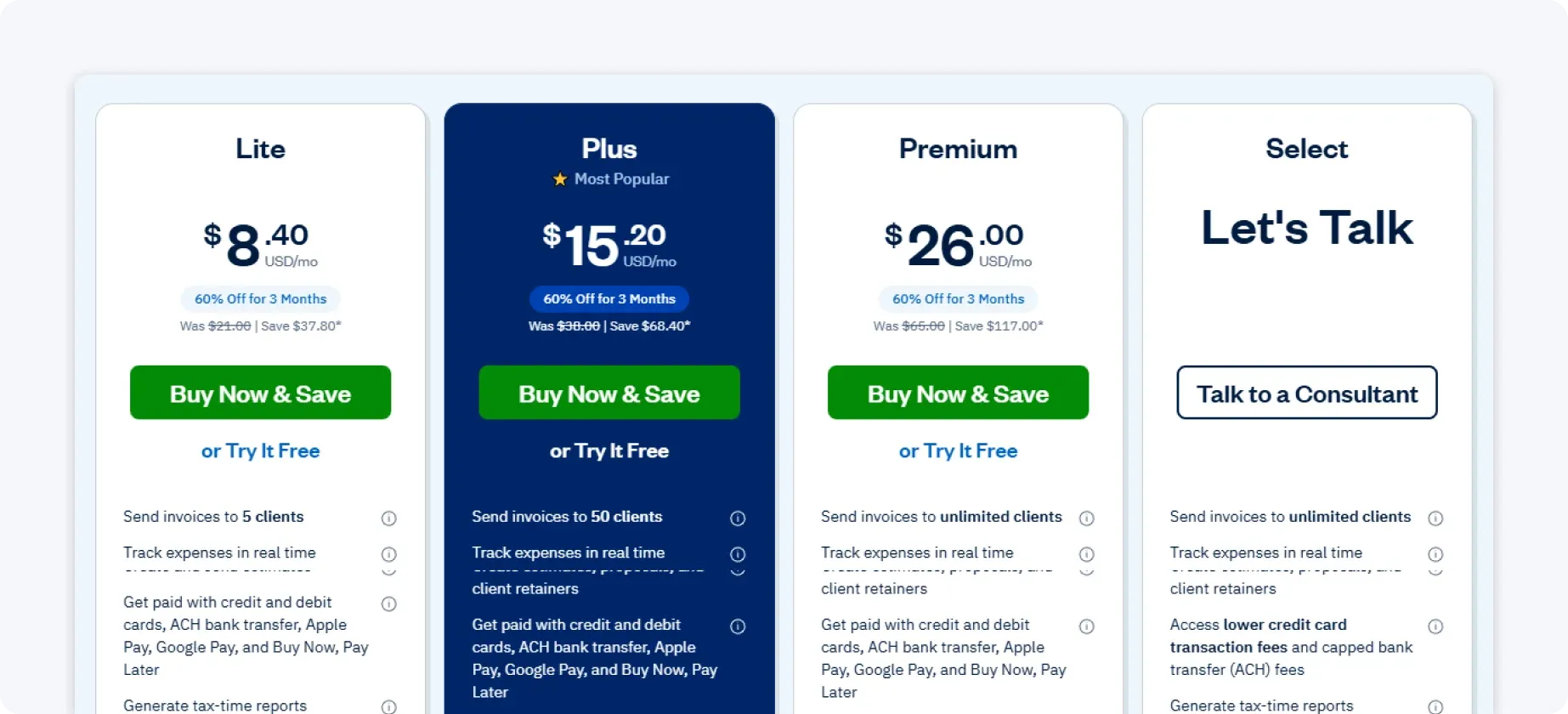
Core features are included across plans, but advanced capabilities and add-ons can increase costs. It’s affordable for simple needs, but less comprehensive overall.
7. Botkeeper
Botkeeper is a hybrid solution that combines AI-driven automation with human bookkeeping support. Rather than replacing bookkeeping entirely with software, it uses automation to streamline processes while a dedicated team handles the day-to-day bookkeeping work on your behalf.
Botkeeper’s key accounting features are:
- AI-powered transaction categorisation
- Automated reconciliations
- Human review and bookkeeping support
- Custom financial reports
Why choose Botkeeper?
Botkeeper is a good option for businesses that want to outsource bookkeeping while still benefiting from automation and AI-driven categorisation. The combination of software and human oversight can significantly reduce internal workload.
The trade-off is reduced hands-on control and less real-time visibility compared to self-serve tools.
Pricing
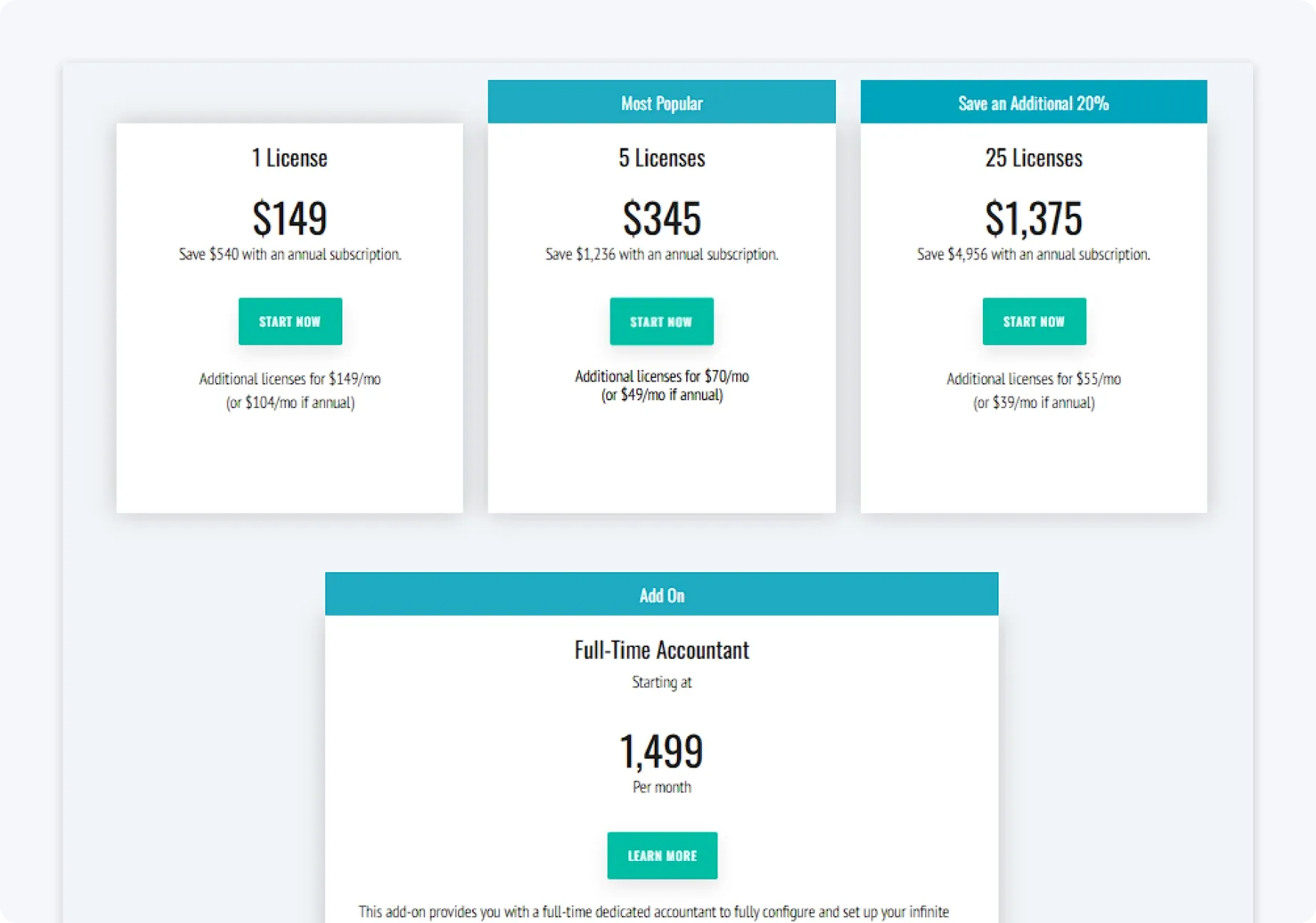
Botkeeper uses custom pricing based on transaction volume and service level. Because it includes human support, it’s typically more expensive than standard accounting software.
8. Tipalti
Tipalti focuses specifically on automating accounts payable and global payments. It’s not a full accounting platform, but it integrates with existing finance systems.
Tipalti’s key accounting features are:
- Invoice capture and approval workflows
- Supplier onboarding and management
- Global payments in multiple currencies
- Tax compliance support
Why choose Tipalti?
Tipalti is built for companies that manage high volumes of payments, especially across borders, and need strong controls regarding payables and tax compliance. It excels at automating complex accounts payable workflows at scale.
For most small businesses, it’s more specialised than necessary and doesn’t replace core accounting software. Using it alongside other tools can add cost and operational complexity.
Pricing
Tipalti uses enterprise-style pricing based on payment volume, suppliers, and supported regions. Contracts are typically annual and tailored to business needs.
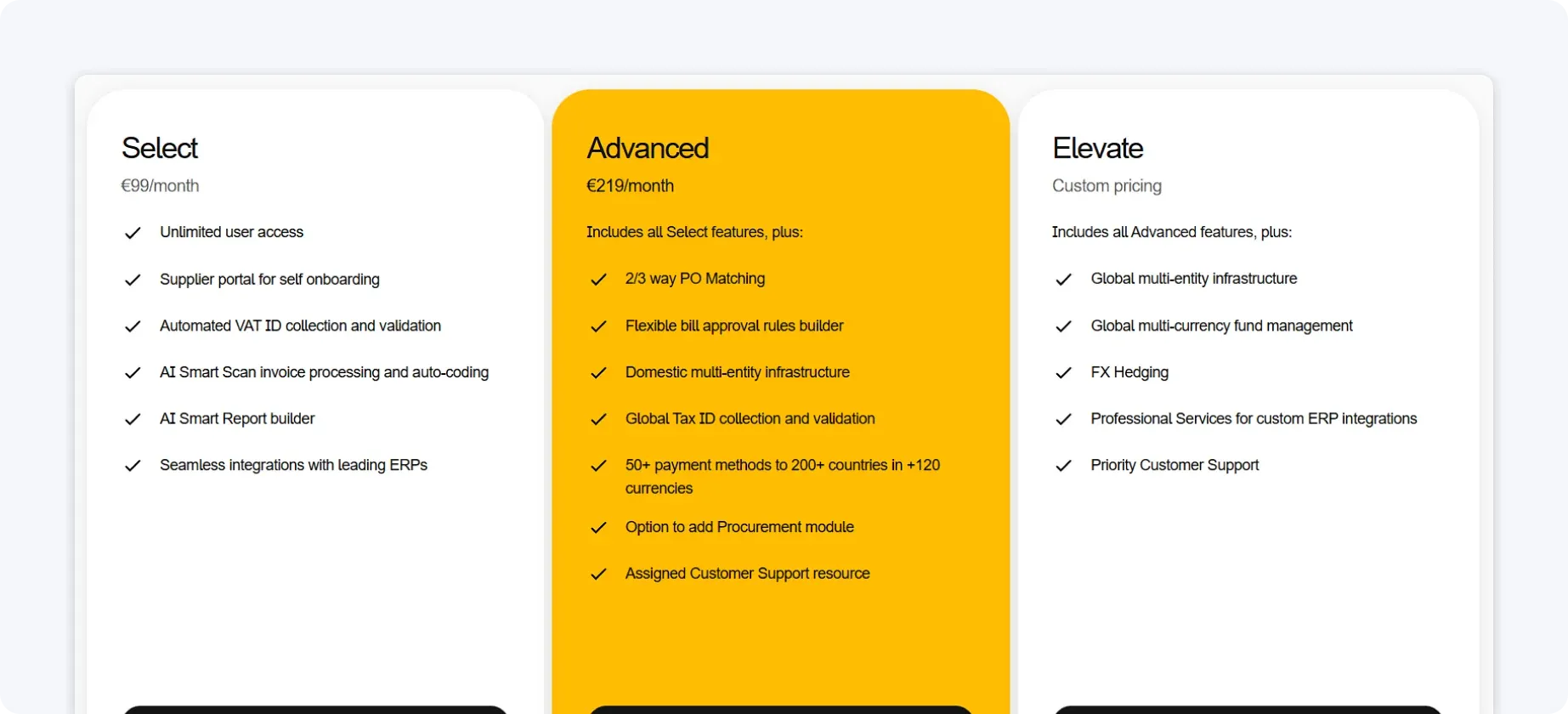
Costs are higher than standard accounting tools, reflecting its focus on complex global payments. It’s best suited to high-growth or international companies.
How to choose the right solution for your business
No single accounting or bookkeeping platform is the right fit for every business. Team size, financial complexity, growth stage, and how involved you want to be day to day all make a difference.
A tool that works well for a company with in-house finance support may feel unnecessarily heavy for a smaller team, while simpler tools can struggle as requirements grow.
The goal is to choose a solution that supports how your business operates today, without creating friction or forcing you into processes you don’t need.
Here are a few practical points to consider:
- Start with what actually takes up your time: Look at the tasks that slow you down most, such as invoicing, VAT tracking, reconciling transactions, or chasing admin. Prioritise tools that reduce effort in those specific areas.
- Consider how hands-on you want to be: Some platforms automate tasks but still expect regular oversight, setup, and configuration. Others operate more like managed services, where bookkeeping is handled for you. Be clear about whether you want control, convenience, or a balance of both.
- Think beyond the price alone: Cheaper software can still be costly in terms of time and manual work. Compare the subscription cost against the admin it removes and the clarity it gives you over your finances.
- Choose a solution that can grow with you: Make sure the solution can handle changes like higher transaction volumes, VAT registration, or more complex reporting.
Different tools suit different businesses, but if you’re looking for an all-in-one solution that automates everyday accounting tasks, reduces admin, and gives you a clear, real-time view of your finances without complex setup, ANNA is designed to do exactly that.
Why ANNA is the best accounting automation software
Accounting automation should make running a business easier. While many tools offer powerful features, they often rely on manual setup, multiple integrations, or ongoing accountant involvement. For freelancers and small business owners, this can quickly turn automation into more admin.
ANNA is different. It’s built to remove accounting work altogether by combining a business account with fully automated accounting, so everything stays organised in real time with minimal effort.
With ANNA, you can manage your money and accounting in one place. Here’s what you get:
- Business account with built-in accounting: Keep banking and accounting connected automatically, so every transaction is recorded and categorised as it happens.
- Free 2025/26 Self Assessment filing: Relax while ANNA fills out and files your Self Assessment return automatically, completely for free. Already paid another provider? ANNA will refund the filing fee when you switch.
- Automated expense tracking and categorisation: Get automatic expense sorting, helping you stay on top of spending without manual input.
- Invoicing and payment tracking: Create, send, and track invoices in one place, with visibility over what’s been paid and what’s outstanding.
- VAT tracking and reminders: Track VAT automatically and get reminders before deadlines, reducing stress and helping you stay compliant.
- Receipt capture and expense management: Upload receipts digitally and match them to transactions for clean, accurate records.
- Real-time financial visibility – See where your business stands at any moment, with up-to-date income, expenses, and cash flow.
Sign up with ANNA today and see how easy it can be to manage your finances.
Read the latest updates


![What Is Marginal Relief? [Everything You Need to Know]](https://storage.googleapis.com/anna-website-cms-prod/small_cover_3000_130_1ef44f67d1/small_cover_3000_130_1ef44f67d1.webp)







You may also like
![What Is Process Automation in Accounting? [Explained]](https://storage.googleapis.com/anna-website-cms-prod/small_cover_3000_12_7b691ef177/small_cover_3000_12_7b691ef177.webp)
![10 Best Accounting Software for Small Businesses [Comparison]](https://storage.googleapis.com/anna-website-cms-prod/small_cover_3000_14_d1471dd859/small_cover_3000_14_d1471dd859.webp)
![How to Choose Accounting Software for Your Business? [Guide]](https://storage.googleapis.com/anna-website-cms-prod/small_cover_3013_f47de4d283/small_cover_3013_f47de4d283.webp)
![How Will Automation Affect Accounting in 2026? [Full Guide]](https://storage.googleapis.com/anna-website-cms-prod/small_cover_3000_11_514d5404c1/small_cover_3000_11_514d5404c1.webp)
Open a business account in minutes
