
Xero vs QuickBooks: Which Is Better for UK Businesses?


Compare Xero vs QuickBooks for UK businesses to find the right accounting solution for invoicing, VAT compliance, reporting, and long-term growth.


In this article
Choosing the right accounting software is one of the most important decisions a UK business owner will make.
For many sole traders, limited companies, and small and medium-sized enterprises (SMEs), software solutions are central to everyday financial tasks like invoicing, bookkeeping, VAT compliance, and tax reporting.
However, there is no one-size-fits-all when it comes to accounting software, because your business size, industry, budget, and even your accountant’s preferences all play a role.
In this article, we’ll compare Xero vs QuickBooks for UK businesses. We’ll analyse their features, pricing, and utility, so you can decide which one fits your business best. If you’re still unsure, we’ll also introduce an alternative worth considering.
What exactly are Xero and QuickBooks?
Xero and QuickBooks Online are cloud-based accounting platforms that help businesses manage day-to-day financial operations.
Both are widely used in the UK and recognised by HMRC as compliant with Making Tax Digital (MTD) for VAT returns. They have matured into full-featured accounting systems over the last decade, offering automation, reporting, integrations, and mobile access.
Despite serving the same core purpose, their strengths differ. Xero tends to focus on broader integrations and collaboration, while QuickBooks emphasises automation and everyday simplicity.
Before you start considering your ideal candidate, think about your specific business needs. Here’s a checklist of what most small businesses require from accounting software:
- Simple invoicing with online payments
- Reliable bank reconciliation
- VAT and MTD compliance
- Accurate expense tracking and receipt capture
- Reporting and business insights
- Easy collaboration with accountants or bookkeepers
- Helpful integrations
- Affordable pricing that scales with growth
Both Xero and QuickBooks aim to fulfil these expectations, but they take different approaches to delivering them.
Xero vs QuickBooks: The core features head-to-head
Let’s take a look at how the core accounting features of both contenders compare:
1. Invoicing and day-to-day cash flow management
Invoicing is one of the most critical day-to-day functions of any accounting system. It affects cash flow, client relationships, and the speed of cash inflow. While both Xero and QuickBooks offer professional invoicing tools, they approach the workflow in slightly different ways.
QuickBooks invoicing
QuickBooks is particularly strong when it comes to invoicing workflows. All plans include unlimited invoices, even at the entry level. This makes it attractive for sole traders and small service businesses that invoice frequently.
Key invoicing features include:
- Fully customisable invoice templates
- Automatic invoice numbering
- Built-in payment links for cards and bank transfers
- Automatic payment reminders
- Invoice status tracking, including customer view notifications
QuickBooks also integrates with payment providers, so payments are automatically matched to invoices upon receipt. This reduces manual reconciliation and improves cash flow visibility.
Xero invoicing
Xero’s cheapest plan limits the number of invoices you can send per month, which can become restrictive as your business grows.
Xero’s invoicing features include:
- Custom branding and layouts
- Quote-to-invoice conversion
- Recurring invoices for regular clients
- Online payment options
- Comprehensive audit trails
Where Xero stands out is in how invoicing connects to the wider accounting system. Quotes, invoices, and payments all flow cleanly into reporting and cash flow forecasts.
The verdict on invoicing
QuickBooks is the stronger option for invoicing. Unlimited invoices on all plans and built-in payment automation make it better suited to businesses that invoice frequently and rely on steady cash flow.
Xero’s invoicing is well structured, but limits on lower-tier plans reduce its appeal at the entry level.
2. Bank feeds and reconciliation
Bank reconciliation is one of the most time-consuming aspects of bookkeeping, making automation particularly valuable.
QuickBooks bank reconciliation
QuickBooks focuses heavily on automation. Once bank feeds are connected, the system learns from previous categorisations and applies rules automatically.
Key features include:
- Smart categorisation rules that improve over time
- Automatic transaction matching
- Clear explanations of suggested categories
- Fast reconciliation for high-volume bank accounts
This approach works well for business owners who want to spend as little time as possible on bookkeeping.
Xero bank reconciliation
Xero also provides reliable bank feeds with most UK banks, but it takes a more controlled approach.
Xero’s reconciliation features include:
- Daily bank feeds
- Transparent matching suggestions
- Manually created rules
- Comprehensive audit trails
While Xero may require more setup initially, accountants often prefer its approach because it produces cleaner records and clearer documentation.
The verdict on bank reconciliation
QuickBooks is more suitable for bank reconciliation. Its automation, smart categorisation, and fast matching save significant time, particularly for high-volume accounts. Xero offers greater control, but requires more manual setup.
3. VAT and MTD compliance
For VAT-registered UK businesses, Making Tax Digital isn’t optional. Accounting software must be able to track VAT accurately, apply the correct rules, and submit returns directly to HMRC. While both Xero and QuickBooks are MTD-recognised, the experience of managing VAT differs.
QuickBooks VAT features
QuickBooks supports MTD-recognised VAT submissions directly to HMRC and handles standard VAT schemes, the Flat Rate Scheme, and partial exemptions.
Features include:
- Automatic VAT tracking on transactions
- VAT summary dashboards
- Direct VAT submissions
- Transparent VAT liability overview
For straightforward VAT setups, QuickBooks performs well. However, businesses with multiple VAT rates, mixed supplies, or edge cases often need to spend more time configuring VAT settings to avoid errors.
Xero VAT features
Xero is widely regarded as particularly strong when it comes to VAT workflows and reporting, especially for businesses with more complex requirements.
Features include:
- MTD-recognised VAT returns
- Transparent audit trails
- Improved handling of complex VAT schemes
- Accountant-friendly VAT reports
Xero’s VAT reports are widely trusted by UK accountants, reducing back-and-forth during reviews and making year-end checks smoother and faster.
The verdict on VAT and MTD compliance
Xero is the better choice for VAT and MTD compliance. While both platforms meet HMRC requirements, Xero’s clearer audit trails and stronger handling of complex VAT scenarios make it more reliable for businesses working closely with accountants.
4. Expense tracking and receipt capture
Accurate expense tracking is essential for understanding true profitability and ensuring allowable expenses are claimed correctly. The difference between Xero and QuickBooks lies in how structured the process is.
QuickBooks expenses
QuickBooks focuses on simplicity and speed, which works well for sole traders and businesses with small teams.
Key features include:
- Mobile app receipt capture
- Automatic receipt-to-bank transaction matching
- Quick and simple expense categorisation
- Support for billable expenses
This setup suits business owners who want a low-effort system that keeps their records broadly accurate without adding administrative complexity.
Xero expenses
Xero’s expense functionality is more formal and better suited to businesses with many employees or those with defined expense policies.
Key features include:
- Receipt uploads via mobile app or email
- Employee expense claim submissions
- Manager approval workflows
- Detailed expense reporting
This approach provides stronger controls and clearer records, which becomes increasingly important as businesses grow and accountability needs become more formal.
The verdict on expense tracking
QuickBooks is better for solo users, while Xero is better for teams. QuickBooks prioritises speed and simplicity, making it ideal for sole traders. Xero’s approval workflows and employee expense claims give it the edge for growing businesses.
5. Reporting and financial insights
Accounting software should not just record the past, but also help business owners understand what is happening now and plan for what comes next. This is where financial insights come into play.
QuickBooks reporting
QuickBooks places strong emphasis on visibility and forecasting, which appeals to business owners who want clear, actionable insights.
Reporting features include:
- Profit and loss statements
- Balance sheets
- Cash flow forecasts
- Customisable reports
Cash flow forecasting is especially useful, as it can help businesses anticipate shortfalls or surpluses and plan accordingly.
Xero reporting
Xero focuses on robust, accountant-grade financial reporting and budgeting.
Reporting features include:
- Highly customisable financial reports
- Budget tracking and variance analysis
- Strong export and sharing options
- Integration with advanced reporting and forecasting tools
While Xero does offer forecasting, businesses often have to rely on third-party apps for deeper forward-looking insights.
The verdict on reporting
Businesses that value cash flow forecasting and day-to-day visibility will prefer QuickBooks, whereas Xero suits those needing detailed financial reports.
6. Users, permissions, and collaboration
As a business grows, more people need access to financial data, including staff, bookkeepers, and external accountants.
QuickBooks user access
QuickBooks limits the number of users depending on the plan, with advanced permissions available only on higher tiers.
Consequently, costs can increase as teams grow and access requirements expand.
Xero user access
Xero allows unlimited users on all plans, which is one of its biggest advantages.
This means businesses can:
- Add employees without extra cost
- Grant accountants access at no additional charge
- Control permissions in detail
This makes Xero particularly attractive for collaborative environments.
The verdict on user access
Xero is superior for user access and collaboration. Allowing unlimited users on all plans makes it far more scalable and cost-effective as businesses grow.
7. Integrations and app ecosystem
Integrations allow accounting software to adapt to different industries, sales channels, and workflows.
Xero integrations
Xero connects with over 1,000 third-party applications, such as payroll providers, e-commerce platforms, Customer Relationship Management systems, and industry-specific tools. It integrates seamlessly with ANNA, as well.
This extensive ecosystem allows businesses to build a tailored setup that fits their exact needs.
QuickBooks integrations
QuickBooks also supports a wide range of integrations, but the ecosystem is smaller and more focused on core accounting and finance functions.
The verdict on integrations
Xero wins on integrations. Its extensive app ecosystem gives businesses greater flexibility to build workflows tailored to their industry and tools.
8. Pricing and overall value
Pricing structures vary, but general patterns are clear:
Xero pricing
Xero plans range from £16 to £65 per month for VAT-registered businesses, while they also offer a Simple plan (from £7) for non VAT-registered users:
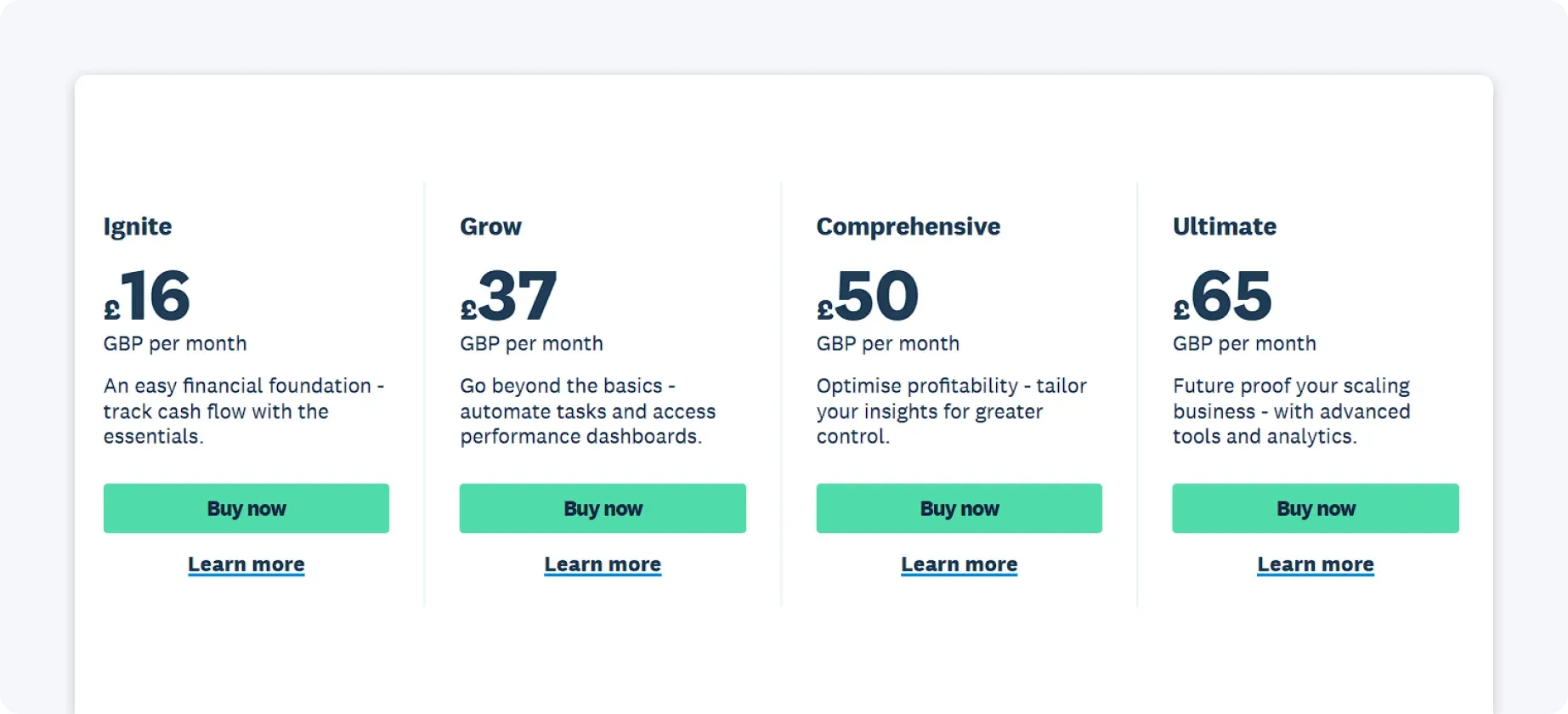
Lower-tier plans include many limits, which can push growing businesses into higher tiers sooner than expected.
QuickBooks pricing
QuickBooks generally starts at a lower price point and offers strong value for very small businesses:
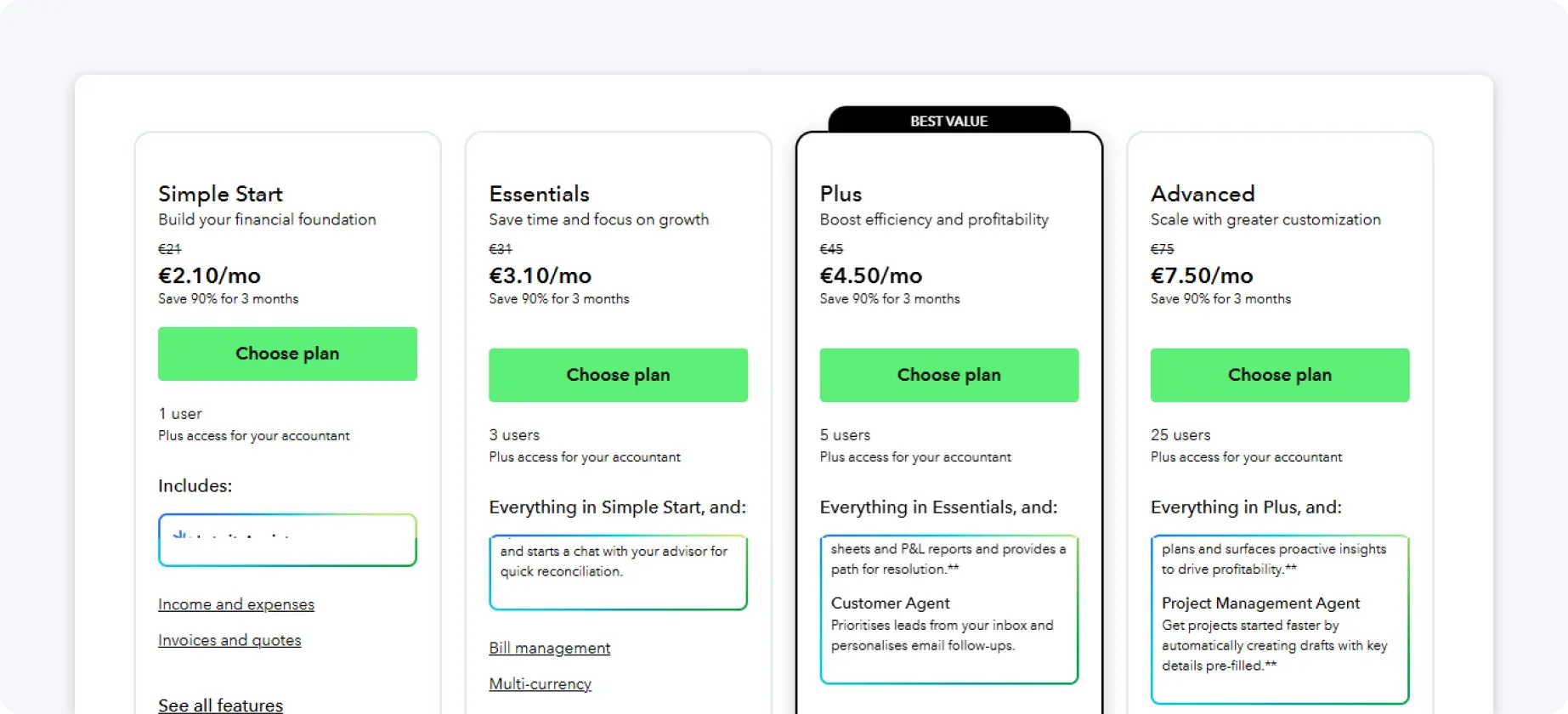
However, higher tiers can become costly as more users and features are added.
The verdict on pricing
QuickBooks is more affordable at the entry level. Xero tends to offer better value for businesses that are scaling.
Xero vs QuickBooks for UK businesses: The final verdict
The table below summarises which software performs better for each core feature based on real-world use for UK businesses:
Comparison table
| Feature | QuickBooks | Xero |
| Invoicing and day-to-day cash flow | Winner | |
| Bank feeds and reconciliation | Winner | |
| VAT and MTD compliance | Winner | |
| Expense tracking for solo users | Winner | |
| Expense tracking for teams | Winner | |
| Reporting and forecasting | Winner | |
| Financial reporting depth | Winner | |
| Users and permissions | Winner | |
| Integrations and app ecosystem | Winner | |
| Entry-level pricing | Winner | |
| Scalability and long-term value | Winner |
Looking at the comparison as a whole, Xero is a better fit for UK businesses that need strong collaboration, detailed reporting, and long-term scalability.
On the other hand, QuickBooks is more suited to sole traders and small businesses that want straightforward bookkeeping, simple expense tracking, and an easy setup at a competitive entry price.
If you want the best of both worlds, try ANNA
If you prefer the simplicity and automation of QuickBooks but want the UK focus and VAT clarity that are typically associated with Xero, ANNA offers a compelling alternative.
ANNA is built specifically for UK small businesses, freelancers, and limited companies, combining accounting, tax, and a business account in one place.
ANNA brings the essentials together in an easy-to-use, HMRC-compliant way.
Here’s what you get with ANNA:
- UK business account with sort code and account number
- Automatic expense categorisation using AI
- Receipt capture via mobile app
- Real-time cash flow visibility
- MTD-recognised VAT calculations and submissions
- Corporation Tax estimates for limited companies
- Invoice creation and tracking
- Built-in tax reminders so you never miss a deadline
- Seamless link between business account and accounting with no manual reconciliation
ANNA is ideal for business owners who want to spend less time managing finances and more time running their business, without sacrificing compliance or visibility.
So, if you want accounting that just works for UK businesses, open an ANNA account today and take control of your finances with one simple app.
Read the latest updates


![What Is Marginal Relief? [Everything You Need to Know]](https://storage.googleapis.com/anna-website-cms-prod/small_cover_3000_130_1ef44f67d1/small_cover_3000_130_1ef44f67d1.webp)







You may also like
![5 Best ClearBooks Alternatives for UK Businesses [Comparison]](https://storage.googleapis.com/anna-website-cms-prod/small_cover_3000_47_5ce9c9d466/small_cover_3000_47_5ce9c9d466.webp)
![10 Best Accounting Software for Small Businesses [Comparison]](https://storage.googleapis.com/anna-website-cms-prod/small_cover_3000_14_d1471dd859/small_cover_3000_14_d1471dd859.webp)
![How to Choose Accounting Software for Your Business? [Guide]](https://storage.googleapis.com/anna-website-cms-prod/small_cover_3013_f47de4d283/small_cover_3013_f47de4d283.webp)

Open a business account in minutes
