
5 Best MTD Self Assessment Software for HMRC [Compared]


Explore the best MTD Self Assessment software so you can compare features, simplify tax admin, stay compliant, and choose the right solution.

In this article
Making Tax Digital for Self Assessment is one of the biggest changes His Majesty’s Revenue & Customs (HMRC) has introduced for sole traders, landlords, and self-employed individuals in recent years. From quarterly updates to digital record keeping, the days of filing one annual tax return from spreadsheets are coming to an end.
As we move into 2026, choosing the right MTD Self Assessment software is no longer optional. It directly affects how much time you spend on tax, how confident you feel about compliance, and whether deadlines become a source of stress.
This guide breaks down the best MTD Self Assessment software for HMRC in 2026, comparing features, strengths, limitations, and the types of users each platform is best suited for.
Key points
- MTD changes how often you report, not how much tax you pay 📅
From 2026, quarterly digital updates become mandatory for many self employed people and landlords, but your final tax bill is still settled through the usual January deadline. - Not all MTD software actually saves you time ⏳
Plenty of platforms tick the HMRC compliance box but still leave categorising, reconciling, and chasing deadlines down to you. - The right software should work in the background 🔄
Tools that connect directly to your business account and update your records automatically cut out most of the manual admin that traditional accounting software still relies on. - ANNA is built for business owners, not accountants 🚀
ANNA combines your business account, bookkeeping, and MTD submissions in one place, so your records stay current without extra input from you.
Why are people looking for good MTD Self Assessment software?
The short answer is – time. While the goal of MTD is to reduce errors and modernise the tax system, it also adds more admin for business owners who are already stretched for time.
Instead of one submission per year, you’re now expected to keep submitting updated digital records using compatible software at least four times per year.
For many freelancers and sole traders, this has exposed a gap between traditional accounting software and what they actually need.
Common frustrations include:
- Too much manual categorisation and reconciliation
- Software built for accountants, not business owners
- Separate tools for banking, bookkeeping, and tax
- Unclear tax estimates and jargon-heavy dashboards
- No proactive reminders or compliance support
Many MTD-compatible tools technically meet HMRC requirements, but still leave the work in the user’s hands. That means more time checking transactions, fixing mistakes, and worrying about whether everything is up to date.
The shift is all about reducing the amount of mental energy tax takes up in the first place.
What makes good MTD Self Assessment software in 2026?
Not all MTD-compatible software is created equal. In 2026, the best platforms go beyond compliance and actively help users stay organised and confident.
The strongest MTD Self Assessment software typically includes:
- HMRC-recognised MTD compatibility
- Automatic transaction capture from real business spending
- Ongoing digital record keeping without spreadsheets
- Quarterly update preparation and submission
- Clear estimates for Income Tax and National Insurance
- Deadline reminders and compliance alerts
- Simple, non-accounting language
Most importantly, it should reduce the amount of manual work required to stay compliant, rather than simply moving it to a digital interface.
The top 5 MTD Self Assessment software options in 2026
There are now several HMRC-recognised platforms that support MTD for Self Assessment. Each has strengths, but they serve very different types of users.
Here are the five best options to consider in 2026:
1. ANNA
ANNA is designed specifically to remove admin from the process of running a small business, including tax.
Unlike traditional accounting software that adds MTD features to an existing accounting system, ANNA gives you a simple, automated way to meet your MTD requirements. You sign up, connect your existing bank account, and ANNA does the heavy lifting for you.
Here’s what ANNA offers for MTD Self Assessment:
- Keep your financial records up to date automatically
- Track and categorise your income and expenses
- Calculate your tax in real time
- Prepare and submit your quarterly MTD updates
- Keep your records digitally without spreadsheets
- Show what you owe in clear, simple language
- Send reminders so you don't miss important deadlines
Because ANNA connects directly to your business account, your records stay up to date naturally, without extra effort.
ANNA vs traditional MTD accounting tools
Here is where ANNA differs from most MTD Self Assessment software:
| Category | ANNA | Traditional MTD software |
| Business account | Built-in UK business account | External bank required |
| Record keeping | Automatic and continuous | Manual review required |
| Expense categorisation | Automatic in real time | Mostly manual |
| MTD updates | Supported with minimal setup | User-led preparation |
| Tax visibility | Plain-English insights | Accounting terminology |
| Deadline reminders | Built-in alerts | Often limited |
| Ease of use | Built for non-accountants | Accounting-focused |
| Admin effort | Very low | Moderate to high |
The biggest difference is how little you need to do yourself. With traditional accounting software, you may need to learn how the software works, connect and configure different tools, and potentially get an accountant to help you manage everything.
ANNA takes a different approach: connect your bank account and let the software handle the calculations, records and submissions automatically.
Who is ANNA best for?
ANNA is best suited to sole traders, freelancers, landlords, and small business owners who want MTD compliance to happen with minimal involvement.
If you want your business management, records, and tax obligations connected automatically, ANNA offers a level of simplicity and automation that traditional accounting platforms don’t.
It’s also a strong choice for anyone new to MTD who wants confidence that updates, deadlines, and records are handled correctly without having to understand the mechanics behind them.
Pricing
ANNA offers clear, tiered pricing with no hidden fees:
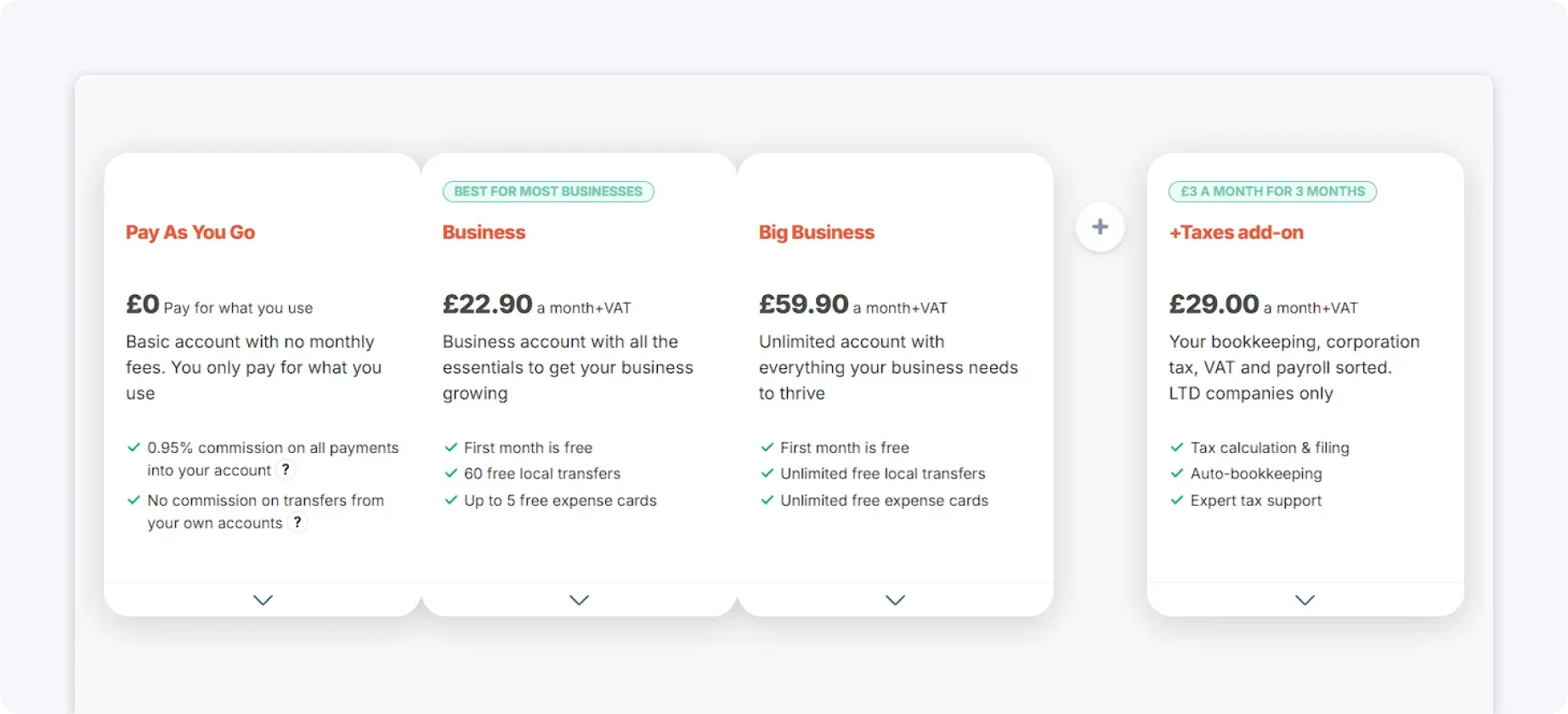
All plans include core compliance features, with higher tiers unlocking more automation and support as your business grows.
2. QuickBooks Online
QuickBooks Online is one of the most well-known accounting platforms that supports MTD for Self Assessment. It’s widely used by accountants and offers strong reporting and bookkeeping tools.
Here’s what QuickBooks offers:
- HMRC-recognised MTD compatibility
- Income and expense tracking
- Quarterly update preparation
- Self Assessment reporting
- Bank feeds and integrations
- Accountant collaboration
QuickBooks works well if you’re comfortable managing your own bookkeeping or working closely with an accountant. However, there are some limitations for MTD users:
- Manual categorisation and reconciliation
- Accounting-led interface
- No built-in business account
- Limited automation for sole traders
For MTD users, this means compliance is fully achievable, but largely dependent on how actively you manage your books throughout the year.
Who is QuickBooks best for?
QuickBooks Online is best for users who are already comfortable with accounting software or who work closely with an accountant. It suits businesses that want detailed reporting, strong audit trails, and full visibility into their numbers, even if that comes with more manual involvement.
For MTD Self Assessment users, QuickBooks works best when tax is treated as an extension of bookkeeping rather than something to be automated. If you prefer hands-on control and don’t mind regular reviews, it remains a reliable option.
Pricing
QuickBooks uses tiered pricing based on features:
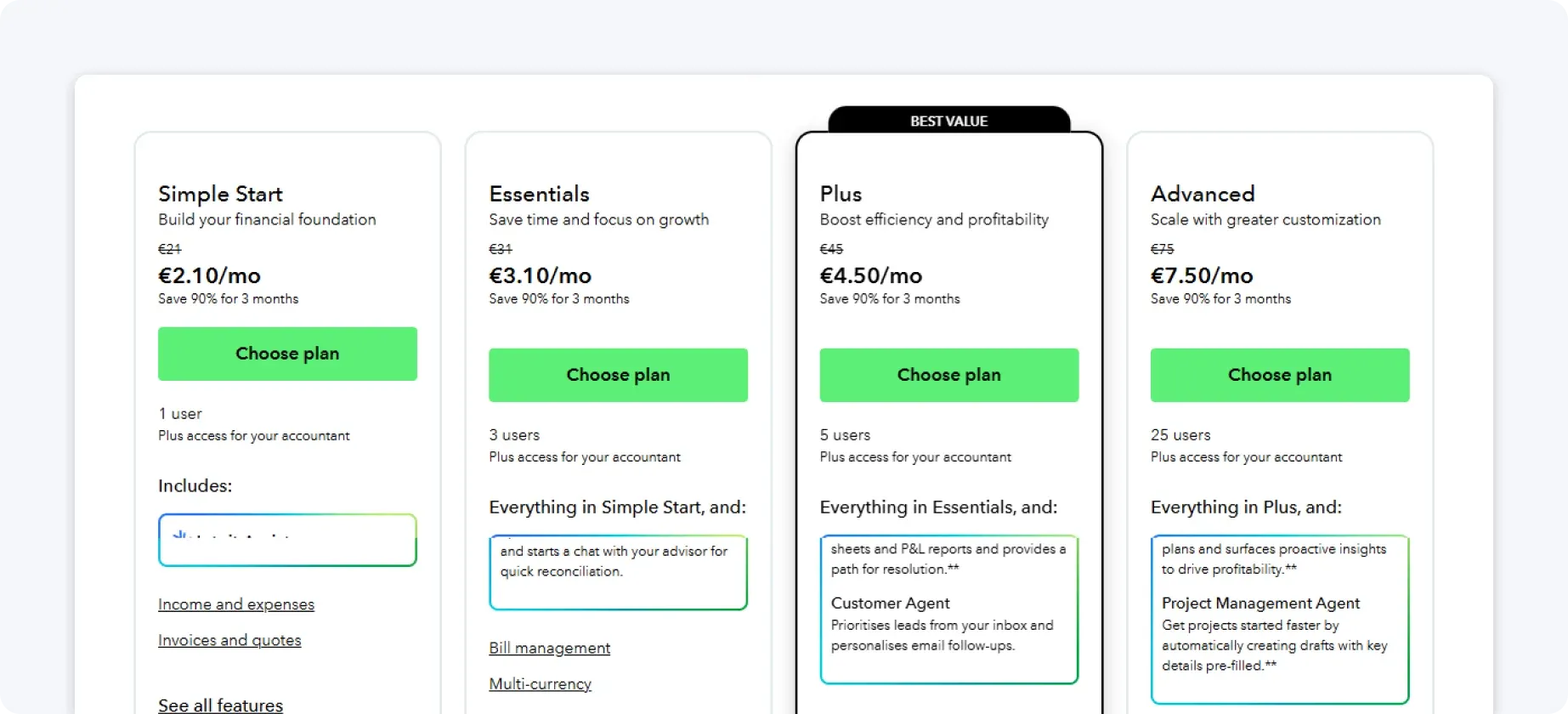
Costs increase as you unlock more automation and reporting, which can add up over time.
3. FreeAgent
FreeAgent is popular among UK freelancers and contractors, particularly those with simple tax affairs. It has built-in MTD Self Assessment support and basic tax estimates.
Here’s what FreeAgent offers:
- MTD Self Assessment compatibility
- Income and expense tracking
- Tax estimates for Self Assessment
- VAT tracking
- Invoicing
- Accountant access
FreeAgent focuses on simplicity, but its automation is limited compared to newer platforms.
These are the drawbacks for MTD-focused users:
- Mostly manual record keeping
- Limited automation
- Reliance on an external bank
- Increasingly restrictive as income grows
FreeAgent takes a lighter approach, aiming to keep things accessible for individuals rather than for large finance teams.
Who is FreeAgent best for?
FreeAgent is best for freelancers and contractors with simple income streams and predictable expenses. It works well when tax affairs are straightforward and unlikely to change significantly over time.
If income increases or business activity becomes more varied, the lack of deeper automation and flexibility can become limiting.
FreeAgent is often a good starting point, but not always the best long-term solution for growing businesses.
Pricing
FreeAgent is available at no extra cost when bundled with certain UK business bank accounts, including NatWest, Royal Bank of Scotland, Ulster Bank, and Mettle.
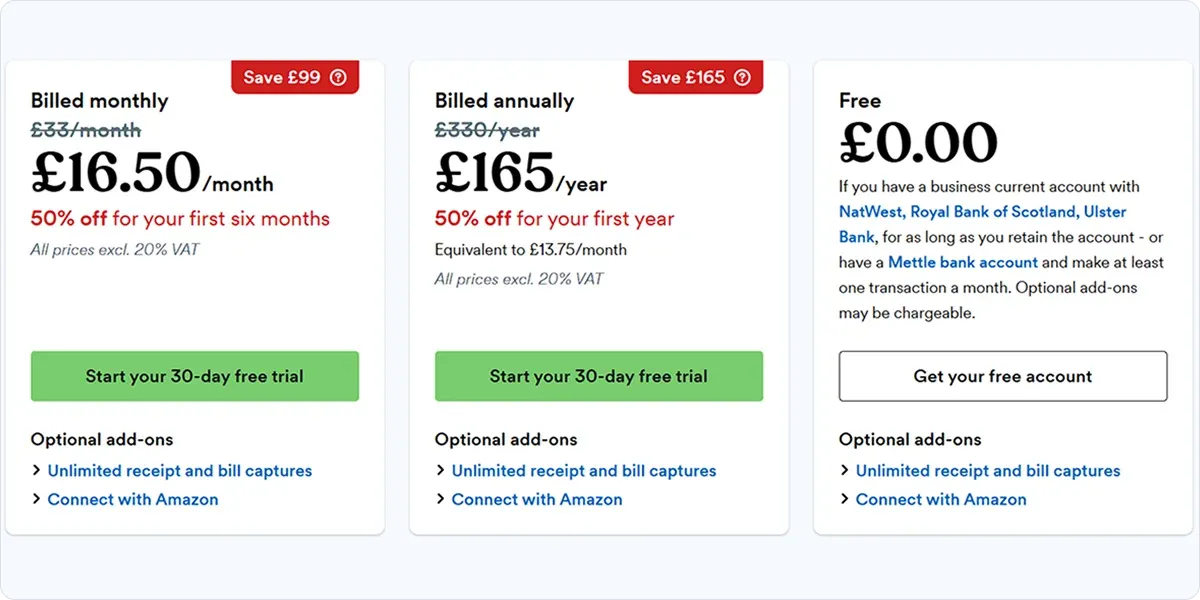
For those using it independently, standalone pricing is offered through a single plan, keeping costs predictable but functionality relatively fixed.
4. Sage Accounting
Sage Accounting is a long-established platform with MTD capabilities for both VAT and Self Assessment. It’s built around traditional accounting workflows and compliance.
Here’s what Sage offers:
- HMRC-recognised MTD compliance
- Digital record keeping
- Quarterly update support
- Reporting and forecasting
- Accountant-led workflows
Sage is comprehensive, but often feels heavy for sole traders who want to stay compliant with minimal effort.
There are some limitations to Sage Accounting:
- Accounting-heavy interface
- Manual workflows
- External bank requirement
- Non-intuitive design for non-accountants
For MTD Self Assessment, Sage delivers reliability, but often at the cost of speed and ease of use.
Who is Sage Accounting best for?
Sage Accounting is best suited to established businesses that value structure, detailed reporting, and accountant-led workflows. It’s a strong choice for users who already operate within formal accounting processes and want MTD compliance to sit alongside broader financial management.
For sole traders focused on speed and simplicity, Sage can feel heavier than necessary. It tends to work best where accounting depth is a priority rather than minimal admin.
Pricing
Sage uses a tiered pricing structure that scales as you add features such as payroll, advanced reporting, and multi-user access.
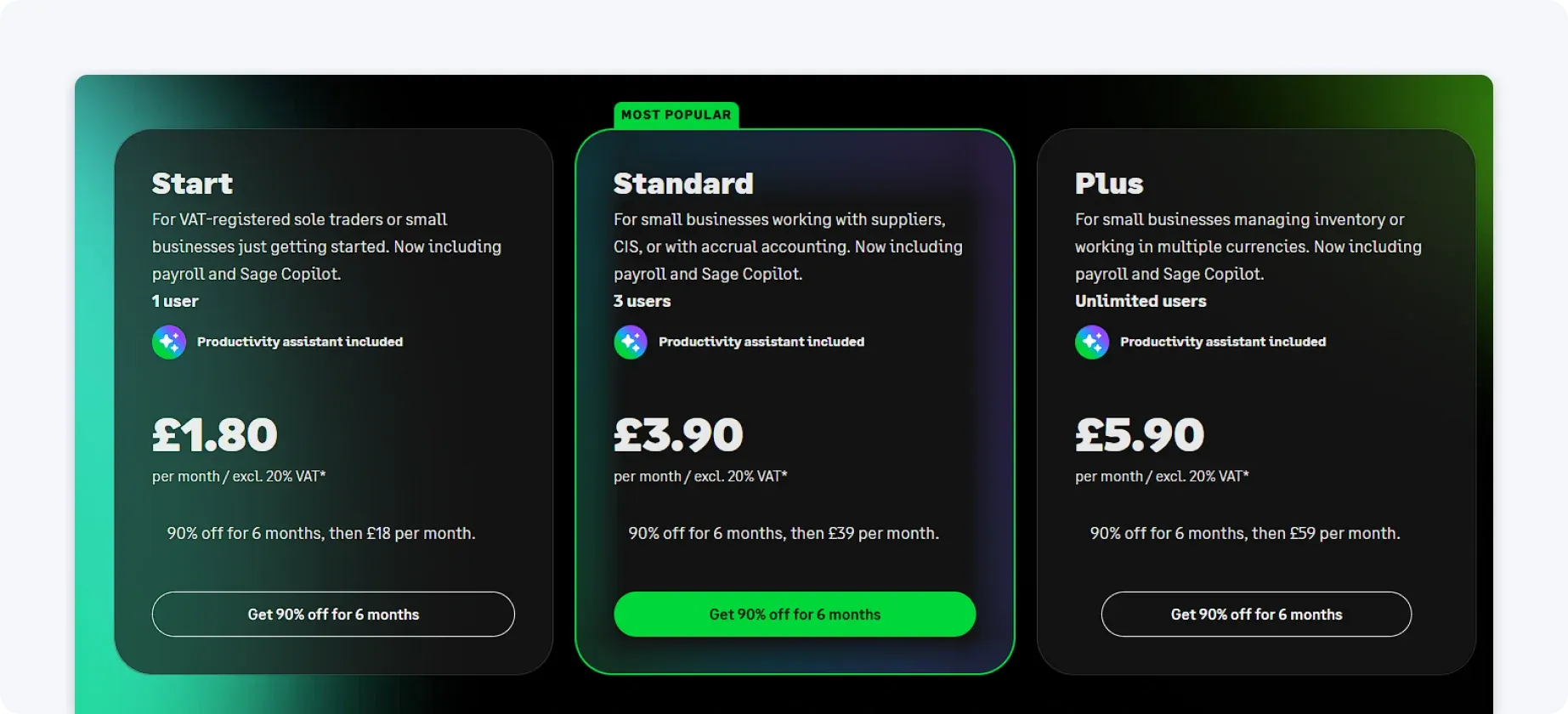
While this flexibility allows businesses to customise their setup, costs can rise quickly when additional modules are added.
5. Coconut
Coconut is a newer tool aimed at freelancers and sole traders, combining light banking features with tax tracking.
Here’s what Coconut offers:
- MTD Self Assessment support
- Income and expense tracking
- Simple tax estimates
- Basic banking features
Coconut is easy to use, but its functionality is limited compared to more comprehensive platforms.
These are the potential downsides to Coconut:
- Limited automation
- Basic reporting features
- Unsuitability for growing businesses
- Reduced compliance tools
Coconut focuses on lowering the barrier to entry for tax tracking, offering a more guided experience than full accounting platforms.
Who is Coconut best for?
Coconut is best for early-stage freelancers who want a simple way to track income and expenses and get a basic view of their tax position. It’s easy to use and quick to set up, making it appealing for people new to self-employment.
That simplicity comes with trade-offs. As MTD requirements become more demanding and businesses grow, Coconut often lacks the depth and automation needed to scale comfortably.
Pricing
Coconut uses a subscription-based pricing model:
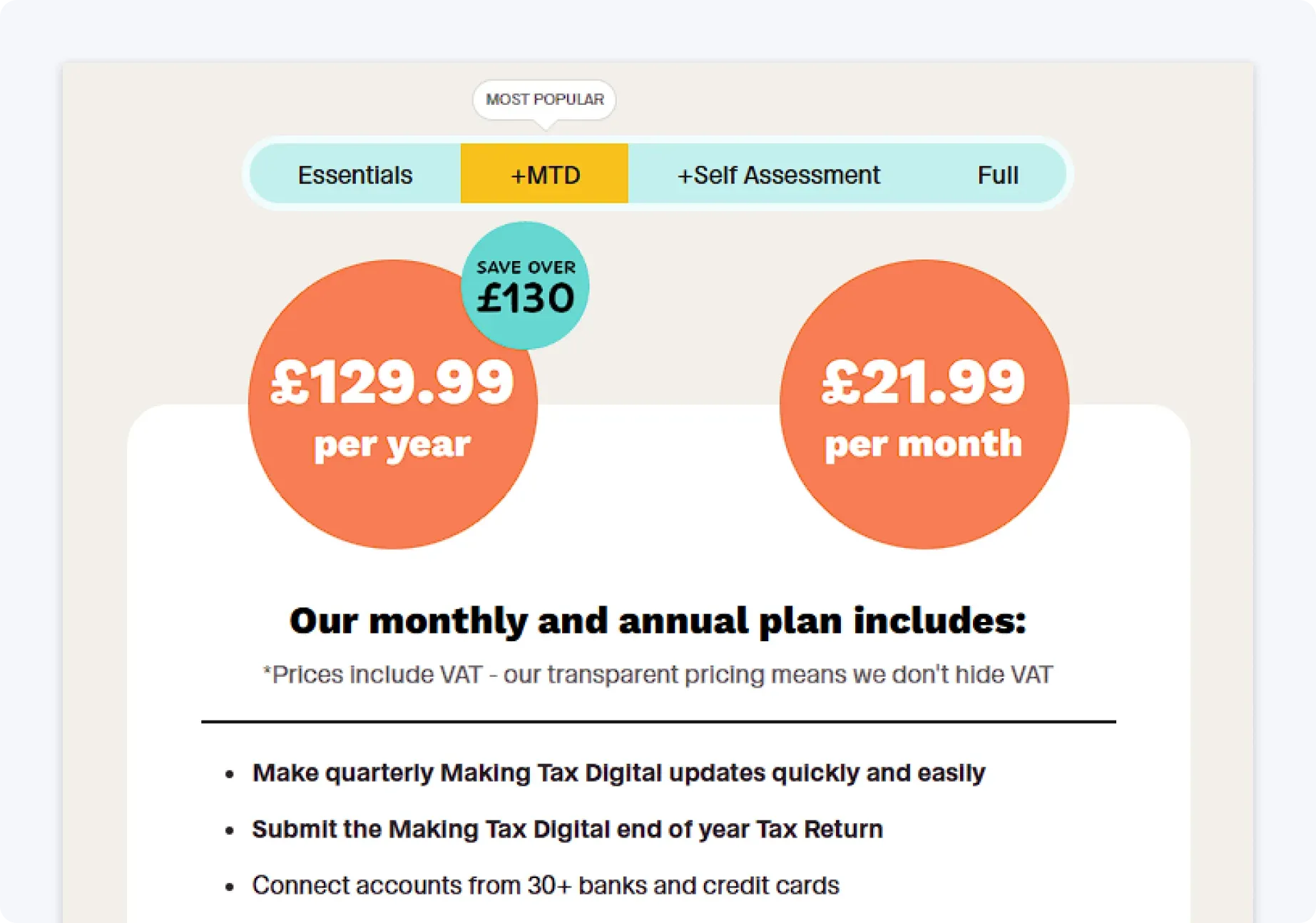
Costs remain affordable for early-stage freelancers, but functionality is limited at lower tiers. As your business grows, you may find that upgrading is necessary to access more advanced tools, which can reduce its value over time.
How to choose the right MTD Self Assessment software
When comparing MTD Self Assessment software, the key question isn’t just whether a platform is HMRC-recognised, but how it can support your business.
If you want maximum control and detailed reporting, traditional accounting platforms may suit you. If your priority is saving time, avoiding mistakes, and staying compliant with as little intervention as possible, automation becomes just as important as the features themselves.
This is where ANNA stands out. By linking business funds directly to digital records and tax awareness, MTD becomes an ongoing task rather than a background process. For many small businesses, that difference is what makes MTD manageable rather than overwhelming.
Anna is the best solution if your goal is to:
- Spend less time on admin
- Avoid missed MTD deadlines
- Understand your tax position clearly
- Stop thinking like an accountant
Get started today with ANNA, and see how effortless MTD Self Assessment can be for your business.
FAQ
Once MTD applies to you, spreadsheets alone aren't enough. You have to use software that connects to HMRC's systems, though bridging software can link a spreadsheet to a compatible platform if you want to keep some of your existing process.
Late quarterly updates fall under HMRC's points-based penalty system. You build up points for each missed submission, and once you hit the threshold, you get a fixed financial penalty rather than an escalating one.
Yes, you can move between HMRC-recognised platforms at any point. You'll need to make sure your historical records transfer accurately or are re-entered in the new software, since quarterly updates need to reflect a complete and consistent picture of your income.
Not necessarily. Software that automates categorisation and tax estimates reduces the need for hands-on accounting support, though some people still choose to keep an accountant for final checks or more complex tax situations.
Read the latest updates

![What Is Marginal Relief? [Everything You Need to Know]](https://storage.googleapis.com/anna-website-cms-prod/small_cover_3000_130_1ef44f67d1/small_cover_3000_130_1ef44f67d1.webp)




You may also like
![6 Best Self Assessment Tax Software for UK Users [Comparison]](https://storage.googleapis.com/anna-website-cms-prod/small_cover_3009_5a6504812e/small_cover_3009_5a6504812e.webp)
![How to Contact HMRC for Self Assessment [Full Guide]](https://storage.googleapis.com/anna-website-cms-prod/small_cover_3041_5c0c7d0e89/small_cover_3041_5c0c7d0e89.webp)
![How to Register for Self Assessment with HMRC [Complete Guide]](https://storage.googleapis.com/anna-website-cms-prod/small_cover_3007_92339d14b7/small_cover_3007_92339d14b7.webp)

![What Is Self Assessment? [UK Tax Guide for Beginners]](https://storage.googleapis.com/anna-website-cms-prod/small_cover_3000_What_Is_Self_Assessment_UK_Tax_Guide_for_Beginners_0fe2795894/small_cover_3000_What_Is_Self_Assessment_UK_Tax_Guide_for_Beginners_0fe2795894.webp)
![How to Register a Partnership for Self Assessment [Guide]](https://storage.googleapis.com/anna-website-cms-prod/small_cover_3029_957be39a83/small_cover_3029_957be39a83.webp)
![What Do You Need for Self Assessment? [Full Checklist]](https://storage.googleapis.com/anna-website-cms-prod/small_cover_3000_17_46b194a164/small_cover_3000_17_46b194a164.webp)
![How to Recover Your HMRC Self Assessment Sign-In [Guide]](https://storage.googleapis.com/anna-website-cms-prod/small_cover_3000_68_7a5ed93110/small_cover_3000_68_7a5ed93110.webp)
![Self Assessment Tax Return for 2026 [Complete Guide]](https://storage.googleapis.com/anna-website-cms-prod/small_cover_3039_3d3bf5c979/small_cover_3039_3d3bf5c979.webp)
Open a business account in minutes
