
Sage for Making Tax Digital: A 2026 Complete Review


Discover a complete Sage Making Tax Digital review to see how it handles compliance, what bookkeeping work still falls on you & if it fits your needs.


In this article
Sage is accounting software that helps UK businesses comply with Making Tax Digital (MTD) by keeping digital records and submitting tax updates directly to HMRC.
It supports both MTD for VAT and MTD for Income Tax (MTD for ITSA), giving sole traders and small businesses a structured way to stay compliant.
In this Making Tax Digital Sage review, we’ll break down Sage’s features, pricing, pros, and cons – and help you decide whether it’s the right fit for your business in 2026 and beyond.
Key points
- Sage is a safe, HMRC-recognised option for MTD compliance 🛡️
Sage is widely trusted in the UK and covers both MTD for VAT and MTD for Income Tax, making it a reliable choice. However, users still need to categorise transactions, check records, and prepare submissions. - MTD workflows in Sage can reduce admin steps 📊
Features like digital record-keeping, quarterly submissions, and end-of-year declarations are all built into Sage. While the system streamlines reporting, the accuracy and effort still depend on how consistently users maintain their financial records throughout the year. - Sage’s automation and insights are helpful but still assistive ⚙️
Tools like bank feeds, AI categorisation, and real-time dashboards improve visibility and save time. However, they still rely on user review and correction, meaning Sage supports bookkeeping instead of fully automating it. - Pricing reflects a trade-off between cost and manual effort 💷
Sage offers a free plan for simple setups and paid tiers starting from £18 to £59 + VAT per month. Lower-cost plans require more manual input, while higher tiers add features but still don’t eliminate the need for ongoing bookkeeping. - As an alternative, ANNA removes much of the manual workload entirely 🚀
Unlike Sage, which requires active bookkeeping, ANNA automates expense tracking, tax calculations, invoicing, and MTD submissions in the background. With added benefits like free Self Assessment filing for the first year and transfer fee coverage, ANNA is positioned as a simpler alternative for users who want to stay compliant without admin.
Sage for MTD: A review of key features
Sage covers all the core requirements for Making Tax Digital, along with a broader set of accounting tools.
These are Sage’s MTD features:
Digital record-keeping
Digital record-keeping sits at the heart of MTD, and Sage handles this through its bookkeeping system.
You can:
- Record income and expenses manually or via bank feeds
- Upload and store receipts and supporting documents
- Maintain a continuous digital audit trail
Bank feeds help automate data entry by pulling transactions directly into the system. However, transactions still need to be categorised and checked for accuracy.
On higher-tier plans, Sage offers suggested categorisation, but this isn’t fully automatic and still requires user input.
Quarterly MTD submissions
One of the biggest changes under MTD for Income Tax is the move to quarterly reporting.
Sage supports this by providing:
- Structured quarterly update workflows
- Direct integration with HMRC systems
- Submission tracking and history
The process is relatively straightforward once your records are in order. You review your financial summary, confirm the figures, and submit directly through the platform.
However, the key factor here is data quality – if records are incomplete or inconsistent, quarterly submissions can become time-consuming.
End-of-year final declaration
At the end of the tax year, Sage allows you to finalise your records and submit your overall tax bill. Because your data is updated throughout the year, this step is generally quicker than traditional Self Assessment.
But, if your bookkeeping has been inconsistent, this ‘simple’ final step can still involve a significant amount of cleanup.
Real-time tax insights
Sage’s dashboards provide a continuous view of your financial position, which is one of its more practical strengths.
You can see:
- Estimated VAT liabilities
- Profit and loss summaries
- Cash flow trends
This helps with budgeting and reduces the risk of unexpected tax bills.
Automation features
Sage includes several automation tools aimed at reducing manual effort. However, they still require user review; the automation in Sage is best described as assistive rather than fully autonomous.
Sage’s automation features include:
- Bank feed syncing to import transactions automatically
- Pre-configured VAT rates to reduce calculation errors
- Automatic totals and report generation
- AI-assisted suggestions for categorisation and workflows
These features can save time, particularly for users familiar with accounting.
Accountant collaboration
Sage is designed to work closely with accountants, which is a major advantage for many businesses.
You can:
- Grant your accountant access to your records
- Collaborate on submissions and corrections
- Rely on professional oversight for compliance
This can reduce your workload significantly – but it often comes with additional costs, depending on your accountant’s involvement.
The pros of using Sage
Once you move beyond basic features, Sage’s value comes down to how it behaves in day-to-day use under MTD. It’s less about what it can do and more about how it changes the way you manage your finances.
Here are the biggest pros of using Sage:
Reliable, low-risk choice for compliance
One of Sage’s biggest advantages is trust. It’s a long-established platform that’s already widely used for MTD for VAT and is being actively updated for MTD for Income Tax. For many businesses, that reduces uncertainty – you know it’ll meet HMRC requirements and continue to be supported.
Clear structure for staying organised
Sage works well if you prefer a structured accounting environment. Instead of scattered spreadsheets or disconnected tools, everything sits inside a defined system. For users who like control and visibility over their numbers, this structure can feel reassuring.
Good fit if you already have an accountant
Sage is particularly strong in accountant-led setups. If you already rely on professional support, it becomes easier to collaborate, share data, and stay aligned on submissions. In these cases, Sage acts more like a shared workspace than a standalone solution.
Scales with business complexity
Even if it feels basic at entry level, Sage can grow with you. As your business becomes more complicated in terms of multiple income streams, VAT, payroll, or reporting needs, it has the depth to expand without forcing you to switch systems.
Sage pricing
Sage offers a tiered pricing structure, with both free and paid options depending on the level of functionality and automation you need for MTD.
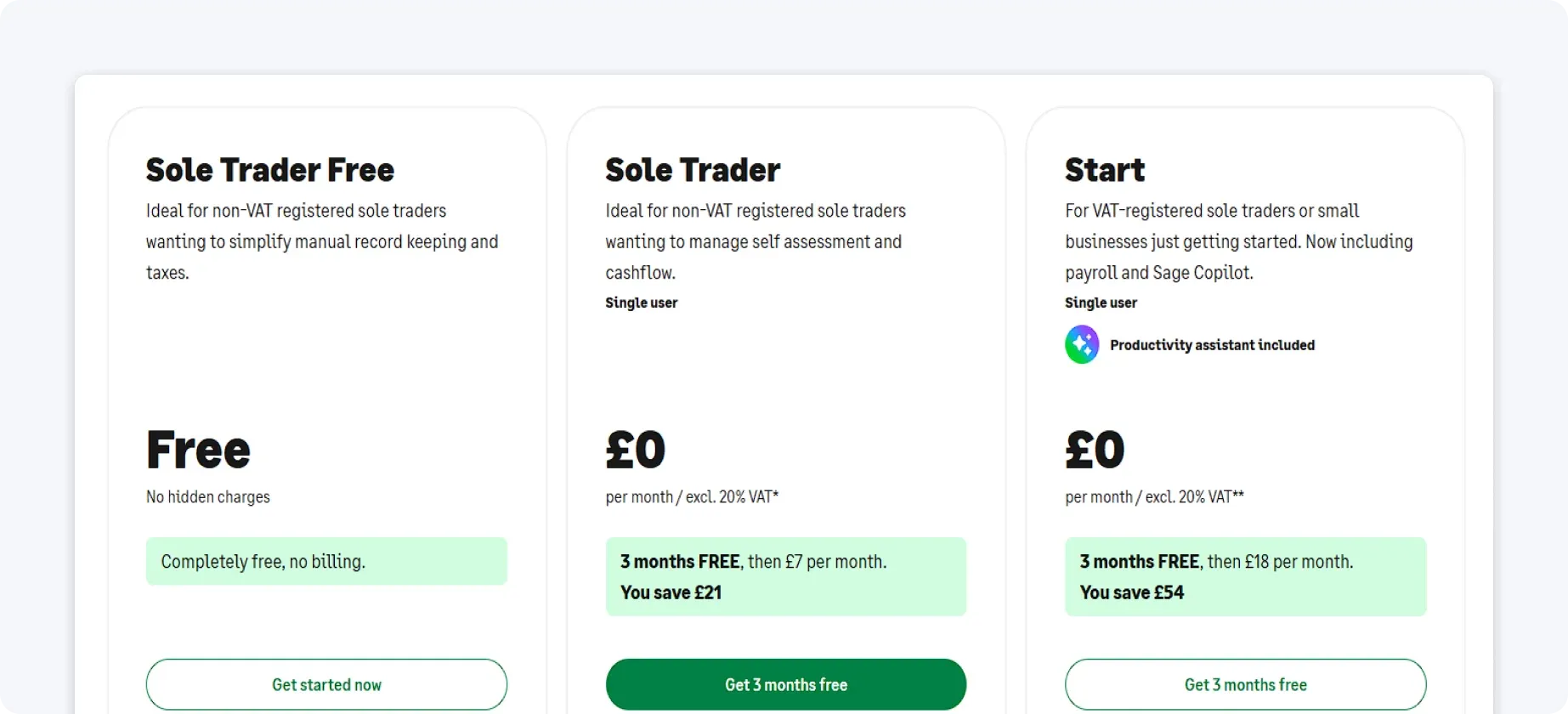
Free plan: Sole Trader Free
Sage’s free plan is designed for sole traders with very simple setups. It works best if you’re not VAT registered, have a low volume of transactions, and only manage a single income stream.
It includes basic MTD functionality for Income Tax, along with income and expense tracking, a single bank connection, and limited invoicing. You also get a simple overview to support your Self Assessment.
This makes it a useful entry point if you want to start preparing for MTD for ITSA without paying upfront.
However, the limitations are noticeable – the free plan doesn’t properly support MTD for VAT, and automation is minimal.
In practice, it’s best seen as a short-term solution or a way to get familiar with the software.
Paid plans
Sage offers several paid tiers under its Sage Accounting range, each designed for different levels of complexity and MTD needs.
The main plans are:
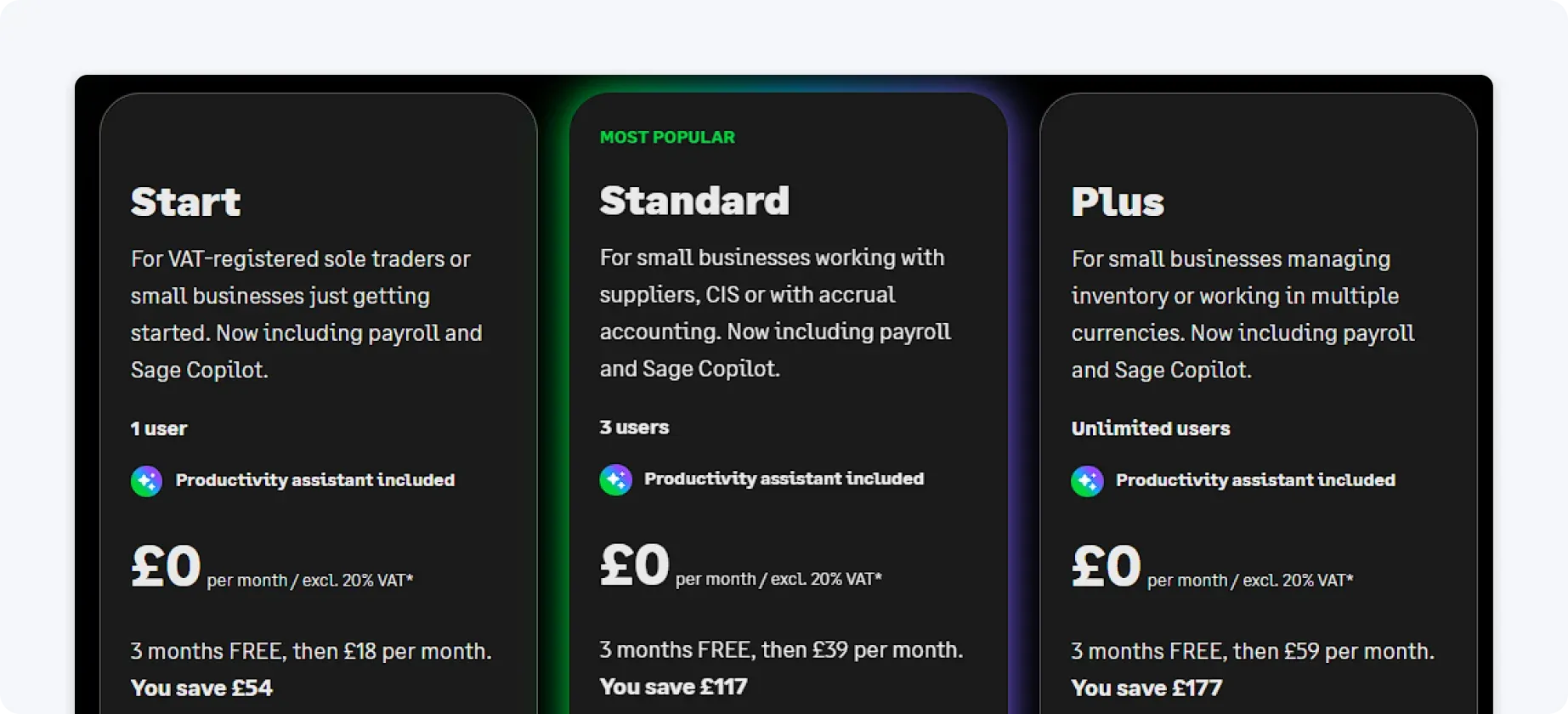
1. Sage Accounting Start: from £18 + VAT per month
This is the entry-level paid plan, aimed at sole traders and very small businesses.
It typically includes:
- Basic income and expense tracking
- Invoicing and cash flow visibility
- Bank feeds (limited compared to higher tiers)
- MTD-compatible record keeping
This plan is suitable if you’ve outgrown the free version but still have relatively simple finances. However, automation and reporting are still quite limited.
2. Sage Accounting Standard: from £39 + VAT per month
This is the most commonly used plan for small businesses needing full MTD functionality.
It includes everything in Start, plus:
- Full MTD for VAT support
- More advanced bank feeds and reconciliation
- Cash flow forecasting
- Better reporting and insights
- Support for multiple users
This is typically the minimum level required for businesses that are VAT-registered or want a smoother MTD workflow.
3. Sage Accounting Plus: from £59 + VAT per month
This is the most advanced Sage Accounting plan for small businesses.
It adds:
- Inventory tracking
- Project tracking and costing
- Advanced reporting
- Multi-currency support
- More detailed financial controls
This plan is best for growing businesses with more complex operations.
What this means in practice
Sage’s pricing reflects a clear trade-off.
Lower-cost plans reduce your spend but require more manual work. Higher-tier plans improve efficiency, but don’t remove the need to stay involved.
Even with the most expensive plans, you’re still expected to:
- Keep your records up to date
- Review and categorise transactions
- Reconcile accounts
- Prepare data before submission
- Stay on top of quarterly deadlines
As MTD turns tax into a year-round process, this ongoing admin becomes more noticeable.
Over time, what used to imply occasional effort can turn into a regular, recurring workload – regardless of which plan you choose.
For simpler, free MTD compliance, choose ANNA
If your goal is to stay compliant without spending hours on bookkeeping, this is where a different approach makes a real difference.
Instead of giving you tools to manage records and submissions, ANNA handles the entire process in the background.
And for users just getting started with MTD, ANNA has a great offer – you get free Self Assessment filing for your first year. If you’ve already filed with someone else, ANNA will cover the fee when you transfer.
Here’s what else ANNA can do for your business:
- MTD for ITSA support included: ANNA is built for Making Tax Digital for Income Tax Self Assessment, with support for digital record-keeping and MTD submissions as part of the platform.
- Automated expense tracking and categorisation: Every transaction is recorded and categorised in real time, helping keep your books accurate without manual input.
- Real-time tax visibility: Your tax position is updated continuously, so you can see what you owe to HMRC at any point in the year – not just at deadline time.
- Smart tax pots: A portion of your income can be automatically set aside for tax, helping you stay prepared for upcoming payments without last-minute stress.
- Smart invoicing and payment matching: Invoices can be created and sent in seconds, with incoming payments automatically matched to the correct invoice.
- Built-in UK business account: ANNA includes a fully integrated UK business account, so you can manage payments, transfers, and business spending in one place.
- Reminders for key deadlines: Automatic reminders help you stay on top of quarterly updates and tax deadlines, reducing the risk of missed submissions.
- 24/7 support, whenever you need it: You can access support whenever questions come up, without having to navigate complex accounting systems alone.
If you want to stay compliant with MTD without turning bookkeeping into a never-ending task, try ANNA today.
Read the latest updates


![What Is Marginal Relief? [Everything You Need to Know]](https://storage.googleapis.com/anna-website-cms-prod/small_cover_3000_130_1ef44f67d1/small_cover_3000_130_1ef44f67d1.webp)







You may also like

![Making Tax Digital for Small Businesses [A Complete Guide]](https://storage.googleapis.com/anna-website-cms-prod/small_cover_3075_180d717fb9/small_cover_3075_180d717fb9.webp)

![Making Tax Digital for Low-Income Taxpayers [6 Challenges]](https://storage.googleapis.com/anna-website-cms-prod/small_cover_3000_52_92d8ae130a/small_cover_3000_52_92d8ae130a.webp)
![Am I Registered for Making Tax Digital? [How to Check]](https://storage.googleapis.com/anna-website-cms-prod/small_cover_3000_37_03afa3fde7/small_cover_3000_37_03afa3fde7.webp)

![Self Assessment Tax Return for 2026 [Complete Guide]](https://storage.googleapis.com/anna-website-cms-prod/small_cover_3039_3d3bf5c979/small_cover_3039_3d3bf5c979.webp)


![Making Tax Digital Exemptions to Know About [Guide]](https://storage.googleapis.com/anna-website-cms-prod/small_cover_3000_26_672a4e45e4/small_cover_3000_26_672a4e45e4.webp)


![Making Tax Digital Penalties Explained [+ How to Avoid Them]](https://storage.googleapis.com/anna-website-cms-prod/small_cover_3000_50_768b17a65c/small_cover_3000_50_768b17a65c.webp)
Open a business account in minutes
