
Making Tax Digital for Income Tax by ANNA
Your 2026/2027 MTD Self Assessment done for you. For free.
Don’t panic - just hire ANNA. Your fully automated, HMRC Recognised MTD solution.
- Sign up easily
- Connect your bank account
- The rest is automatic

Limited time offer
If you sign up for our MTD offer, we’ll file your 2025/2026 Self Assessment for free too!
No credit card required
MTD and you: the basics
From 6 April 2026, sole traders and landlords with income over £50,000 have to digitally submit tax updates 4 times a year using HMRC Recognised software. The good news? MTD is mandatory, but your involvement isn’t. So take a deep breath, hire ANNA, and leave it to us.

The panic-free solution for Making Tax Digital
A lot of MTD solutions still expect you to buy pricey software, learn new rules, remember a long list of deadlines, and open a specific type of business account. Sounds like a lot of work, so we built a solution that does it all for you.






Click the button to start now

How it works
Sign up for free with ANNA
Sign up for an ANNA account for free and choose the type of Self Assessment you want us to file.
Connect your bank account
Connect ANNA to your business bank account. With Open Banking it’s simple, secure and fast. We are FCA registered.
Auto Accountant gets to work
Auto Accountant crunches the numbers, so ANNA can automatically file your updates and annual return.
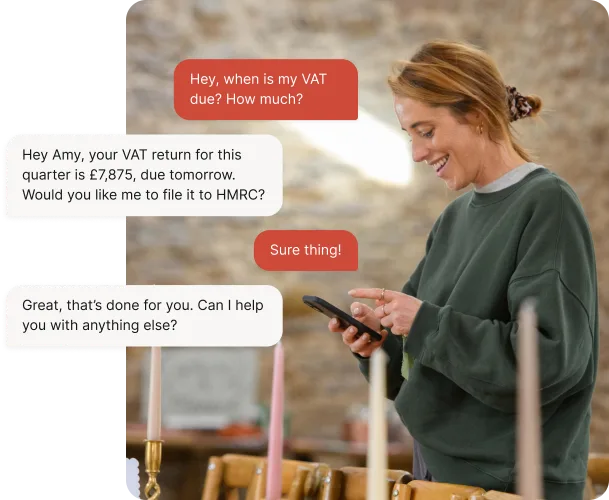
Hire Auto Accountant to do your Self Assessment.
Auto Accountant keeps your books tidy, prepares and files your MTD updates, and keeps you compliant – without you lifting a finger.
- Help me with Self Assessment
- Do I need to do MTD this year?
- File my Self Assessment
- What expenses can I claim?
- When are my deadlines?
- Can I get last year’s return filed for free too?
No software to learn. No training needed. No feature overload.
No last-minute panic. And no strings attached.
Auto Accountant takes care of MTD for you
Auto Accountant is AI-based, HMRC Recognised, trusted by thousands of UK businesses and designed specifically for the UK tax system. Auto Accountant will file your MTD for you. First time and error-free.
Digital records are created automatically from bank activity
Quarterly updates are prepared ready for filing
You review and approve the files - we file them to HMRC

Click the button to start now
You don’t even have to think about it.
Files everything on time
Everything you need to submit is filed on time with HMRC
No costly human errors
No worrying if you’ve copied the wrong figure from a spreadsheet
Every transaction logged
Money in, money out, receipts and payments. All logged automatically
Every expense claimed
Auto Accountant makes sure you don’t miss out on tax savings
It’s always at your side
HMRC Recognised technology
Your MTD updates are submitted directly to HMRCFully secure and protected
Bank-level security keeps your data safe24/7 UK-based customer support
Real humans in Cardiff, ready to help when you need itTrusted by business owners
Thousands of UK businesses already use ANNA

Unlock the power of Auto-Accountant
MTD Self Assessment
Let Auto Accountant handle it for you, automatically.
Free
If you sign up for our MTD offer, we’ll file your 2025/2026 Self Assessment for free too!
Limited offer
Already paid for accounting software? We’ll refund you.
Read the latest updates
![What Is Qualifying Income for MTD? [Fully Explained]](https://storage.googleapis.com/anna-website-cms-prod/small_cover_3037_1bb2e59623/small_cover_3037_1bb2e59623.webp)
![Making Tax Digital Exemptions to Know About [Guide]](https://storage.googleapis.com/anna-website-cms-prod/small_cover_3000_26_672a4e45e4/small_cover_3000_26_672a4e45e4.webp)
![What are the MTD Deadlines for 2026? [Fully Explained]](https://storage.googleapis.com/anna-website-cms-prod/small_cover_3015_0a5cbf467b/small_cover_3015_0a5cbf467b.webp)
![5 Best MTD Self Assessment Software for HMRC [Compared]](https://storage.googleapis.com/anna-website-cms-prod/small_cover_3005_b1c87e930d/small_cover_3005_b1c87e930d.webp)



![Making Tax Digital for Small Businesses [A Complete Guide]](https://storage.googleapis.com/anna-website-cms-prod/small_cover_3075_180d717fb9/small_cover_3075_180d717fb9.webp)


Making Tax Digital – explained
Making Tax Digital for Self Assessment (MTD ITSA) is now live. If you're a sole trader or landlord earning over £50,000, quarterly reporting to HMRC is now required. Here's everything you need to know – and how ANNA does it for you, free.
What is MTD for Income Tax (MTD for ITSA)?
Making Tax Digital for Income Tax is HMRC’s digital way of reporting what you earn. Instead of one big Self Assessment return once a year, you keep your records digitally, send HMRC 4 quarterly updates, and finish the year with a final declaration.
You’ll see it called all sorts of things – MTD for Income Tax, MTD ITSA or MTD for Self Assessment. They all mean the same thing. And with ANNA, all of it happens behind the scenes.
Does MTD apply to you? The 3 thresholds
It depends on your qualifying income, and it’s being phased in over 3 years.
| When it starts | Qualifying income | Status |
|---|---|---|
| 6 April 2026 | Over £50,000 | Live now |
| 6 April 2027 | Over £30,000 | Next |
| 6 April 2028 | Over £20,000 | Announced |
Under £20,000? You stay on Self Assessment as things stand.
HMRC looks at your tax return from 2 years earlier to determine when you need to join MTD. For 2026/27 (6 April 2026), this means your 2024/25 return.
If you are required to join, you should sign up for MTD as you are responsible for checking and then to register. HMRC may also contact you or sign you up automatically.
What actually changes: 4 updates and a final declaration
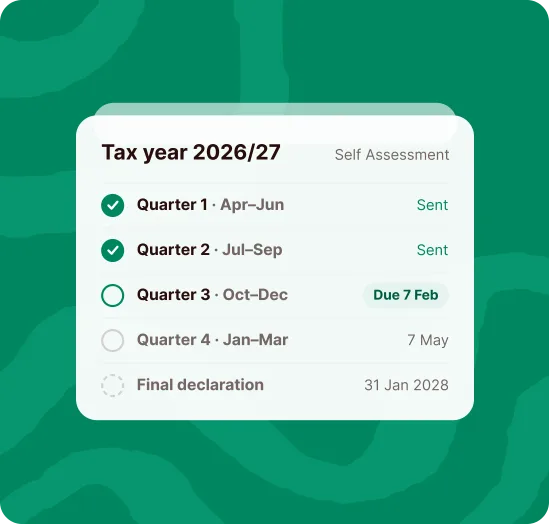
You used to do one return, once a year, usually in a January panic. Now you keep digital records all year, send HMRC a summary of your income and expenses every 3 months, then tie it all together with a final declaration.
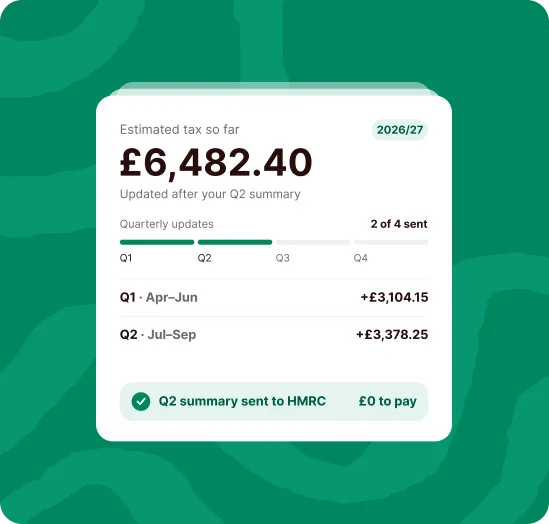
The quarterly updates are just summaries. They’re not tax returns, and you don’t pay anything on them.
4 updates instead of 1 return sounds like more admin, and it is. But it also means no January guesswork – you’ll know what you owe as you go. Here’s the rest of the upside: 7 benefits of Making Tax Digital for Income Tax.
Your MTD deadlines for 2026/27
| Quarter | Period | Update due |
|---|---|---|
| 1 | 6 April – 5 July 2026 | 7 August 2026 |
| 2 | 6 July – 5 October 2026 | 7 November 2026 |
| 3 | 6 October 2026 – 5 January 2027 | 7 February 2027 |
| 4 | 6 January – 5 April 2027 | 7 May 2027 |
| Final declaration | 2026/27 tax year | 31 January 2028 |
Prefer round months? You can ask HMRC to use calendar quarters instead, so your periods end on the last day of the month.
Auto Accountant tracks all of this for you, so you get a nudge before each one, not a penalty after it.
Frequently asked questions
So if you earn £34,000 freelancing and £19,000 renting out a flat, your qualifying income is £53,000. You’re in from April 2026, even though neither one on its own crosses £50,000.
- your qualifying income is under £20,000, as things stand
- you’re digitally excluded, because of your age, a disability, where you live and the internet you can get there, or your religious beliefs
- you’re insolvent, or there are other exceptional circumstances
None of which is your problem if ANNA is filing for you. Everything goes in on time, automatically.
Auto Accountant keeps each one in its own set of books, so nothing gets mixed up.
To qualify for the refund, you need to:
- Be registered for MTD (Making Tax Digital)
- Sign up for the ANNA MTD service

MTD for Income Tax is here
Since April 2026, HMRC requires self-employed people and landlords earning over £50,000 to keep digital records and send quarterly updates. ANNA handles both, and MTD filing is free on every plan.