
FreshBooks vs Xero: Accounting Software Fully Compared


Compare FreshBooks vs Xero to find the right accounting software for invoicing, VAT compliance, reporting, and supporting your business as it grows.


In this article
Choosing the right accounting software can make or break your business operations. With the rise of cloud-based solutions, small and medium businesses have more options than ever.
Two popular accounting platforms that often come up in this conversation are FreshBooks and Xero.
While both aim to simplify business finances, they are designed for different types of users. FreshBooks is widely associated with freelancers and service-based businesses, while Xero has built a strong reputation among UK accountants and growing businesses.
In this article, we’ll compare FreshBooks vs Xero in detail across features, usability, VAT handling, pricing, and scalability, so you can make an informed decision about which platform is best suited to your UK business.
What are FreshBooks and Xero?
FreshBooks and Xero are cloud-based accounting platforms designed to help businesses manage day-to-day financial operations online. Both allow users to invoice customers, track income and expenses, connect bank accounts, and generate financial reports.
However, their focus differs:
- FreshBooks started as an invoicing tool for freelancers and has evolved into a lightweight accounting solution focused on ease of use and quick payments.
- Xero was built as a full accounting system and has become one of the most widely used platforms in the UK, particularly among accountants and bookkeepers.
Xero is fully recognised by HMRC for Making Tax Digital (MTD) for VAT. At the same time, while still HMRC-recognised, FreshBooks is more internationally focused and less tailored to UK tax workflows.
FreshBooks vs Xero: Core features head-to-head
Both FreshBooks and Xero offer features for UK businesses that need assistance with their accounting obligations and financial management, but their approaches differ.
1. Invoicing and day-to-day cash flow management
For many small businesses, invoicing is the most important interaction they’ll have with accounting software. How quickly you can create invoices, send them to clients, and follow up on late payments directly affects cash flow, financial stability, and even business growth.
Late payments remain a common issue for freelancers and small businesses, so tools that reduce friction and encourage faster payment make a measurable difference.
FreshBooks invoicing
Invoicing is where FreshBooks truly excels. The platform is built with non-accountants in mind and focuses heavily on speed, clarity, and ease of use. From the moment you log in, invoicing is positioned as the core workflow.
Key invoicing features include:
- Professionally designed, customisable invoice templates
- Unlimited invoices on most plans
- Recurring invoices for regular clients
- Automatic payment reminders
- Integrated online payments
- Clear invoice status tracking
These are major advantages for freelancers and consultants who invoice frequently and want minimal admin.
Xero invoicing
Xero also offers professional invoicing tools, but with a more structured, accounting-first approach. Invoicing is closely tied to the wider accounting system, which provides stronger controls but slightly less immediacy.
Key features include:
- Custom-branded invoices and quotes
- Quote-to-invoice conversion
- Recurring invoices
- Online payment integrations
- Strong audit trails
Keep in mind that Xero’s lower-tier plans limit the number of invoices you can send each month, which can become restrictive for growing businesses.
The verdict on invoicing
FreshBooks is the stronger option for invoicing. Its simplicity, unlimited invoicing, and focus on fast payments make it ideal for service-based businesses. Xero’s invoicing is solid, but ultimately less flexible at the entry level.
2. Bank feeds and reconciliation
Reconciling bank transactions is one of the least enjoyable parts of bookkeeping – and one of the easiest areas for saving time with good software.
FreshBooks bank reconciliation
FreshBooks offers a relatively lightweight approach to bank reconciliation. It provides bank connectivity and basic tools designed to keep things simple.
Key features include:
- Automatic transaction imports
- Suggested expense categorisation
- Simple matching of income and expenses
This setup works well for businesses with low to moderate transaction volumes, such as freelancers or sole traders with straightforward finances. However, FreshBooks isn’t designed for complex reconciliation scenarios or detailed accounting controls.
Xero bank reconciliation
Xero’s bank reconciliation tools are widely regarded as one of its strongest features and a key reason accountants recommend the platform.
Key capabilities include:
- Daily bank feeds from most UK banks
- Smart matching suggestions
- Custom reconciliation rules
- Clear audit trails
- Detailed history for compliance and reviews
Xero’s reconciliation process is more methodical and structured. While this can feel more complex initially, it produces cleaner, more reliable records and scales well as transaction volumes increase.
The verdict on bank reconciliation
Xero is superior for bank reconciliation, particularly for VAT-registered businesses or companies with higher transaction volumes. FreshBooks is adequate for simple use cases but lacks the depth required for more complex bookkeeping.
3. VAT and Making Tax Digital (MTD) compliance
VAT compliance is one of the most important differentiators between UK accounting platforms. Mistakes in VAT reporting can be costly, time-consuming, and stressful, so reliability and clarity are non-negotiable.
FreshBooks VAT features
FreshBooks supports VAT on invoices and expenses and is recognised by HMRC as MTD-compatible software. Its UK VAT functionality is also relatively straightforward.
With FreshBooks:
- VAT can be applied to invoices and expenses within the system
- VAT return reports can be generated and submitted to HMRC under MTD
- Common VAT schemes, such as cash accounting and flat rate, are supported
That said, VAT reporting may lack the depth, automation, and detailed breakdowns that growing businesses require.
For those dealing with multiple VAT rates, reverse charge rules, or more complex reporting needs, FreshBooks may require additional manual checks and admin compared to more feature-rich accounting software.
Xero VAT features
Xero is widely regarded as one of the most VAT-reliable platforms in the UK and is designed with MTD compliance in mind.
It offers:
- Direct MTD submissions to HMRC
- Clear VAT summaries and breakdowns
- Strong audit trails
- Better handling of multiple VAT rates and schemes
Many UK accountants actively recommend Xero because of how predictable, transparent, and robust its VAT reporting is.
The verdict on VAT and MTD
Xero is the stronger option for VAT and MTD compliance. It reduces risk, simplifies submissions, and integrates smoothly with accountant workflows.
4. Expense tracking and receipt capture
Accurate expense tracking is essential for understanding true profitability, maintaining clean records, and ensuring you can claim all allowable expenses.
For many small businesses, the key difference between platforms is how much effort expense tracking requires and how well it scales as the business grows.
FreshBooks expense management
FreshBooks is designed to make expense tracking as simple and unobtrusive as possible. The focus is on quick capture rather than detailed process control.
Key features include:
- Mobile receipt capture, allowing users to photograph receipts on the go
- Automatic matching of expenses to imported bank transactions
- Easy expense categorisation with minimal accounting knowledge required
This setup works well for sole traders and freelancers who want a low-effort system and have relatively few monthly expenses. The mobile app is particularly useful for capturing receipts, reducing the risk of lost paperwork.
However, FreshBooks doesn’t offer advanced workflows or multi-user expense controls. As a result, it can become limiting for businesses that need approvals, reimbursements, or structured expense policies.
Xero expense management
Xero takes a more structured and scalable approach to expense management, aligning expense tracking with accounting and reporting requirements.
Key features include:
- Receipt uploads via the mobile app or by forwarding receipts via email
- Employee expense claims with clear submission and tracking
- Approval workflows for managers, adding control and accountability
- Detailed expense reporting by category, employee, or time period
This makes Xero far better suited to businesses with employees, contractors, or more formal expense policies. While it requires a bit more setup, it provides greater visibility and control, which becomes increasingly valuable as a business grows.
The verdict on expense tracking
FreshBooks is better for solo users who value simplicity and speed, while Xero is the stronger choice for teams and growing businesses that need structured expense management, approvals, and reporting.
5. Reporting and financial insights
Accounting software shouldn’t just record transactions – it should also help business owners understand their financial position, identify trends, and make informed decisions.
FreshBooks reporting
FreshBooks focuses on providing clear, easy-to-understand reports that don’t overwhelm users.
It offers essential reports such as:
- Profit and loss statements
- Expense summaries
- VAT reports
These reports are visually clean and accessible, making them suitable for business owners with limited accounting knowledge. However, reporting options are limited, with little room for customisation or deeper financial analysis.
For users who simply want a high-level overview of income and expenses, this may be sufficient. For more detailed financial planning or performance tracking, it can quickly feel restrictive.
Xero reporting
Xero provides accountant-grade reporting tools designed for both business owners and professional advisors.
Reporting features include:
- Customisable financial reports tailored to specific needs
- Balance sheets and detailed cash flow statements
- Budget tracking with actual-versus-forecast comparisons
- Export and sharing options for accountants, investors, or lenders
Xero’s reporting capabilities make it much easier to analyse performance over time, plan ahead, and support funding or compliance requirements.
The verdict on reporting
Xero is the stronger platform for reporting and financial insights, particularly for businesses that want deeper visibility, forecasting, and professional-grade financial information.
6. Users, permissions, and collaboration
As businesses grow, collaboration becomes increasingly important. The ability to give access to accountants, bookkeepers, or team members without compromising control is a key consideration.
FreshBooks user access
FreshBooks limits the number of users depending on the plan, and permission controls are relatively basic. While this may be sufficient for a solo business owner working independently, it can become restrictive when external advisors or staff need access.
Xero user access
Xero allows unlimited users on all plans and offers detailed permission settings. Business owners can control exactly what each user can see and do, whether they are an accountant, employee, or external advisor.
The verdict on collaboration
Xero is superior for businesses that work closely with accountants, bookkeepers, or internal teams, thanks to its unlimited users and granular permission controls.
7. Integrations and app ecosystem
Integrations can significantly extend the functionality of accounting software, allowing businesses to connect payroll, e-commerce, customer relationship management apps, and banking tools into a single workflow.
FreshBooks integrations
FreshBooks integrates with a range of popular tools for:
- Online payments
- Time tracking
- Project management
These integrations cover the most common needs of freelancers and service-based businesses. However, the overall ecosystem is relatively limited.
Xero integrations
Xero offers one of the largest app ecosystems in the accounting space, with over 1,000 third-party integrations. These include:
- Payroll and HR software
- E-commerce platforms
- CRM and inventory systems
- Banking and finance tools
Xero also integrates seamlessly with ANNA, making it particularly attractive to UK small businesses that want smart accounting integrated with their business account.
The verdict on integrations
Xero wins on integrations, offering far greater flexibility and scalability for businesses with more complex or evolving software needs.
8. Pricing and overall value
Pricing is often a deciding factor, especially for small businesses, but it’s important to consider long-term value rather than just the monthly cost.
FreshBooks pricing
FreshBooks pricing in the UK is based primarily on how many clients you bill and whether you need advanced features or additional users. Plans generally range from around £15 to £35 per month (excluding VAT), with a custom tier for larger businesses.
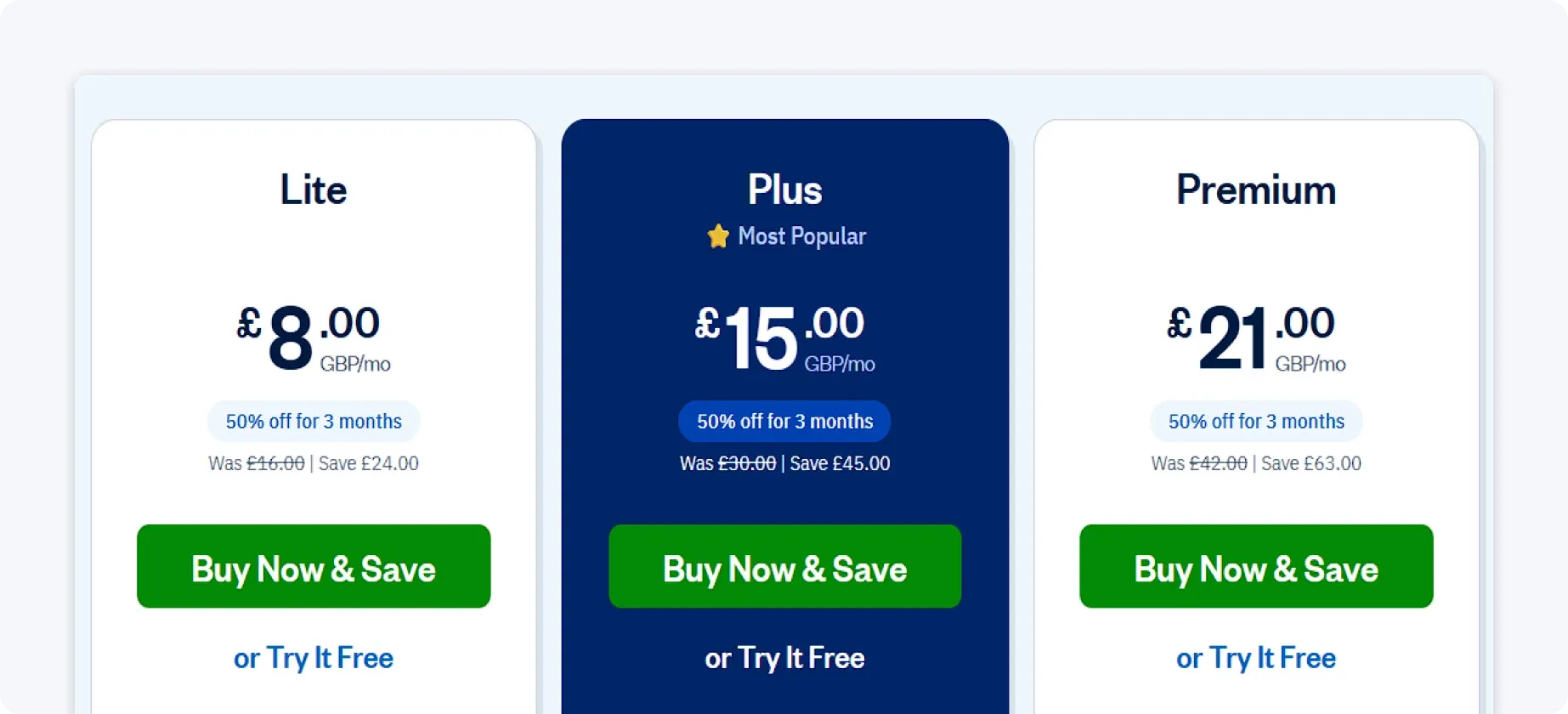
However, there are some additional pricing considerations:
- Extra users typically cost around £8 per user per month
- Payment processing features may require an additional monthly fee
- Discounts are often offered for the first few months
This structure makes FreshBooks accessible for freelancers and very small businesses, but costs can rise as client numbers grow or team access is needed.
Xero pricing
Xero’s pricing is structured around the depth of accounting and compliance features rather than client limits. UK plans typically range from around £7 to £65 per month (excluding VAT).
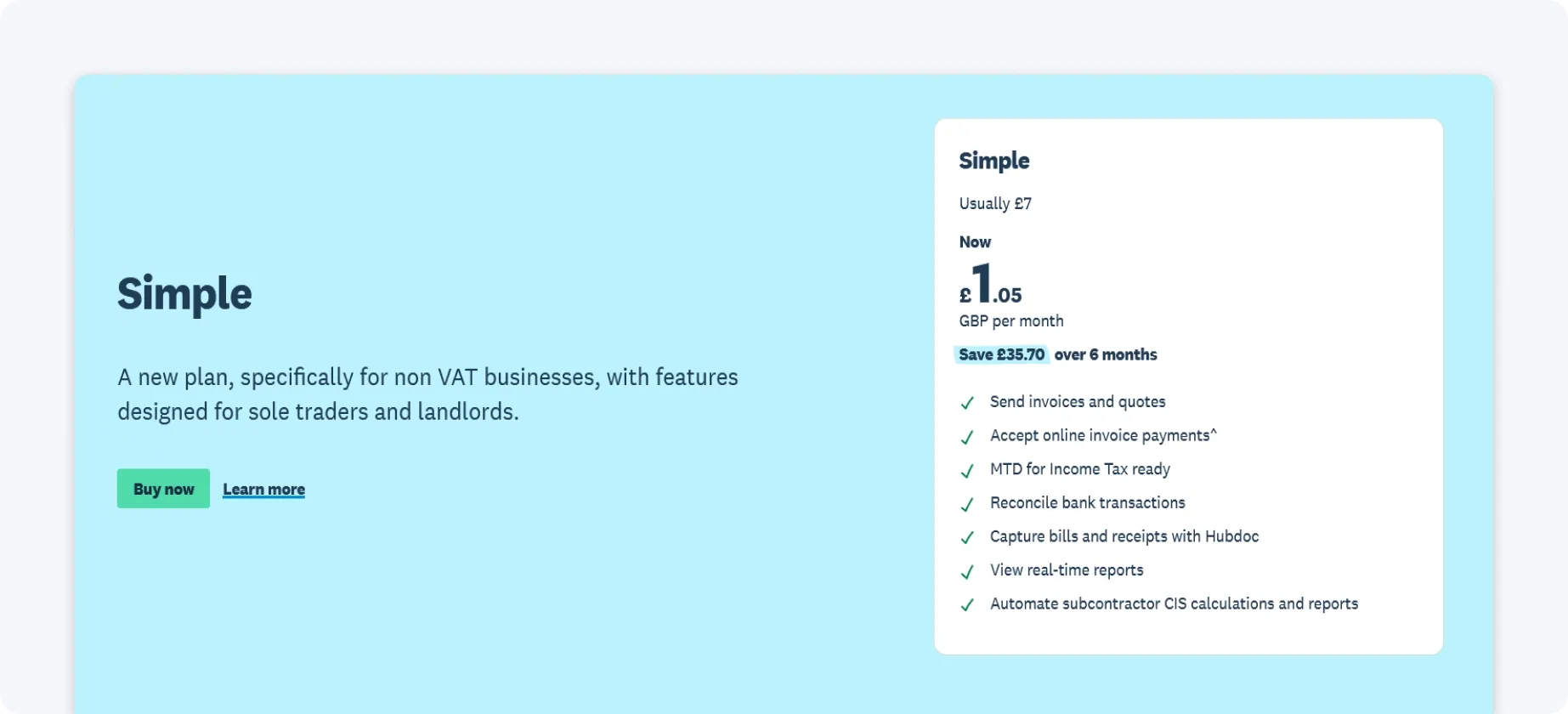
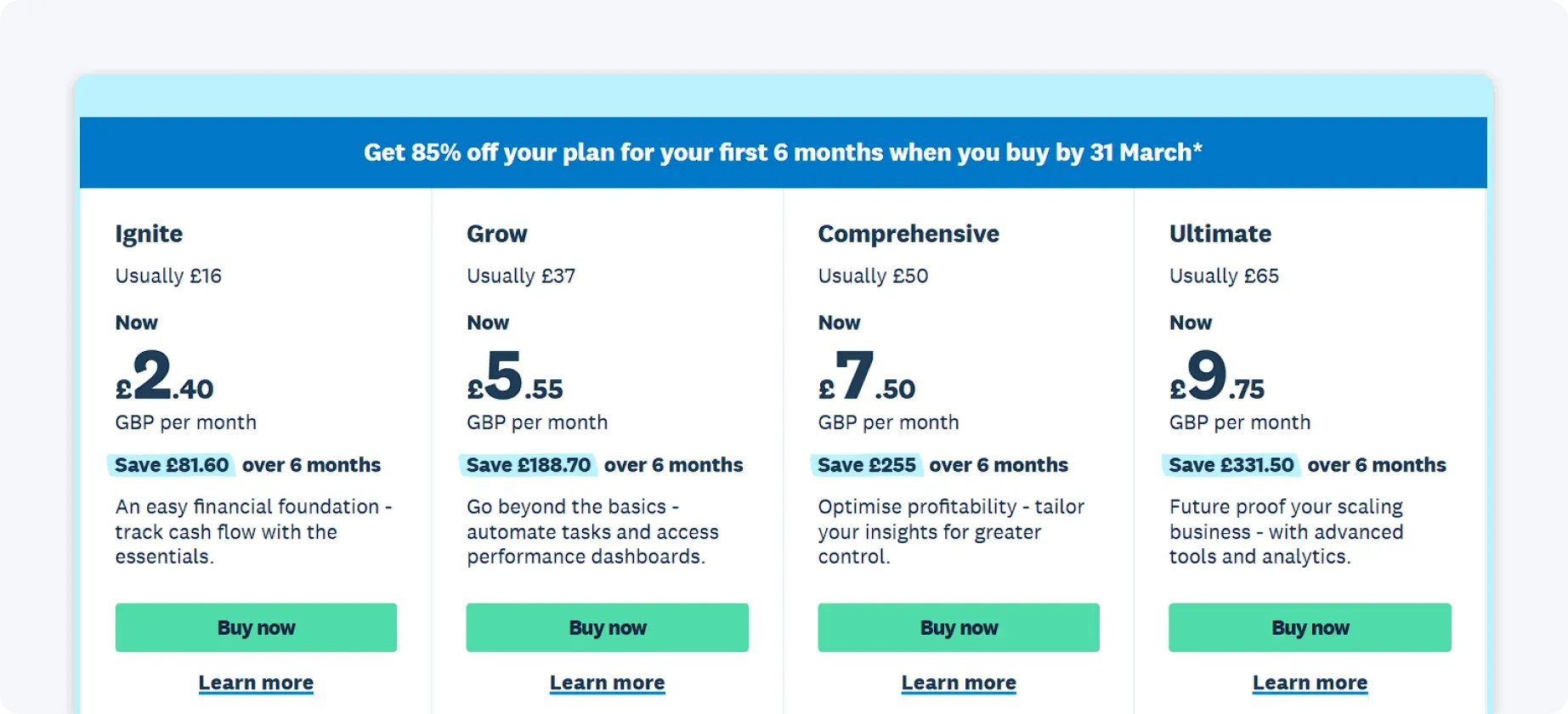
Here are some considerations when it comes to Xero’s pricing:
- Unlimited users are included on all paid plans
- Certain features (such as Construction Industry Scheme, additional payroll employees, or bill payments) may incur add-on costs
- There are no client-based invoicing limits
Xero’s pricing scales with functionality rather than usage caps, making it easier to grow without hitting structural limits.
The verdict on pricing
FreshBooks can be cost-effective for solo operators with simple needs, but Xero tends to offer better scalability and overall value for businesses planning to grow.
Where does ANNA fit in? An alternative worth considering
Comparing FreshBooks and Xero highlights a familiar trade-off for UK business owners.
FreshBooks prioritises simplicity and ease of use, but becomes restrictive as client numbers and team access increase. Xero offers depth, compliance, and scalability, but can feel complex and expensive for smaller businesses that don’t want to manage multiple tools or add-ons.
This is where ANNA takes a different approach.
Rather than acting as just accounting software, ANNA brings the essentials together:
- A UK business account with a sort code and account number
- Automatic expense categorisation using AI
- Receipt capture via mobile app
- Real-time cash flow visibility without manual reconciliation
- MTD-recognised VAT calculations and submissions
- Invoice creation and tracking
- Built-in tax reminders so deadlines are never missed
So if you want accounting that fits the realities of running a UK business, sign up with ANNA today, and get financial clarity in one simple app.
Read the latest updates


![What Is Marginal Relief? [Everything You Need to Know]](https://storage.googleapis.com/anna-website-cms-prod/small_cover_3000_130_1ef44f67d1/small_cover_3000_130_1ef44f67d1.webp)







You may also like
![10 Best Accounting Software for Small Businesses [Comparison]](https://storage.googleapis.com/anna-website-cms-prod/small_cover_3000_14_d1471dd859/small_cover_3000_14_d1471dd859.webp)
![How to Choose Accounting Software for Your Business? [Guide]](https://storage.googleapis.com/anna-website-cms-prod/small_cover_3013_f47de4d283/small_cover_3013_f47de4d283.webp)
![What Is Process Automation in Accounting? [Explained]](https://storage.googleapis.com/anna-website-cms-prod/small_cover_3000_12_7b691ef177/small_cover_3000_12_7b691ef177.webp)
Open a business account in minutes
