





Explore what you need to know about MTD for landlords and learn how you can stay compliant, manage digital records, and simplify your tax reporting.


- In this article
- Key points
- What is MTD ITSA?
- Who is affected by MTD, and when does it start?
- These staged thresholds give landlords time to adjust, and many will fall into scope over the next few years as income and reporting obligations change.
- What does ‘qualifying income’ mean for landlords?
- How MTD ITSA for landlords affects tax reporting
- Are there penalties for non-compliance?
- How to prepare for MTD ITSA
- The best MTD software for landlords
- Get ahead of MTD ITSA today with ANNA – for free
Making Tax Digital (MTD) for Income Tax Self Assessment, or MTD ITSA, represents one of the most significant shifts in the UK tax system. Landlords who have previously managed their rental income through annual, paper-based Self Assessment tax returns must now transition to digital record-keeping and quarterly reporting using software approved by HM Revenue and Customs (HMRC).
In this guide, we’ll lay out everything landlords need to know: what MTD ITSA for landlords means in practice, when it takes effect, how it works, and which digital tools can help you stay compliant.
Key points
- MTD ITSA replaces annual Self Assessment with digital, quarterly reporting 💻
Landlords and self-employed individuals must keep digital records, submit quarterly income and expense summaries, and complete a final end-of-year declaration through HMRC-approved software. - Compliance depends on your combined income 💰
MTD ITSA applies based on your total gross income from rental properties and self-employment before expenses. The thresholds roll out in stages from April 2026, starting at £50,000 and gradually reducing to £20,000 by April 2028. - Penalties and admin pressure make preparation essential 📝
HMRC is introducing a points-based penalty system for missed deadlines, alongside interest and late payment penalties. Even if there is some leniency during the transition year, relying on that is risky. - The right all-in-one software can make compliance much easier 🖥️
Many accounting platforms support MTD, but not all are built with landlords in mind. Using separate tools for banking, bookkeeping, and tax submissions can create duplication and extra admin, especially if you have both rental and self-employment income.
What is MTD ITSA?
Making Tax Digital is a UK Government initiative that aims to modernise the country’s tax system by replacing traditional paper filings with digital reporting. Originally announced in 2015 as a broad digital transformation of tax administration, MTD’s first mandatory phase was for VAT, which began in April 2019.
The next phase, MTD for Income Tax Self Assessment (MTD ITSA), affects self-employed individuals and landlords, and requires digital record-keeping and quarterly reporting to HMRC via compatible software.
Under these new rules, landlords with income from rental properties will no longer submit a single annual Self Assessment tax return. Instead, landlords within the income threshold will:
- Maintain digital records of all relevant income and expenses
- Submit quarterly updates summarising income and expenditure to HMRC
- Submit an end-of-year final declaration digitally, replacing the old Self Assessment submission
This changes how landlords interact with HMRC, shifting from an annual tax snapshot to regular, calendarised reporting throughout the tax year.
Who is affected by MTD, and when does it start?
Making Tax Digital (MTD) starts in April 2026, and it’ll apply to landlords and self-employed individuals based on their total annual qualifying income.
Here’s how the phased rollout works:
- From 6 April 2026: Landlords (including sole traders) with a qualifying income of £50,000 or more in the 2024–25 tax year must comply with MTD ITSA.
- From 6 April 2027: Those with a qualifying income of £30,000 or more in the 2025–26 tax year must use MTD ITSA.
- From 6 April 2028: The threshold drops further to £20,000 or more in qualifying income.
These staged thresholds give landlords time to adjust, and many will fall into scope over the next few years as income and reporting obligations change.
What does ‘qualifying income’ mean for landlords?
Qualifying income is the total amount you earn from rental properties and self-employment before expenses are deducted.
Here’s what counts as qualifying income:
- Rental income from UK properties: Income collected from tenants before expenses, including residential property lettings.
- Rental income from overseas properties: Income collected from overseas may require separate reporting.
- Self-employment income: Your turnover and rental income are considered together for the qualifying threshold if you own a business.
If your combined gross income from these sources exceeds the relevant threshold, HMRC will require you to join MTD ITSA, typically based on your most recent Self Assessment figures.
Qualifying income doesn’t include employment income, pension income, dividends, or savings interest.
How MTD ITSA for landlords affects tax reporting
Under the old Self Assessment system, landlords kept records and filed an annual return by 31 January each year. With MTD ITSA, the process changes in several key ways:
1. Digital record-keeping
All income, receipts, and allowable expenses have to be managed digitally using compatible software. Handwritten ledgers or paper receipts stored in a shoebox are no longer acceptable.
2. Quarterly reporting
Instead of a single annual return, landlords must submit at least four quarterly summaries of their income and expenses through software. These summaries update both you and HMRC about your tax position in real time.
3. Final declaration
At the end of the tax year, landlords complete a final declaration digitally, which combines all quarterly data with any other information needed to calculate the overall tax liability. This replaces the traditional Self Assessment return.
4. Separate periodic updates
If you own multiple properties, each property’s income and expenditure may need separate tracking for the quarterly summaries, although you can usually aggregate the totals in software.
Overall, the aim is to create a smoother, more accurate, and digitally synchronised tax reporting process, reducing errors and surprises at the end of the tax year.
Are there penalties for non-compliance?
Yes. HMRC is introducing a new points-based penalty system for MTD ITSA:
- If you miss quarterly deadlines, you receive penalty points. Accumulating a certain number of points can trigger a financial penalty.
- Interest and late payment penalties still apply if tax is paid after the deadlines, and penalties can escalate if unpaid tax remains outstanding.
As it’s a significant transition, HMRC has indicated that penalties for late quarterly filings may be waived in the first year of implementation for many taxpayers. However, you shouldn’t treat this as a compliance strategy.
How to prepare for MTD ITSA
Transitioning to digital tax reporting can seem stressful, but landlords can prepare well in advance with the right approach. For example, you should:
- Review your income and check thresholds: Look back at your recent tax returns to understand whether you meet the qualifying income thresholds. If you’re close to a threshold, start preparing early.
- Start digital record-keeping now: Even if you don’t have to join MTD yet, adopting digital record-keeping helps you get used to the new system and ensures you have accurate data for later.
- Train staff or advisors: If you have a bookkeeper or an accountant, make sure they understand the timelines, deadlines, and new reporting formats required by MTD.
- Choose HMRC-approved software: Choosing HMRC-approved software is essential, since you can’t submit your Making Tax Digital ITSA filings without it. However, choosing the best software is also about quality, functionality, and fit for your specific needs as a landlord, not just compliance.
Types of MTD-compatible software
When it comes to MTD software, there are two main types to consider:
- Full accounting software: This type lets you record all transactions, categorise income and expenses, run reports, connect bank feeds, and submit digital tax updates directly to HMRC.
- Bridging software: If you prefer using spreadsheets or another system you already own, bridging software connects your current records to HMRC’s systems for submission.
Both approaches are valid under MTD, as long as the final submissions are sent digitally through HMRC-compatible software.
The best MTD software for landlords
There are now dozens of tools claiming to support Making Tax Digital for Income Tax, but not all software is built with landlords in mind.
Some platforms are traditional accounting systems adapted for MTD, while others are property-specific tools that bolt on tax functionality. The key is choosing software that genuinely makes managing rental income easier.
Below are some of the most popular options, starting with a solution designed to simplify tax and money management in one place.
1. ANNA
If you’re looking for a tool that combines a business account, bookkeeping, and tax filing in one place, ANNA stands out as the most streamlined option for landlords.
Unlike traditional accounting platforms that focus primarily on bookkeeping, ANNA is built around reducing admin and automating compliance. For landlords preparing for MTD ITSA, that means less manual work, fewer spreadsheets, and clearer visibility of your tax position throughout the year.
The best bit? ANNA provides a free MTD Self Assessment for Income Tax service. If you’ve already filed your 2025–26 tax return using different software, ANNA will also refund you the cost of opening that other account.
Key features for landlords include:
- Automatic income and expense tracking
- Smart categorisation of transactions
- Digital record-keeping fully aligned with MTD requirements
- Quarterly submission capability for MTD ITSA
- Self Assessment support, including final declarations
- Real-time tax estimates, so you can see what you owe as you earn
- Receipt capture via app
- Built-in business current account
Because ANNA connects your cash flow and bookkeeping, rental income and expenses flow into your records automatically. That makes quarterly updates significantly easier, and it reduces the risk of missed or duplicated transactions.
For landlords who also run a side business or freelance activity, ANNA can handle both rental and self-employment income under one roof, which is particularly useful given that MTD thresholds combine these income streams.
Pricing
ANNA offers subscription-based plans. Pricing varies depending on features, but typically includes a monthly fee that covers bookkeeping tools, tax features, and banking functionality.
The Auto Accountant enables MTD ITSA submissions and Self Assessment filing. Compared to paying separately for accounting software, bridging software, and potentially a tax-filing tool, ANNA is a more cost-effective all-in-one solution.

2. FreeAgent
FreeAgent is a well-known cloud accounting solution and is fully recognised by HMRC for MTD ITSA. It’s particularly popular among freelancers, contractors, and small business owners.
Features include:
- Bank feeds and transaction imports
- Income and expense categorisation
- Digital record-keeping
- MTD ITSA quarterly updates
- End-of-year tax reporting
FreeAgent offers a clean interface and strong reporting tools, and it works especially well if you already operate as a limited company or contractor.
However, FreeAgent’s structure is designed primarily around business trading income. For landlords with multiple properties, mixed income sources, or more nuanced rental expense tracking, workflows may require manual adjustments or input from an accountant to ensure everything is categorised correctly.
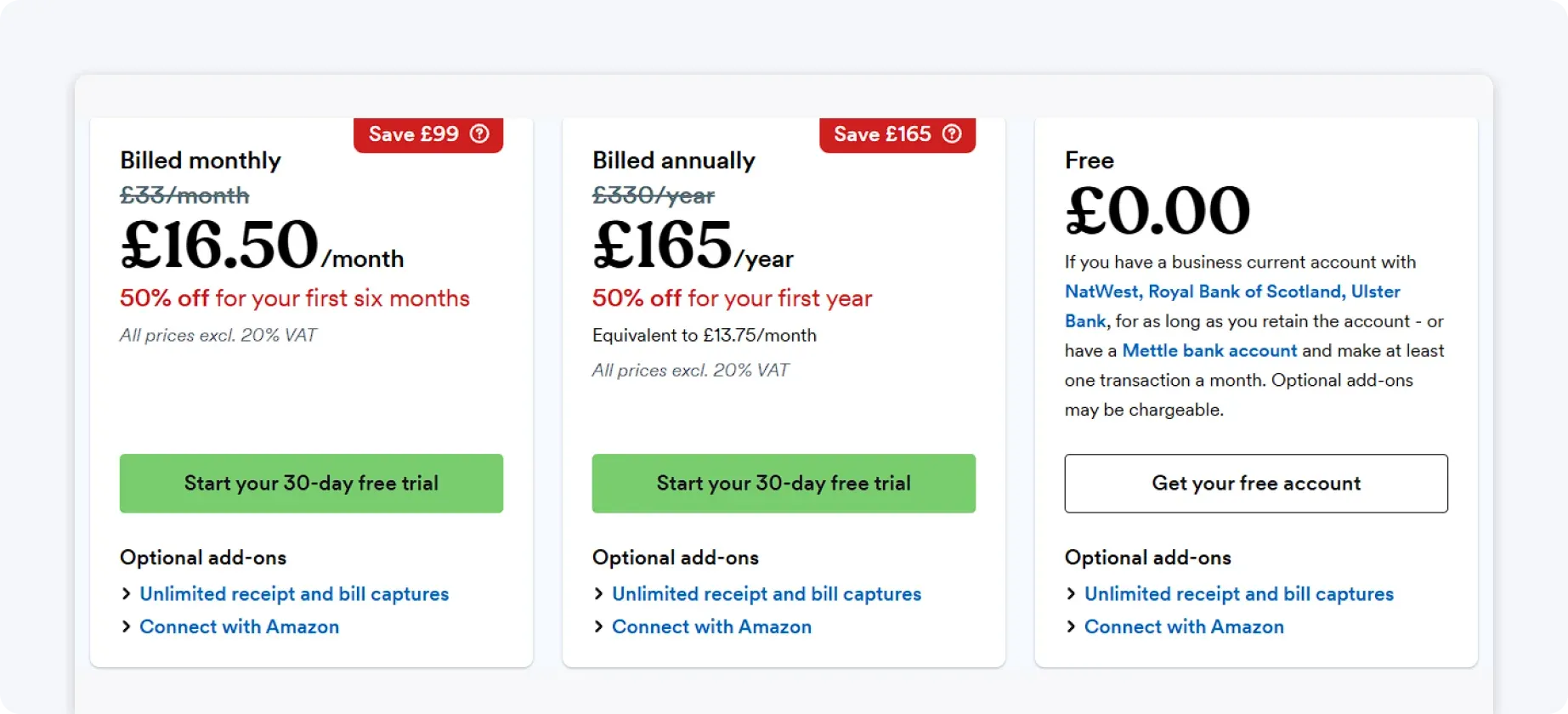
Pricing
FreeAgent operates on a monthly subscription model. Some business bank providers offer it free as part of their account package (NatWest, Mettle, Ulster Bank, or Royal Bank of Scotland); otherwise, users pay a standard monthly fee.
3. Xero
Xero is one of the most widely used cloud accounting platforms in the UK. It’s powerful, flexible, and accountant-friendly.
Key features:
- Advanced reporting
- Bank feeds and automation
- Expense management
- MTD-compatible digital submissions
- Multi-user access
For landlords with multiple properties, complex finances, or an accountant who already uses Xero, this can be a strong option. Its reporting depth and integration ecosystem are extensive.
That said, Xero’s strength is also its drawback for smaller landlords. The platform can feel technical, with a steeper learning curve and more configuration required to tailor it to rental income structures. Many landlords end up relying heavily on an accountant to manage setup and ongoing reporting, which can increase overall costs.
Pricing
Xero offers tiered monthly subscription plans. Higher tiers unlock additional features, such as multi-currency support or advanced reporting.

4. QuickBooks Online
QuickBooks Online is another major accounting platform that supports MTD ITSA compliance. It’s well established and widely used by small businesses.
Features include:
- Automated bank feeds
- Expense categorisation
- Invoicing tools
- Quarterly submission capability
- Reporting dashboards
QuickBooks is flexible and well supported by accountants, making it a familiar choice for many small business owners.
However, QuickBooks is structured around traditional business accounting workflows, such as invoicing clients and managing sales pipelines. For landlords who primarily collect rent and track property expenses, some of its features may feel misaligned with day-to-day needs.
Customising the platform for rental income can require additional setup and ongoing management.
Pricing
QuickBooks Online operates on a monthly subscription basis, with pricing increasing based on feature access and reporting complexity.

5. Landlord Vision
Landlord Vision is designed specifically for landlords and property investors. It combines property management features with MTD-ready accounting functionality.
Key features:
- Property-by-property income tracking
- Tenant management tools
- Expense logging
- MTD-compatible submissions
Because it’s tailored to landlords, it includes tenancy tracking, maintenance records, and portfolio management tools, which may appeal to landlords with larger portfolios who want operational oversight in addition to accounting.
However, for landlords whose main priority is tax compliance, clean bookkeeping, and streamlined MTD submissions, the additional operational features may add complexity without directly improving the tax process.
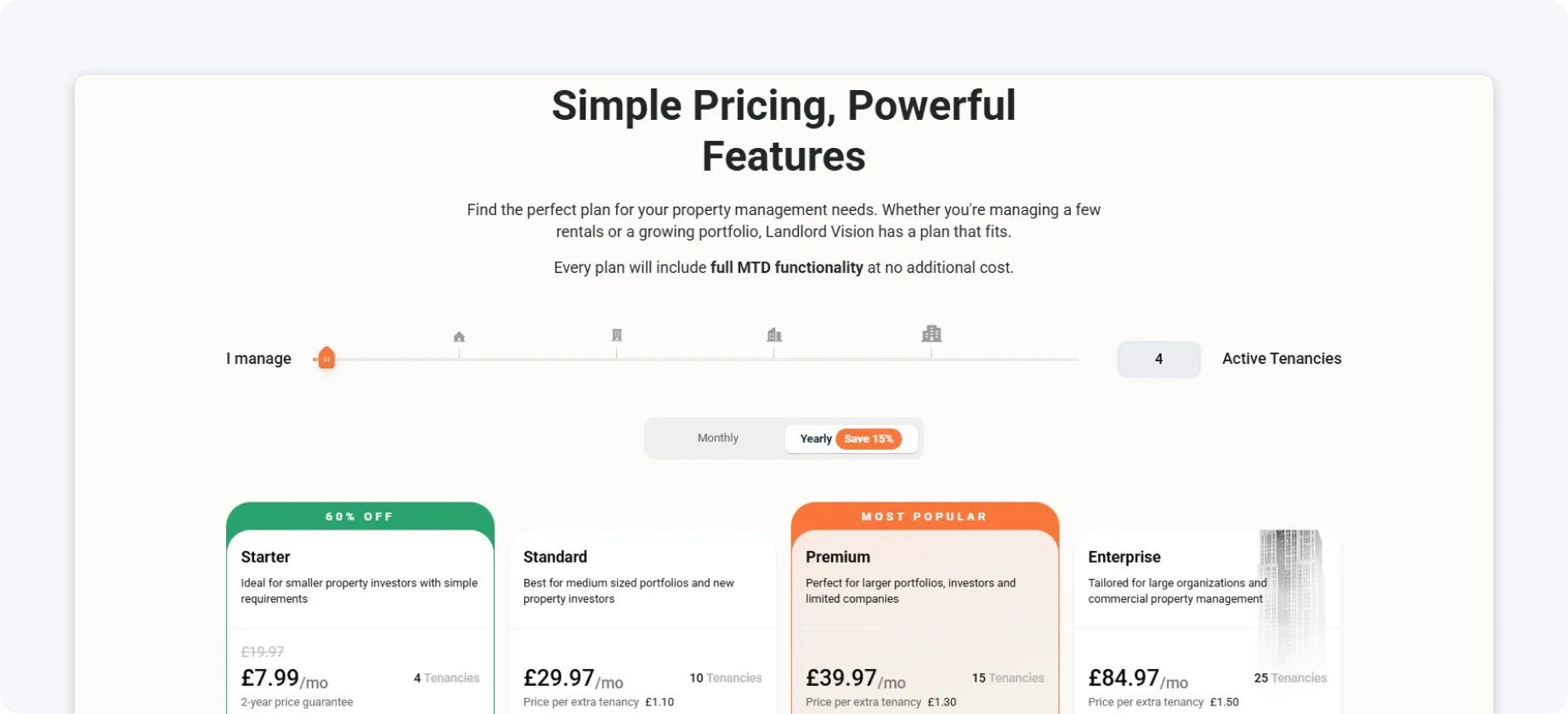
Pricing
Landlord Vision typically uses a tiered pricing structure based on the number of properties in your portfolio. This means smaller landlords pay less, while those managing larger portfolios move into higher pricing bands. Some plans may include onboarding support, but additional services, such as bespoke training or premium support, may come at an extra cost.
6. Landlord Studio
Landlord Studio focuses on rental property accounting and is built with landlords in mind.
Features include:
- Rental income tracking
- Expense categorisation
- Receipt scanning
- MTD-compliant digital submissions
It’s generally considered user-friendly and suitable for small to mid-sized landlords.
That said, Landlord Studio is primarily focused on property-level tracking. If you also have self-employment income, side businesses, or more complex financial needs, you may require additional tools to manage everything together.
Since MTD ITSA thresholds combine rental and self-employment income, using separate systems can create extra admin and duplication.
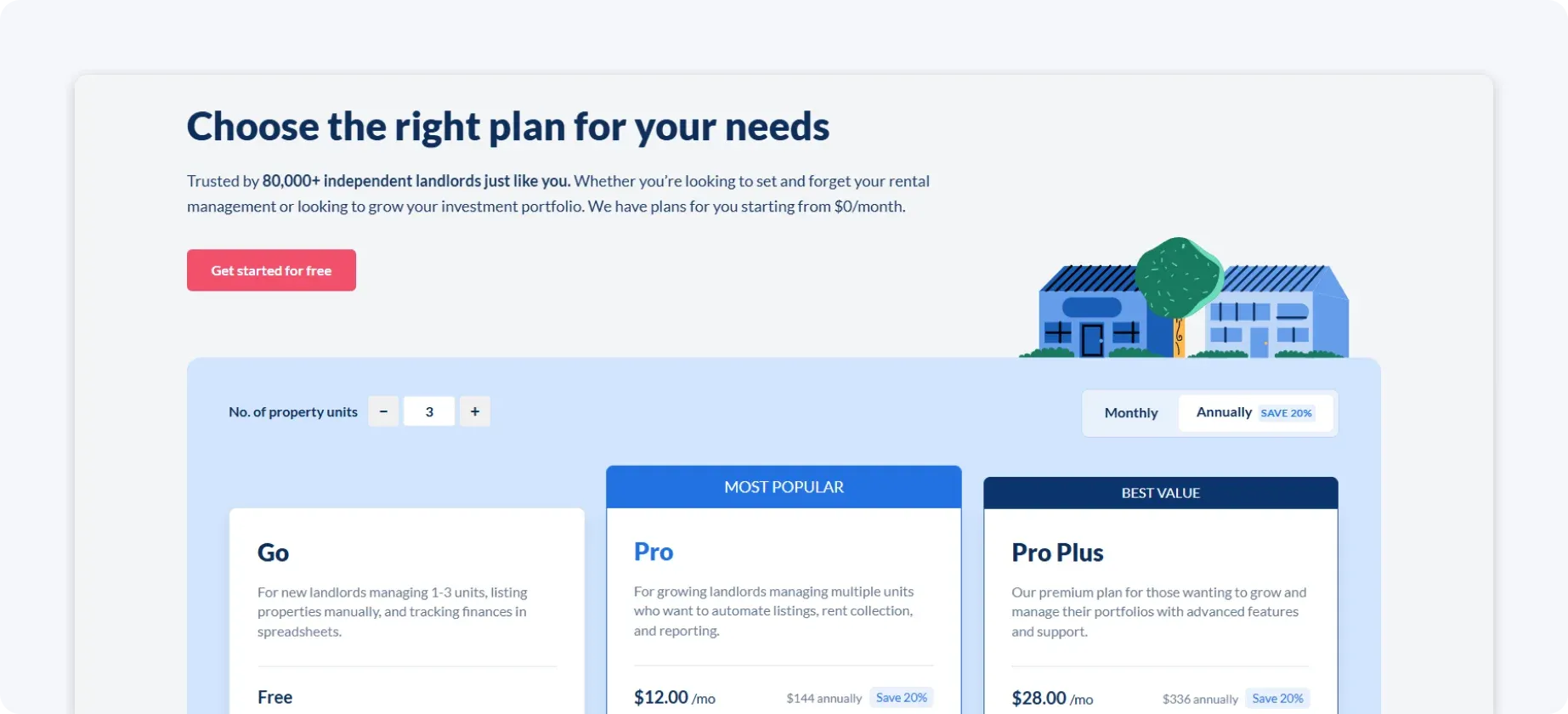
Pricing
Landlord Studio operates on a subscription model, with pricing tiers based on portfolio size and a free option. Costs increase as you add properties, so landlords expanding their portfolio should factor in rising software expenses over time.
How to choose the right software for you
When picking software, consider the following factors:
- Features: Does it handle digital records, bank feeds, expense categorisation, and HMRC submission?
- Ease of use: Is the interface intuitive, and does it reduce manual work?
- Property-specific tools: If you own multiple properties, does the software let you track each property separately?
- Cost: How does this software fit in your budget? Some tools are free for basic use, while others require monthly subscriptions – decide what makes sense for your business.
- Support: Does it offer quality, reliable support? Good documentation, tutorials, and customer support can help you get up to speed faster.
Also, HMRC provides a software-finder tool that lets you check whether a product meets your specific needs for MTD ITSA compliance.
Get ahead of MTD ITSA today with ANNA – for free
Waiting until the rules become mandatory can leave you scrambling to organise records, choose software, and understand quarterly reporting deadlines.
The smarter move is to prepare now and to do it with a system designed to make taxes simpler.
With ANNA, Making Tax Digital doesn’t just mean staying compliant going forward; it also covers what you need right now. MTD software is completely free to use, and we’ll even prepare and file your 2025/26 Self Assessment return.
Already paid another provider to file your 2025/26 return? ANNA will refund you when you switch and open an account.
Everything is handled in one place, without extra fees, separate tools, or last-minute stress.
So, register with ANNA today and get ahead of MTD ITSA. And if you need any help, we are here in the app 24/7 to answer any questions.
Read the latest updates

![What Is the Threshold for Making Tax Digital? [Guide]](https://storage.googleapis.com/anna-website-cms-prod/small_cover_3057_f0f2ffd268/small_cover_3057_f0f2ffd268.webp)


![Making Tax Digital for Freelancers [Complete 2026 Guide]](https://storage.googleapis.com/anna-website-cms-prod/small_cover_3000_25_15d6713572/small_cover_3000_25_15d6713572.webp)
![How to Sign Up for Making Tax Digital [A Detailed Guide]](https://storage.googleapis.com/anna-website-cms-prod/small_cover_3031_86f7f6f18a/small_cover_3031_86f7f6f18a.webp)
![How to Choose the Best MTD Bridging Software [+Comparison]](https://storage.googleapis.com/anna-website-cms-prod/small_cover_3000_22_ba8f9dee9d/small_cover_3000_22_ba8f9dee9d.webp)
You may also like
![9 Features to Look for When Choosing MTD Software [+Steps]](https://storage.googleapis.com/anna-website-cms-prod/small_cover_3000_32_ec1954cac9/small_cover_3000_32_ec1954cac9.webp)
![Making Tax Digital Costs: What Will MTD Cost You? [Breakdown]](https://storage.googleapis.com/anna-website-cms-prod/small_cover_3051_a896b063b0/small_cover_3051_a896b063b0.webp)




Open a business account in minutes
