
5 Best ClearBooks Alternatives for UK Businesses [Comparison]


Explore the best ClearBooks alternatives to simplify accounting, automate tax compliance, reduce manual admin, and gain better control of finances.


In this article
- Key points
- How we selected the best ClearBooks alternatives
- Comparison table
- The top 5 ClearBooks alternatives in 2026
- ANNA vs ClearBooks: Key differences
- Xero vs ClearBooks: Key differences
- QuickBooks vs ClearBooks: Key differences
- FreeAgent vs ClearBooks: Key differences
- Sage vs ClearBooks: Key differences
- Why ANNA stands out
ClearBooks has long been a staple of UK accounting software, offering simple bookkeeping and invoicing for small businesses.
But as accounting needs evolve, especially with Making Tax Digital (MTD) expanding to Income Tax Self Assessment, there are now more options that offer better automation, modern interfaces, and hands-off tax compliance.
This guide highlights the top ClearBooks alternatives, comparing features, usability, pricing, and MTD readiness so you can choose the best solution for your business.
Key points
- ANNA leads in automation and MTD compliance ✅
ANNA is fully automated, handling both VAT and ITSA submissions within the app. This removes nearly all manual bookkeeping and tax preparation work, making it ideal for freelancers and small business owners who want hands-off accounting. - Ease of use is crucial for non-accountants 🧩
Platforms like ANNA and FreeAgent are beginner-friendly, requiring minimal accounting knowledge. Tools such as QuickBooks and Xero are more powerful but assume some familiarity with bookkeeping, which can slow down setup and everyday use. - MTD ITSA readiness varies widely 💻
ANNA and FreeAgent offer full MTD ITSA automation, while alternatives like Xero, QuickBooks, and Sage submit quarterly updates too but still expect you to keep the bookkeeping behind them up to date. - Pricing transparency matters for small businesses 💷
ANNA and FreeAgent offer simple and predictable pricing, including free tiers or bank-linked discounts. Platforms like Xero and QuickBooks have more complex tiered pricing, which can quickly add up if you need advanced features or multi-user access.
How we selected the best ClearBooks alternatives
We evaluated tools based on:
- MTD compliance (VAT + ITSA readiness)
- Ease of use for non-accountants
- Automation level (manual vs hands-off)
- Pricing transparency
- Real-world suitability for UK sole traders and small businesses
Here’s a quick comparison table:
Comparison table
| Software | Ease of Use | Automation | Typical expected pricing |
| ANNA | 5/5 | 5/5 | ££ |
| Xero | 4/5 | 3/5 | ££££ |
| QuickBooks | 4/5 | 3/5 | £££ |
| FreeAgent | 4/5 | 4/5 | ££ |
| Sage Accounting | 3/5 | 3/5 | £££ |
The top 5 ClearBooks alternatives in 2026
These five platforms stand out in 2026 for their ability to simplify accounting, streamline tax submissions, and reduce the admin burden for business owners.
1. ANNA – Best for fully automated accounting
ANNA is designed for non-accountants. There’s no setup-heavy onboarding, no need to understand accounting terms, and no requirement to manually categorise transactions.
Everything is structured so that freelancers or small business owners can start using it immediately without training.
ANNA’s key features include:
- Combined business account and accounting software
- Automatic transaction categorisation
- Real-time tax estimates and smart tax pots
- Built-in invoicing with payment links
- MTD for VAT and free MTD for ITSA submissions
- Receipt capture and automated record-keeping
ANNA vs ClearBooks: Key differences
| Category | ANNA | ClearBooks |
| Business account | Built-in UK account | External bank required |
| Expense tracking | Automatic in real time | Manual entry and reconciliation |
| Receipt capture | App, email, chat | Manual upload via web |
| VAT tracking | Built-in with reminders | Manual or semi-automated |
| MTD for ITSA support | Full quarterly and year-end automation | None built-in |
| Tax deadline alerts | Full MTD support | Limited reminders |
| Invoicing | Auto-matching payments | Manual reconciliation |
| Admin automation | High, works in the background | Low, mostly manual |
| Ease of use | Beginner-friendly | Moderate, accounting knowledge helpful |
| Accounting integrations | Not required | Optional, for add-ons |
| Support | 24/7 live support | Limited, mostly email support |
MTD for ITSA support
ANNA handles MTD for VAT and MTD for ITSA directly within the app.
That means ANNA automatically collects your income and expense data, prepares quarterly MTD ITSA updates, and helps you produce the year‑end declaration without exporting files or reconciling offline spreadsheets. For sole traders and freelancers, this removes almost all of the manual work required to stay compliant.
ANNA also offers free MTD for Self Assessment filing for 2026-27, and if you’ve already filed your return with another software, you’ll receive a full refund when you join.
Pricing
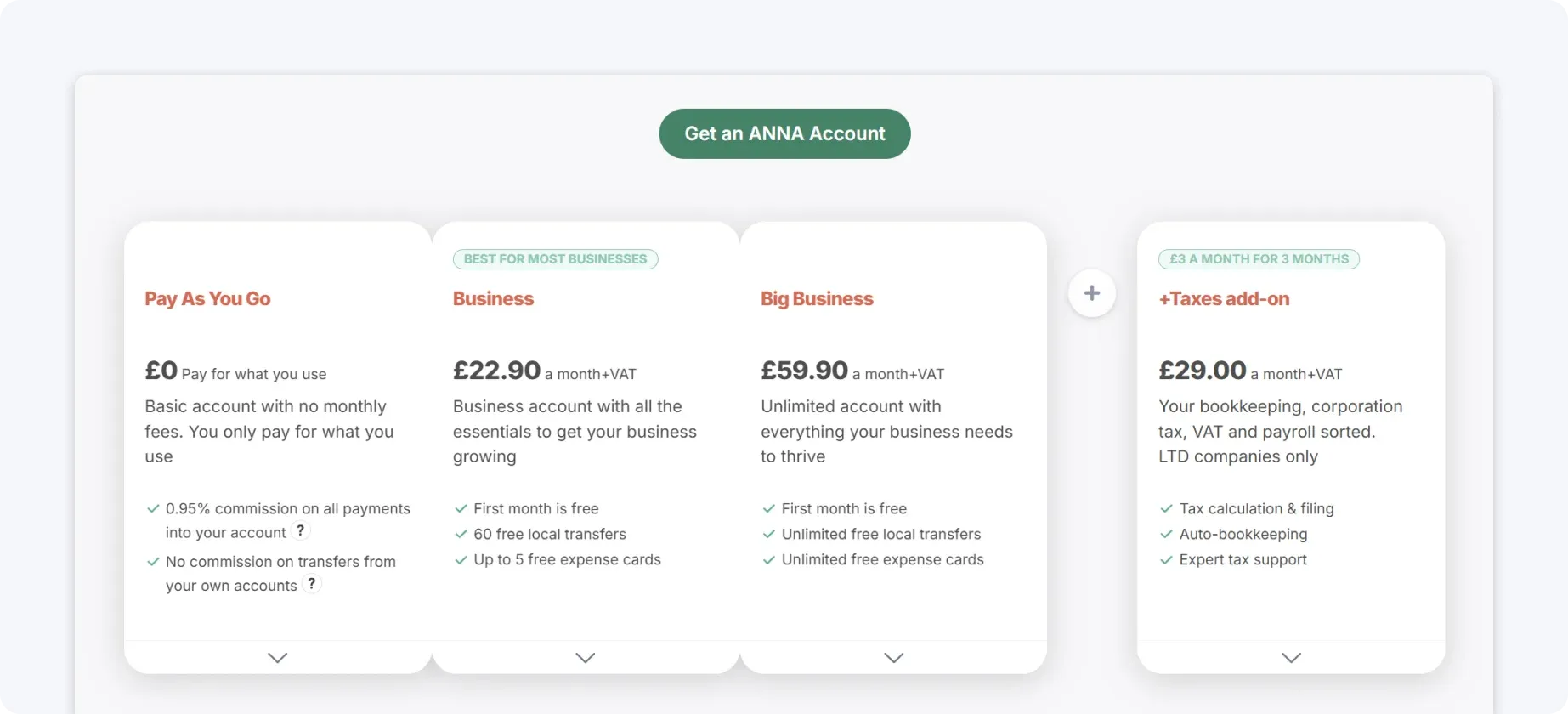
ANNA offers a transparent tiered pricing structure designed for small businesses and sole traders, with core accounting and MTD compliance included on all plans.
The Free tier gives UK users a business account and VAT tracking at no cost, making it attractive for freelancers and sole traders just starting out. Paid plans unlock advanced automation, priority support, and enhanced financial tools.
2. Xero – Best for growing businesses needing flexibility
Xero is a strong ClearBooks alternative for businesses that want a scalable platform with deep integrations and accountant support.
Xero is relatively user-friendly compared to older accounting systems, but it still assumes a basic understanding of bookkeeping. Tasks like reconciliation, categorisation, and report generation require user input and regular attention.
Xero’s key features include:
- Bank feeds with reconciliation tools
- Customisable financial reporting
- Inventory and project tracking
- Integration with over 1,000 third-party apps
- Multi-user access with role permissions
Xero vs ClearBooks: Key differences
| Category | Xero | ClearBooks |
| Business account | External bank required | External bank required |
| Expense tracking | Semi-automated; some manual review needed | Manual entry and reconciliation |
| Receipt capture | App, email, or third-party upload | Manual upload via web |
| VAT tracking | Built-in, accounting-led, automated | Manual or semi-automated |
| MTD for ITSA support | Built-in quarterly and year-end filing | None built-in |
| Invoicing | Customisable templates, automated payment matching | Built-in |
| Admin automation | Moderate; recurring tasks and reminders | Low, mostly manual |
| Ease of use | Moderate learning curve | Moderate, accounting knowledge helpful |
| Accounting integrations | Extensive; banks, apps, and payment platforms | Optional, for add-ons |
| Support | Customer support available; an accountant recommended for complex queries | Limited, mostly email support |
MTD for ITSA support
Xero includes MTD for VAT support and offers tools that help with UK tax reporting, and its MTD ITSA filing is built in. You can draft quarterly updates and year‑end returns in Xero and submit them straight to HMRC, without bridging software or a separate portal.
Pricing
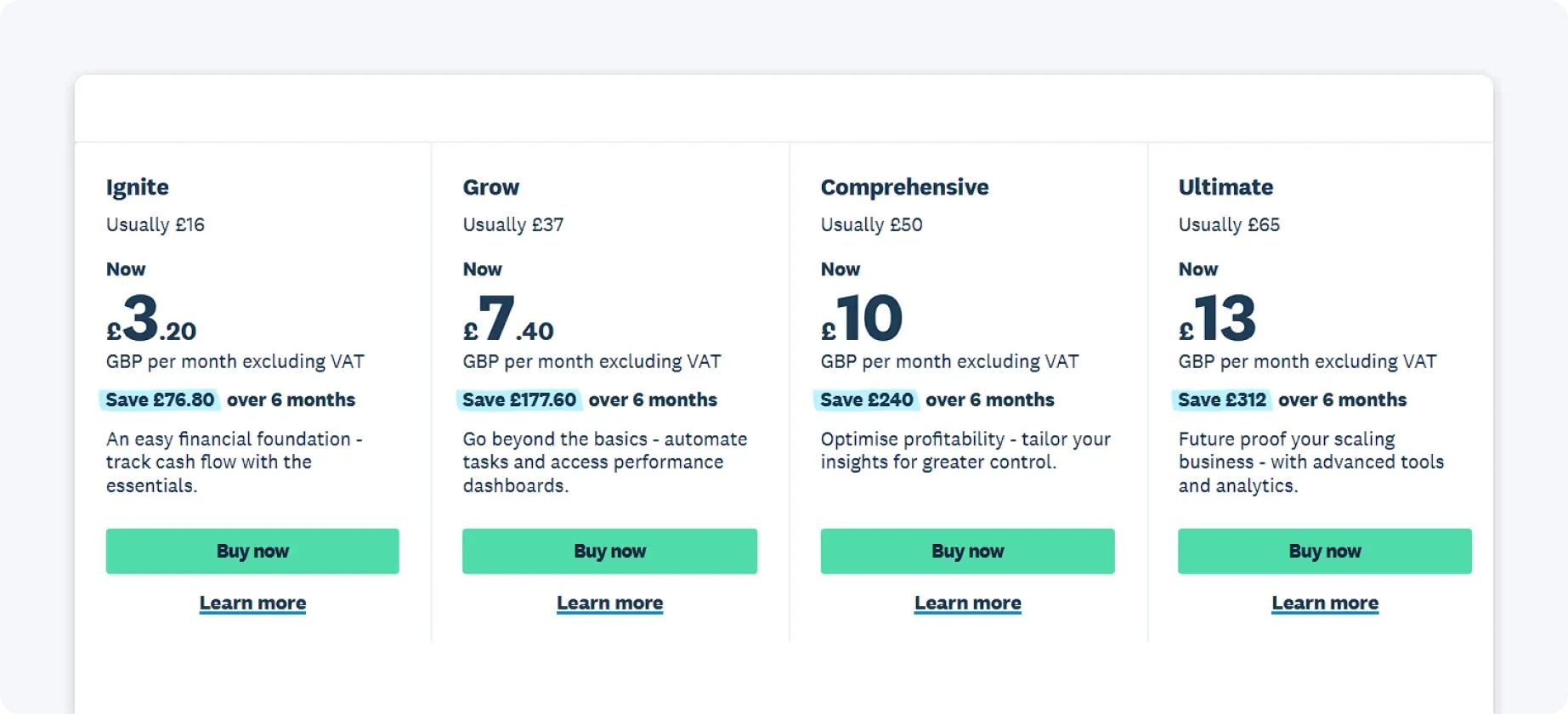
Xero offers several subscription tiers in the UK, each designed for different business sizes and needs. The entry‑level Simple plan is around £7 per month (excluding VAT) and includes essentials like invoicing, bank reconciliation, MTD for Income Tax readiness, and basic receipt capture.
Higher tiers, such as Ignite, Grow, Comprehensive, and Ultimate, add more automation, performance dashboards, multi‑user access, and advanced features, with regular prices rising from about £18 up to £70 per month.
3. QuickBooks – Best for reporting and financial visibility
QuickBooks is ideal for businesses that prioritise detailed financial insights and reporting.
QuickBooks offers a clean interface and guided workflows, making it easier to use than many traditional tools. However, it still requires users to regularly review transactions, manage categories, and ensure accuracy.
QuickBooks’ key features include:
- Advanced reporting dashboards (profit & loss, cash flow, forecasts)
- Automated bank feeds and expense tracking
- VAT tracking and submission
- Payroll and invoicing add-ons
- Mobile app for on-the-go management
QuickBooks vs ClearBooks: Key differences
| Category | QuickBooks | ClearBooks |
| Business account | External bank required | External bank required |
| Expense tracking | Semi-automated | Manual |
| Receipt capture | App and manual upload | Manual upload via web |
| VAT tracking | Built-in, accounting-led | Manual/semi-automated |
| MTD for ITSA support | Built-in quarterly and year-end filing | None built-in |
| Tax deadline alerts | Limited | Limited |
| Invoicing | Built-in, with templates | Built-in |
| Admin automation | Moderate | Low |
| Ease of use | Moderate learning curve | Moderate, accounting knowledge helpful |
| Accounting integrations | Extensive | Optional |
| Mobile app | iOS & Android | Limited |
| Support | Customer support, an accountant recommended | Email support only |
MTD for ITSA support
QuickBooks provides strong support for MTD for VAT, and it also handles MTD for ITSA inside the core platform, so you can send quarterly updates and the final declaration without third‑party tools or an accountant.
This means QuickBooks prepares the data you need, and the quarterly and year‑end tax steps run end‑to‑end in the app once you have reviewed them.
Pricing
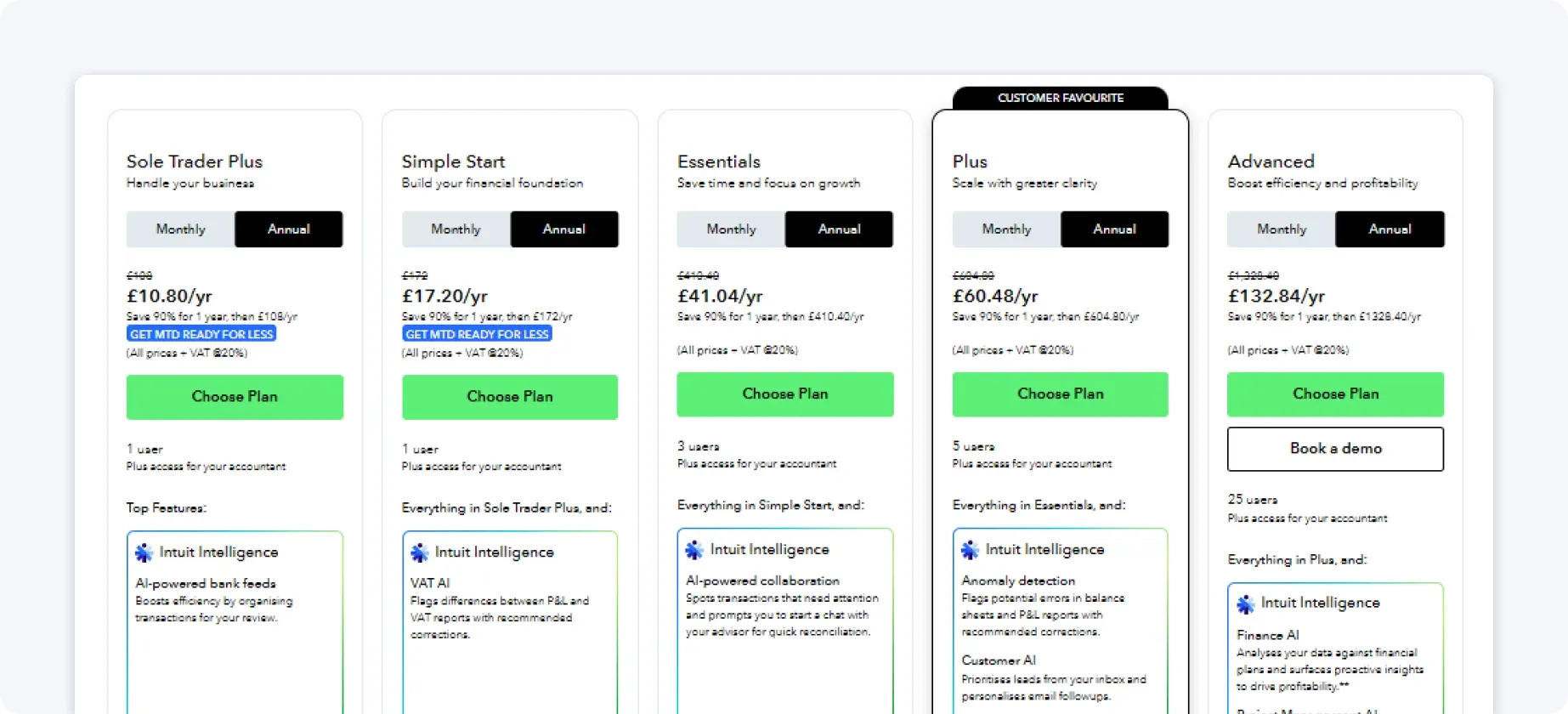
QuickBooks pricing starts with plans suitable for basic bookkeeping, VAT returns, and invoicing. As you move to higher tiers, you get additional features such as detailed reporting, multi‑currency support, and user seats, which is helpful for businesses with teams or external accountants.
UK pricing can feel higher than some lightweight alternatives, especially once payroll or additional users are added, so it’s important to consider what features you truly need.
4. FreeAgent – Best for freelancers and simple UK tax needs
FreeAgent is a ClearBooks alternative built specifically for UK freelancers, contractors, and small service-based businesses.
FreeAgent is one of the easiest traditional accounting tools to use. Its interface is clean, and many features are tailored specifically to UK tax requirements.
FreeAgent’s key features include:
- Built-in tax timeline and deadline reminders
- MTD ITSA and VAT support
- Invoice creation and expense tracking
- Mileage tracking for business travel
- Integration with UK banks
FreeAgent vs ClearBooks: Key differences
| Category | FreeAgent | ClearBooks |
| Business account | External bank | External bank |
| Expense tracking | Basic, mostly manual | Manual entry |
| Receipt capture | App upload | Manual upload via web |
| VAT tracking | Built-in, simple | Manual/semi-automated |
| MTD for ITSA support | Built-in quarterly & Self Assessment tools | None built-in |
| Tax deadline alerts | Basic estimates | Limited |
| Invoicing | Built-in | Built-in |
| Admin automation | Low | Low |
| Ease of use | Simple, contractor-focused | Moderate, accounting knowledge helpful |
| Accounting integrations | Minimal | Optional |
| Mobile app | iOS & Android | Limited |
| Support | UK-based customer support | Email only |
MTD for ITSA support
FreeAgent includes built‑in support for Making Tax Digital for VAT and MTD ITSA, with features that help freelancers and contractors stay compliant without the need for external tools.
This includes automatic VAT submission and tools that help you produce quarterly MTD ITSA reports and Self Assessment estimates, all designed around UK tax requirements.
Pricing
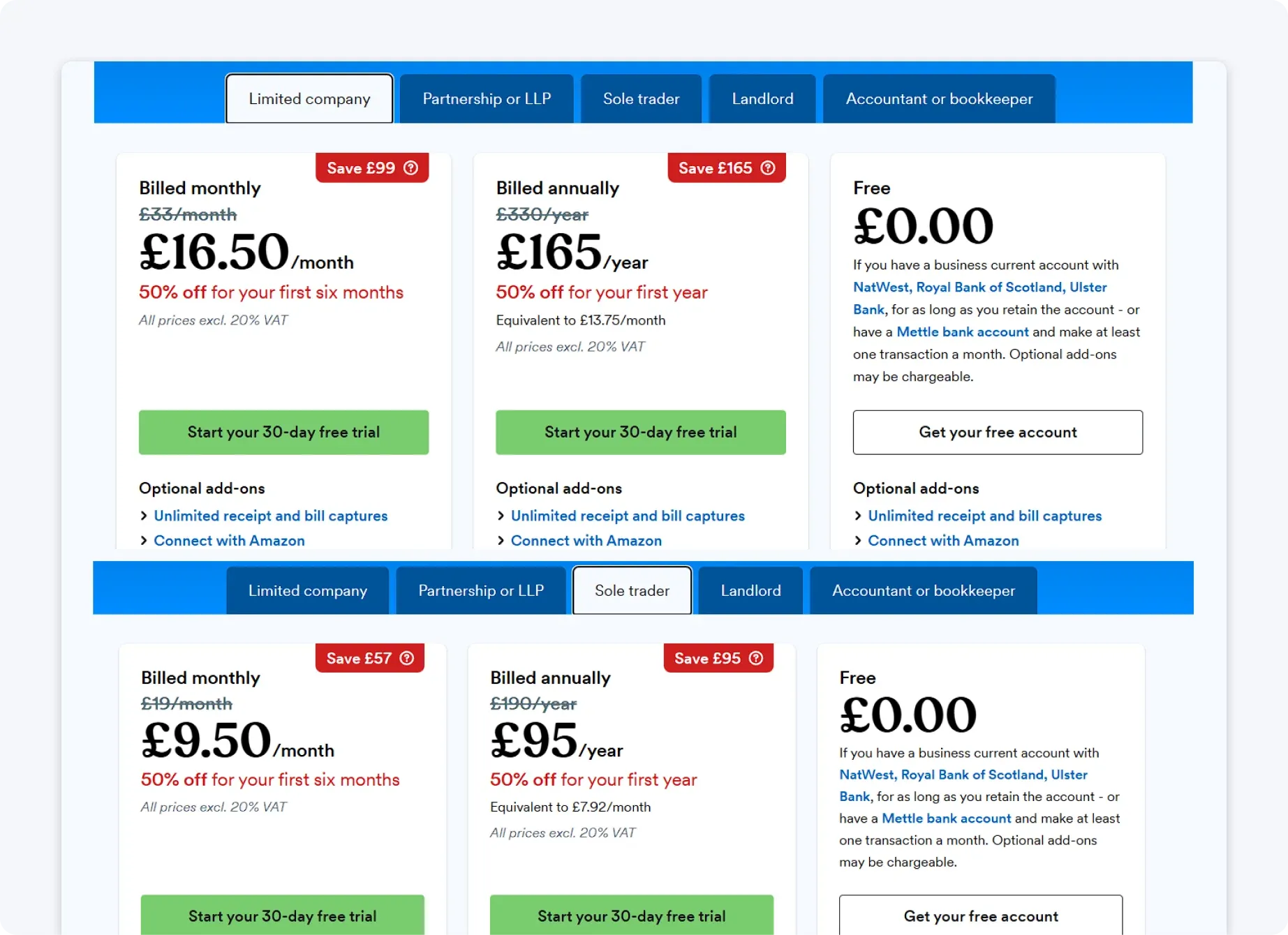
FreeAgent has one monthly plan per business type that covers the full suite of features, making pricing simple and predictable for UK freelancers and contractors.
It’s also free for users who hold qualifying business accounts from UK banks like NatWest, RBS, Ulster Bank, or Mettle.
5. Sage Accounting – Best for traditional accounting workflows
Sage is a long-standing ClearBooks alternative suited to businesses familiar with traditional accounting systems.
Sage is less intuitive than newer tools. While it offers strong functionality, the interface can feel dated, and users often need some accounting knowledge to use it effectively.
Sage’s key features include:
- VAT calculation and submission
- Cash flow forecasting
- Invoice and expense management
- Payroll integration
- Financial reporting tools
Sage vs ClearBooks: Key differences
| Category | Sage Accounting | ClearBooks |
| Business account | External bank | External bank |
| Expense tracking | Manual | Manual |
| Receipt capture | App upload | Manual |
| VAT tracking | Built-in | Manual/semi-automated |
| MTD for ITSA support | Partial; quarterly updates built in, year-end manual | None built-in |
| Invoicing | Built-in | Built-in |
| Admin automation | Low to moderate | Low |
| Ease of use | Complex | Moderate, accounting knowledge helpful |
| Accounting integrations | Extensive | Optional |
| Mobile app | iOS & Android | Limited |
| Support | Live support, accountant-reliant | Email only |
MTD for ITSA support
Sage Accounting includes MTD for VAT out of the box and offers tools to help prepare data for MTD for ITSA, and quarterly updates go straight to HMRC from Sage, though the year‑end Self Assessment step still needs an accountant or another tool.
Sage is strong on compliance but expects more hands‑on involvement from the business or accountant.
Pricing
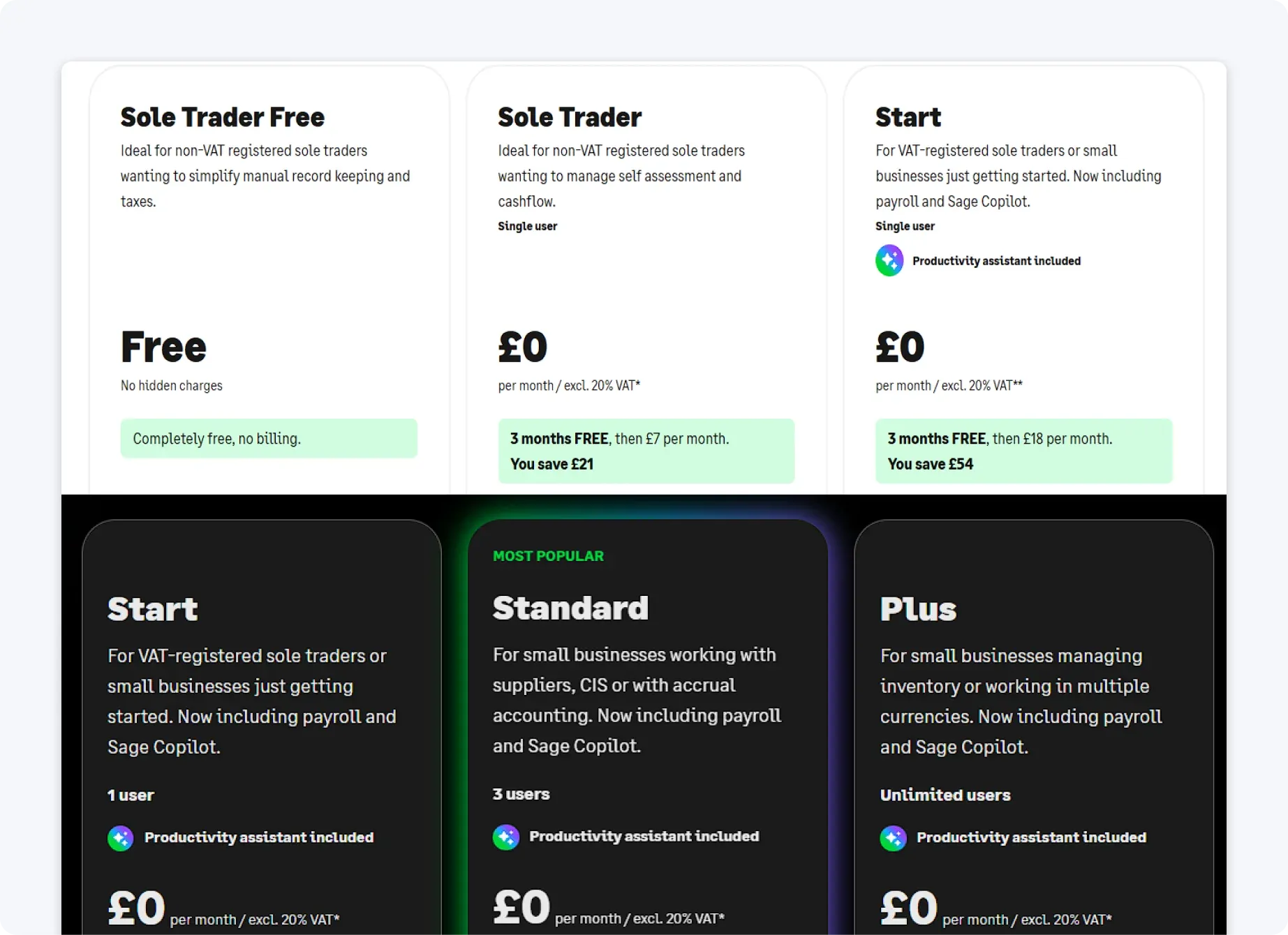
Sage Accounting’s pricing is tiered based on features such as reporting, multi‑user access, and payroll integration, giving businesses flexibility but also the risk of overpaying.
Entry‑level plans cover essentials like invoicing, expense tracking, and VAT submissions, which satisfy basic UK accounting needs. Adding modules such as payroll or cash flow forecasting increases monthly costs, so businesses should determine their needs before committing.
Why ANNA stands out
For UK small businesses, sole traders, and freelancers, ANNA is the most future-proof ClearBooks alternative. It combines full automation, real-time MTD VAT and ITSA compliance, smart tax management, and a built-in UK business account in a single platform.
Unlike other solutions, ANNA minimises manual bookkeeping, eliminates reconciliation stress, and automatically keeps tax obligations on track, making it perfect for business owners who want clarity, control, and peace of mind without the accounting headache.
In short, ANNA isn’t just another accounting tool: it’s a fully integrated finance companion that lets you focus on running your business while keeping compliance effortless.
So, try ANNA today and experience seamless, stress-free business finance management with 24/7 support right in the app.
Read the latest updates


![What Is Marginal Relief? [Everything You Need to Know]](https://storage.googleapis.com/anna-website-cms-prod/small_cover_3000_130_1ef44f67d1/small_cover_3000_130_1ef44f67d1.webp)







You may also like
![10 Best Accounting Software for Small Businesses [Comparison]](https://storage.googleapis.com/anna-website-cms-prod/small_cover_3000_14_d1471dd859/small_cover_3000_14_d1471dd859.webp)
![How to Choose Accounting Software for Your Business? [Guide]](https://storage.googleapis.com/anna-website-cms-prod/small_cover_3013_f47de4d283/small_cover_3013_f47de4d283.webp)

Open a business account in minutes
