
How to Contact HMRC for Self Assessment [Full Guide]


Discover how to contact HMRC for Self Assessment and find the quickest way to get help so you can resolve issues and avoid unnecessary stress.


In this article
If you’re nearing the Self Assessment deadline or feeling stuck in a confusing bit of tax paperwork, knowing how to make contact with HMRC can save you time, stress, and potential penalties.
Read on to learn how to contact HMRC for Self Assessment so you can find the best route to get the assistance you need.
Key points
- HMRC offers multiple contact methods
You can reach HMRC via their digital assistant, live webchat, phone, social media (X), or post. Choosing the right channel for your query can save time and reduce frustration. - Online tools and webchat are often the fastest
The digital assistant is available 24/7 for common questions, such as registration, filing, or refunds. Live webchat is open weekdays from 8 am to 7:30 pm and Saturdays from 8 am to 4 pm, providing a convenient way to reach an adviser without waiting on hold. - Preparation makes contact smoother
Before reaching out, have your Unique Taxpayer Reference, National Insurance number, tax year details, and any error messages ready. This helps HMRC staff or the digital assistant resolve your issue more quickly. - Watch out for scams
HMRC will never ask for passwords or financial details via unsolicited emails, texts, or calls. Forward suspicious emails to phishing@hmrc.gov.uk and scam texts to 60599, and avoid clicking unknown links. - Automate and simplify with ANNA
To take the stress out of contacting HMRC, ANNA can manage your invoices, bookkeeping, VAT, Corporation Tax, and Self Assessment all in one app. With automated filing, tax calculations, and smart money management, you can focus on running your business while staying fully compliant.
How to contact HMRC for Self Assessment in 4 ways
HMRC offers multiple contact channels, and with a little strategy, you can pick the right one for your issue.
1. Online contact
Contacting HMRC online is probably the fastest way to get the information you need, and there are a few ways to do so.
1.1. HMRC’s digital assistant
HMRC’s digital assistant is a chatbot that’s available 24/7, and it’s ideal for non-technical questions, such as:
- How to register for Self Assessment
- How to file your tax return online
- How to pay your bill or get a refund
- What to do about activation codes and penalty appeals
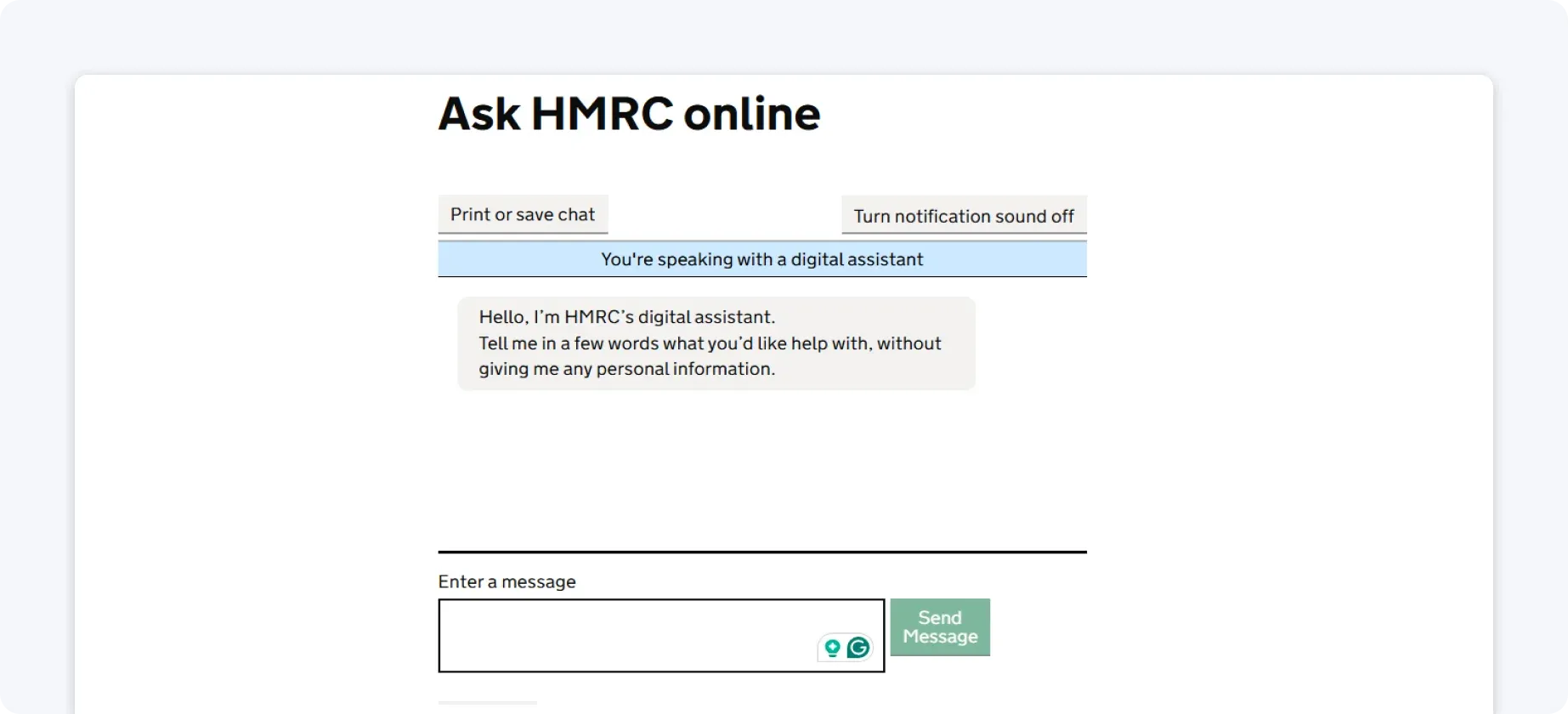
If it has trouble answering your question, you can often ask to be transferred to a live webchat adviser (if one is available at that time).
1.2. A live webchat adviser
Webchat is open on workdays from 8 am to 7:30 pm, and on Saturdays from 8 am to 4 pm. The service isn’t available on bank holidays.
These longer weekday hours make it a convenient option if you can’t call during standard office hours.
It’s also a good middle ground if your issue is a bit too specific for the chatbot, but you’d rather avoid sitting on hold.
The service can help you with questions about:
- Self Assessment
- Simple Assessment
- National Insurance
- PAYE
- Tax for employers, including employers’ PAYE
- Child Benefit
- The Construction Industry Scheme
- Corporation Tax
- The Horizon Shortfall Scheme
2. Phone contact
Sometimes typing just won’t cut it. Maybe you have a unique situation, or you’re dealing with penalties or payment issues, in which case phone support might be necessary.
You can reach HMRC for Self Assessment questions on 0300 200 3310, on workdays, from 8 am to 6 pm. The service isn’t available on bank holidays.
For calls outside the UK, the phone number is +44 161 931 9070.
If the busiest tax day of the year, 31 January, falls on a Saturday, HMRC can extend support by keeping their helpline and webchat open to help taxpayers on the deadline day.
The cost of calling HMRC depends on the type of number you’re dialling, your phone provider, and whether you’re calling from a mobile or a landline. In some cases, the call might be included in your phone plan, so it’s worth checking before you dial.
Quick tip:
A lot of people find calling HMRC stressful because of long waits, especially near deadlines.
That’s one reason many taxpayers now favour online solutions.
But if your issue is complicated, it’s best to call during the first half of the week and earlier in the morning when lines often move faster.
3. Contact over X
You can use the social media platform X (formerly Twitter) to ask general questions.
The working times are Monday to Friday from 8 am to 8 pm and on Saturdays from 8 am to 4 pm.
To contact HMRC this way, start your message with @HMRCcustomers.
However, bear in mind that HMRC won’t give out specific tax advice or discuss your personal tax affairs publicly, so you shouldn’t give any personal details.
4. Contact via post
If you need to send documents, have a formal query that can’t be dealt with online or by phone, or prefer written communication, you can still write to HMRC at the following address:
Self Assessment
HM Revenue and Customs
BX9 1AS
United Kingdom
You should include your Unique Taxpayer Reference (UTR), National Insurance number, contact details, and a clear description of your query, for example, a 2025/26 tax year amendment, for faster processing.
Also, when you send documents, keep the originals and send copies.
If you opt for this method of reaching out, you can expect a response in a few weeks.
Where to send letters if you’re not using Royal Mail?
In the UK, many HMRC mailing addresses use PO Boxes or special non-geographic ‘BX’ postcodes that work fine for Royal Mail letters. However, private courier companies, such as DHL, UPS, and FedEx, can’t deliver to them.
In case you want to send a post to HMRC via any of the above companies, you should use this address instead:
HM Revenue and Customs
Central Mail Unit
BP5001
Dunstanburgh House
Benton Park View
Newcastle Upon Tyne
NE98 1ZZ
United Kingdom
If you need to include a contact name or phone number on the delivery paperwork, use 0300 200 3300.
3 practical tips before you contact HMRC for Self Assessment
Before you pick up the phone or open a webchat, a little preparation can make the whole process much smoother. These quick tips will help you avoid common pitfalls.
1. Gather key information
Before you contact HMRC, especially by phone or webchat, have the following at hand:
- Your Unique Taxpayer Reference (UTR)
- National Insurance number
- Any error messages or document references you’ve seen
This saves time and helps the adviser or digital assistant give accurate answers.
2. Watch out for scams
Fake emails, texts, and calls impersonating HMRC increase around the Self Assessment deadline.
HMRC will never ask for personal financial information in an unsolicited email or text, and they’ll never threaten you with arrest by voicemail or text.
If you encounter something suspicious:
- Forward scam emails to phishing@hmrc.gov.uk
- Forward scam texts to 60599
- Never click links in messages you weren’t expecting
3. Try digital first
Even if you plan to call, start with HMRC’s online services and digital assistant. More than half of queries can be handled that way, and it often saves you time.
When to use each contact method:
- Digital Assistant/Webchat: Quick, general queries and online submission issues
- Phone: Best for questions that aren’t resolved online or for complicated cases
- Social Media (X): General questions and quick tips, not tailored support
- Post: Suitable for formal letters or supporting documents, but slower response
How can ANNA help you stay compliant without you having to contact HMRC?
ANNA is an all-in-one business app that can register your business, create and chase invoices, manage your bookkeeping, and file your VAT, Corporation Tax, and MTD Self Assessment, all in one place.
ANNA takes care of the heavy lifting so you can focus on running your business, not crunching numbers.
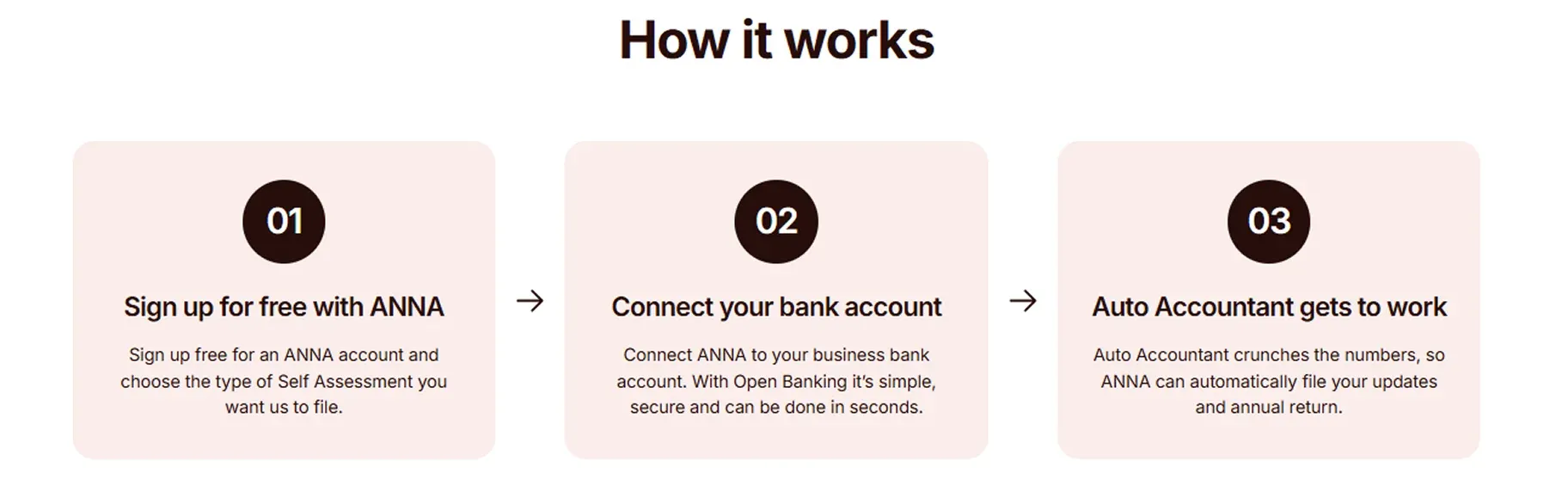
Here’s what ANNA does:
- Keeps your documents safe, sorted, and accessible: All invoices, receipts, and statements are stored securely and easy to find.
- Maintains your books in perfect order 24/7: Everything is automatically categorised and recorded, so your accounts are always up to date.
- Calculates your taxes intelligently: ANNA works out the most accurate and tax-efficient amounts you owe.
- Automates filings: VAT returns, Corporation Tax, and Income Tax Self Assessment are prepared and submitted directly to HMRC. We also handle Year-End Financial Statements and Confirmation Statements for Companies House.
- Manages PAYE for your team: Payroll is handled automatically, so you don’t need to worry about deadlines or calculations.
- Does smart invoicing: Creates, sends, and tracks invoices automatically, with payments matched without lifting a finger.
- Creates smart money pots: ANNA sets aside a percentage of your income into a tax pot.
- Provides real-time tax estimates: You can see exactly what you owe HMRC at any moment.
- Offers automated reminders and 24/7 support: Never miss a deadline, and get your tax questions answered anytime.
Why ANNA feels different:
Unlike traditional accounting software, ANNA doesn’t require hours of setup, manual logging, or learning a complicated system.
Everything runs quietly in the background, powered by automation and advanced AI.
As a result, your accounts are always up to date, filings are handled automatically, and you can save up to 90% compared to what most small businesses spend on accounting.
Sign up for ANNA today and let automation do the work for you.
Frequently asked questions
If you can’t get through by phone, HMRC’s digital assistant and webchat are often faster, especially during busy periods like the weeks leading up to the 31 January deadline.
The digital assistant can help with common issues, such as registering, filing, refunds, or penalties.
When you register for Self Assessment or submit an appeal, HMRC may send you an email or text to confirm they’ve received your request and are processing it.
These messages are automated and won’t ask for passwords, bank details, or personal financial information.
If you owe tax but can’t reach HMRC by phone right away, consider:
- Calling early in the morning when lines are less busy
- Using webchat
- Leaving a message explaining your situation, as it creates a record that you tried to contact them
It also helps if you act promptly, as HMRC may be more understanding if you’ve made an effort to get in touch before the deadline.
Read the latest updates


![What Is Marginal Relief? [Everything You Need to Know]](https://storage.googleapis.com/anna-website-cms-prod/small_cover_3000_130_1ef44f67d1/small_cover_3000_130_1ef44f67d1.webp)







You may also like
![How to Register for Self Assessment with HMRC [Complete Guide]](https://storage.googleapis.com/anna-website-cms-prod/small_cover_3007_92339d14b7/small_cover_3007_92339d14b7.webp)
![How to Register a Partnership for Self Assessment [Guide]](https://storage.googleapis.com/anna-website-cms-prod/small_cover_3029_957be39a83/small_cover_3029_957be39a83.webp)
![How to Recover Your HMRC Self Assessment Sign-In [Guide]](https://storage.googleapis.com/anna-website-cms-prod/small_cover_3000_68_7a5ed93110/small_cover_3000_68_7a5ed93110.webp)
![How to File a Self Assessment as a Sole Trader [Full Guide]](https://storage.googleapis.com/anna-website-cms-prod/small_cover_3049_2dd341de72/small_cover_3049_2dd341de72.webp)

![What Is Self Assessment? [UK Tax Guide for Beginners]](https://storage.googleapis.com/anna-website-cms-prod/small_cover_3000_What_Is_Self_Assessment_UK_Tax_Guide_for_Beginners_0fe2795894/small_cover_3000_What_Is_Self_Assessment_UK_Tax_Guide_for_Beginners_0fe2795894.webp)
![What Do You Need for Self Assessment? [Full Checklist]](https://storage.googleapis.com/anna-website-cms-prod/small_cover_3000_17_46b194a164/small_cover_3000_17_46b194a164.webp)
![5 Best MTD Self Assessment Software for HMRC [Compared]](https://storage.googleapis.com/anna-website-cms-prod/small_cover_3005_b1c87e930d/small_cover_3005_b1c87e930d.webp)
![Self Assessment Tax Return for 2026 [Complete Guide]](https://storage.googleapis.com/anna-website-cms-prod/small_cover_3039_3d3bf5c979/small_cover_3039_3d3bf5c979.webp)
![How to Pay Self-Assessment Tax? [HMRC Payment Guide]](https://storage.googleapis.com/anna-website-cms-prod/small_cover_3000_19_2d6ca0a661/small_cover_3000_19_2d6ca0a661.webp)
Open a business account in minutes
