
5 Best QuickBooks Alternatives Compared [2026 List]


Discover the best QuickBooks alternatives so you can compare features, simplify financial admin, stay compliant, and choose the right solution.

In this article
QuickBooks Online has long been one of the most recognisable accounting platforms, particularly in the UK. Its dashboards, bank feeds, invoicing tools, and reporting features have made it a familiar choice for managing day-to-day finances.
However, familiarity doesn’t always equal suitability.
Many business owners, freelancers, and directors are now rethinking what they expect from financial software. Rather than using tools that simply record transactions, they’re looking for platforms that actively reduce admin, automate repetitive tasks, surface tax obligations early, and make financial information easier to understand.
As a result, interest in QuickBooks alternatives has grown.
This guide compares some of the strongest alternatives to QuickBooks, highlighting how each platform approaches accounting, automation, and compliance.
Key points
- Decide how much admin you want to handle yourself ⚙️
QuickBooks is a capable accounting platform, but alternatives increasingly focus on reducing manual bookkeeping, simplifying tax management, and making finances easier for non-accountants. - FreeAgent and Sage are better suited to users who want more hands-on accounting control 📊
FreeAgent focuses on straightforward accounting for freelancers and contractors, while Sage offers more detailed financial control and collaboration with accountants. Both can involve more manual work than highly automated alternatives. - Zoho Books is a strong choice for custom workflows, while Wave suits basic needs 💡
Zoho Books offers flexible automation and workflows but may take time to configure. Wave is attractive if you want free core accounting tools, although its limited tax and automation features make it less suitable for more complex businesses. - If your main goal is to take financial admin off your plate, ANNA is worth considering 🚀
Rather than simply replacing QuickBooks with another accounting system, ANNA aims to automate cash management, invoicing, expenses, and tax and VAT returns, so you spend less time managing your finances.
Why do people look for QuickBooks alternatives?
QuickBooks is a capable accounting system, but it’s still accounting-led by design. This means that QuickBooks is designed primarily around traditional accounting workflows, which isn’t how most people actually run their finances day-to-day.
Users are expected to categorise transactions, reconcile accounts, review journals, and interpret financial reports using accounting terminology. Much of the value comes from setting things up correctly and maintaining them over time, rather than from the system handling tasks automatically.
For people who aren’t accountants, this often results in more manual checks, more decisions to make, and more reliance on external tools or professional support to ensure everything is correct.
People who explore alternatives to QuickBooks are often looking for software that:
- Reduces manual bookkeeping and bank reconciliation
- Combines banking, invoicing, expenses, and tax tracking in one place
- Presents financial information in plain language
- Provides proactive reminders for tax and compliance obligations
- Automates routine admin instead of requiring constant input
A QuickBooks alternative isn’t just about switching software. It’s about finding a setup that saves time, reduces stress, and offers clearer visibility into finances without requiring accounting expertise.
The top 5 QuickBooks alternatives
Modern QuickBooks alternatives tend to prioritise automation, simplicity, and clarity. Below are five well-known options, each with a different approach to managing finances.
1. ANNA
ANNA is designed for people who want their financial admin handled with minimal effort.
Rather than focusing purely on bookkeeping, ANNA brings together invoicing, expense tracking, and tax compliance. With ANNA, many processes that require manual input in traditional accounting software are automated by default.
The emphasis is on reducing the day-to-day burden of financial admin while keeping users informed and compliant.
ANNA’s key features:
- Automatic expense capture and categorisation
- Real-time tax estimates
- Smart money pots that save a percentage of your income for tax time
- Smart invoicing with automatic payment matching
- Built-in UK business account with cards and transfers
- Automated VAT returns with Making Tax Digital compliance
- Automated Company Accounts and Corporation Tax filing
- Free Self Assessment filing with MTD compatibility
- Automated reminders, tracking, and 24/7 admin support tools
Instead of expecting users to interpret reports, ANNA focuses on answering practical questions such as what is owed, when it’s due, and what needs attention next.
ANNA vs QuickBooks: Key Differences
Take a look at how ANNA compares to QuickBooks:
| Feature | ANNA | QuickBooks |
| Business account | Built-in UK business account | Requires connection to an external bank |
| Expense tracking | Automatic and real-time categorisation | Semi-automated, requires manual review |
| Receipt capture | App, email, and chat | App upload or manual entry |
| VAT and tax reminders | Built-in with proactive alerts | Accounting-led, limited reminders |
| Invoicing | Automatic payment matching | Manual monitoring of payments |
| Admin automation | High | Moderate |
| Ease of use | Designed for non-accountants | Accounting-focused interface |
| Integrations | Minimal required | Heavy reliance on third-party tools |
| Support | 24/7 live chat | Email and phone support during business hours |
Doing taxes with ANNA is a totally different experience. QuickBooks requires learning, setup, and regular admin, whereas with ANNA you don’t need to do anything. Everything is handled seamlessly in the background while you run your business.
Pricing
ANNA uses a tiered subscription model, with pricing based on the level of automation and support included.
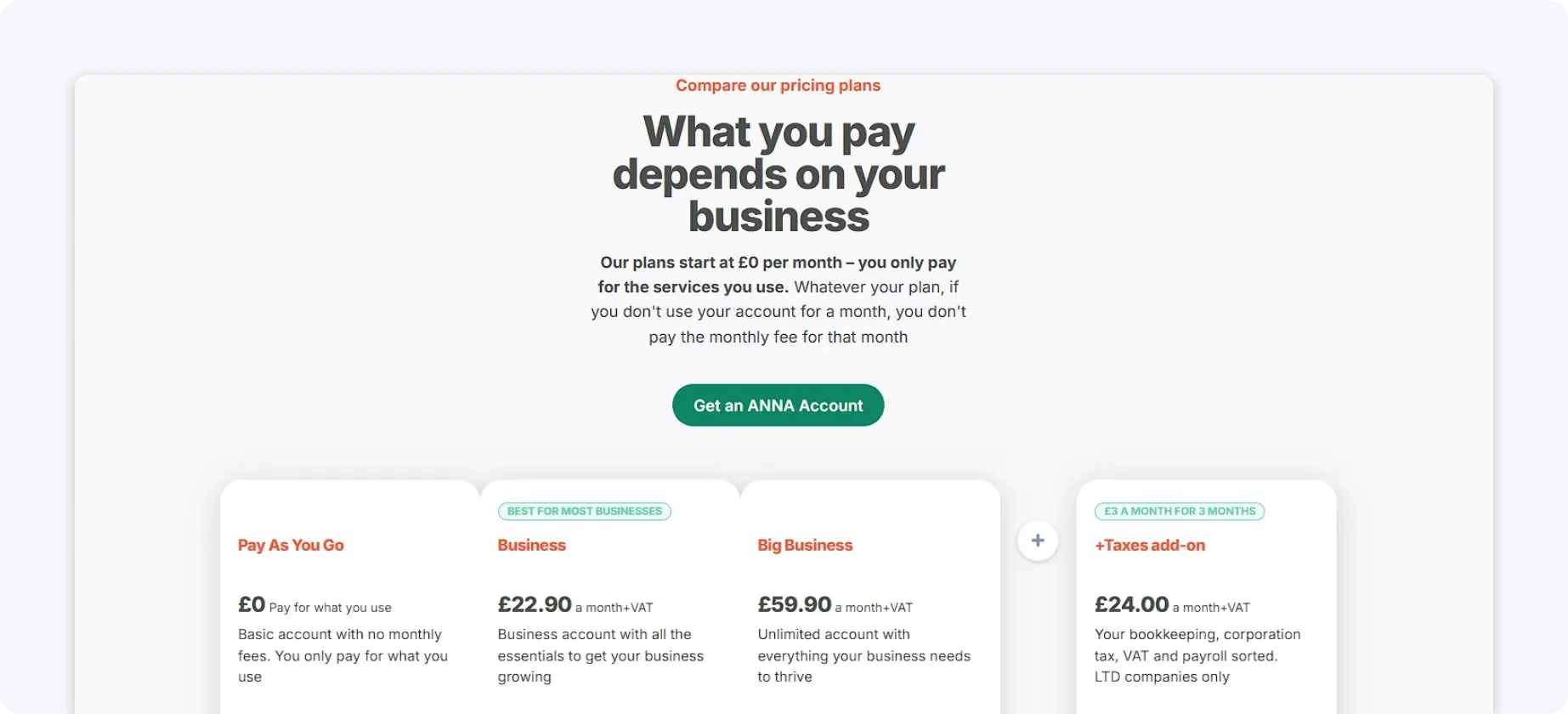
Core plans cover essentials such as the business account, invoicing, expense tracking, and tax visibility, while Auto Accountant adds automated tax filing and 24/7 tax support.
Pricing is transparent and predictable, with no need to pay separately for integrations or a linked business account.
2. FreeAgent
FreeAgent is a UK-focused accounting platform known for its clean interface and straightforward approach. It’s commonly used by freelancers and contractors who want a simple way to track income, expenses, and tax estimates.
FreeAgent’s key features:
- Simple invoicing and payment tracking
- Expense and receipt management
- VAT tracking and MTD support
- Basic cash flow and profit reporting
- Tax estimates for Self Assessment and Corporation Tax
FreeAgent focuses on simplicity rather than automation, which keeps the platform easy to understand but more hands-on.
FreeAgent vs QuickBooks: Key Differences
This is how FreeAgent’s services compare to QuickBooks:
| Feature | FreeAgent | QuickBooks |
| Business account | Requires an external bank | Requires an external bank |
| Expense tracking | Mostly manual | Semi-automated |
| Receipt capture | App upload | App upload or manual entry |
| VAT tracking | Built-in, limited flexibility | Accounting-led |
| Tax alerts | Basic reminders | Limited |
| Admin automation | Low | Moderate |
| Ease of use | Simplicity-focused | Accounting-focused |
| Integrations | Limited | Extensive |
| Support | UK-based support during standard business hours | Email and phone support during standard business hours |
FreeAgent works well for users with straightforward finances who want a clear view of their numbers without learning accounting concepts. However, as transaction volume or complexity increases, the lack of automation can result in increased manual work.
Pricing
FreeAgent is available as a monthly subscription, with all core features included in a single plan. Pricing is relatively straightforward, but there are fewer tiers to scale automation or support as needs grow.
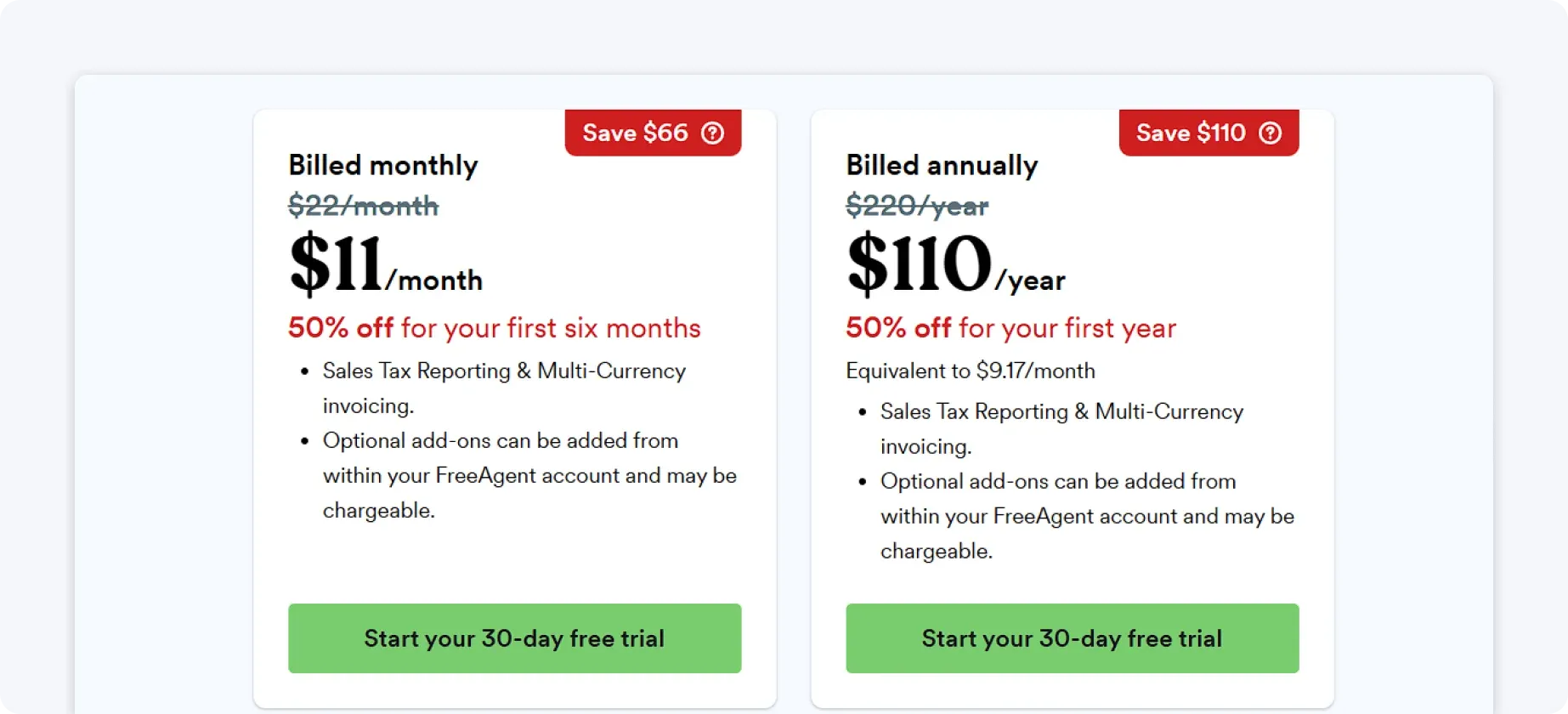
Some users can access FreeAgent at no additional cost through certain bank partnerships (NatWest, RBS, Ulster Bank, or Mettle), though some eligibility rules may still apply.
Overall, FreeAgent offers good value for simple accounting needs, but limited flexibility as complexity increases.
3. Sage Accounting
Sage Accounting is part of the wider Sage ecosystem and has a long history in the accounting software market. It offers robust tools for invoicing, reporting, and compliance, particularly for those working closely with accountants.
Sage Accounting’s key features:
- Invoicing, expenses, and cash flow reporting
- VAT returns and compliance tools
- Payroll and advanced add-ons
- Bank feed integrations
- Features designed to improve collaboration with accountants and financial advisors
Sage provides detailed control but often requires users to be comfortable with accounting workflows and terminology.
Sage vs QuickBooks: Key differences
This is how the two compare when it comes to features:
| Feature | Sage Accounting | QuickBooks |
| Business account | Requires an external bank | Requires an external bank |
| Expense tracking | Manual review | Semi-automated |
| Receipt capture | App upload | App upload or manual entry |
| VAT tracking | Compliance-focused | Accounting-led |
| Tax alerts | Limited | Limited |
| Invoicing | Built-in | Built-in |
| Admin automation | Low | Moderate |
| Ease of use | May be complex for non-accountants | More approachable; requires some familiarity with accounting |
| Integrations | Integration-heavy | Integration-heavy |
| Support | Live chat/phone support plus a partner network of certified accountants | Email and phone support during business hours |
Sage is well-suited to users who want granular financial control and are comfortable navigating accounting workflows. For those looking to minimise admin or avoid accounting complexity, it can feel cumbersome.
Pricing
Sage Accounting offers multiple plans, with pricing increasing based on features such as VAT support, multi-currency, and access to additional modules. Payroll, advanced reporting, and other tools are typically charged separately, which can increase overall cost.
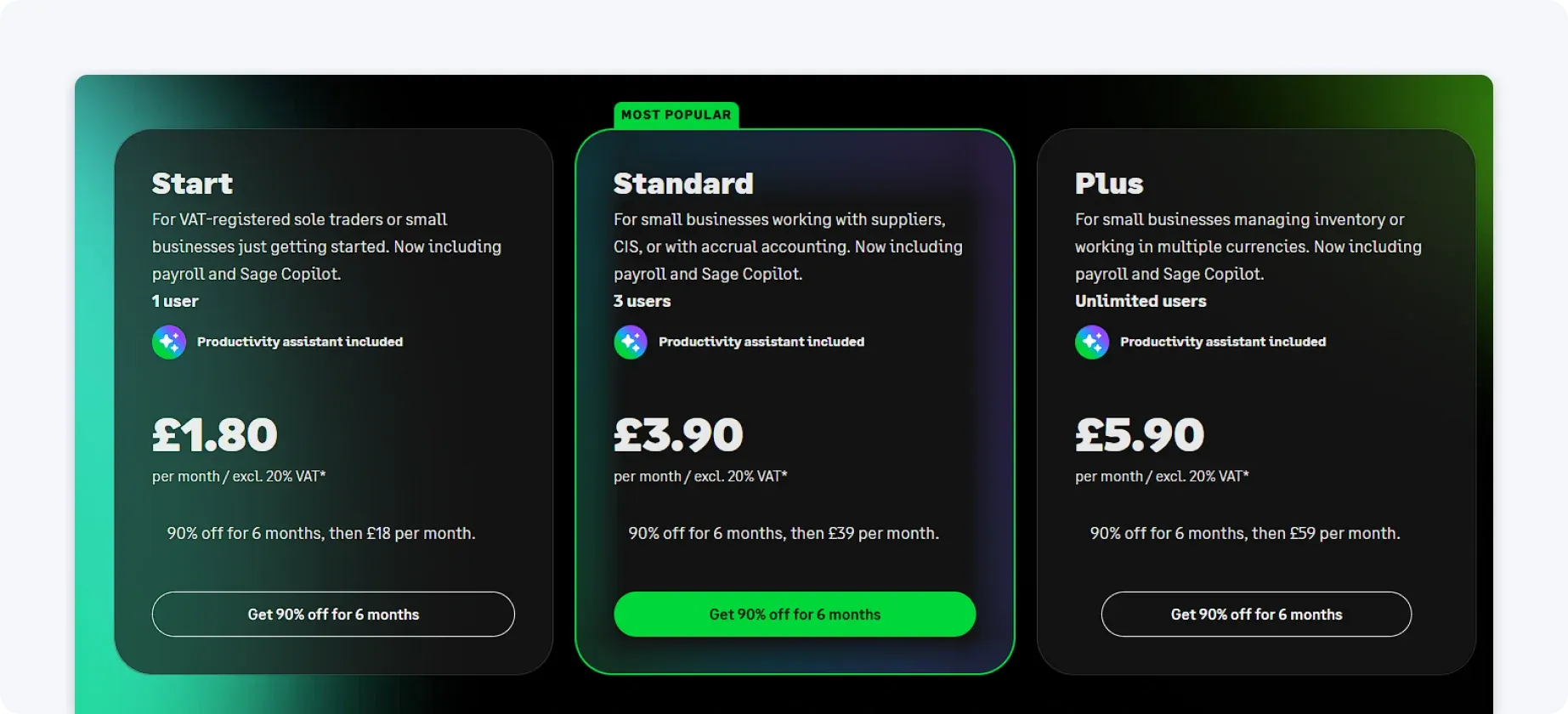
This modular approach can make pricing harder to predict. Sage is often positioned as a longer-term investment rather than a low-cost option.
4. Zoho Books
Zoho Books is part of the larger Zoho suite and is known for its workflow automation capabilities. It offers a flexible system that can be tailored to different processes, particularly for users already using other Zoho tools.
The platform is powerful but can take time to configure.
Zoho Books’ key features:
- Invoicing and recurring billing
- Expense tracking and bank reconciliation
- Tax compliance tools
- Automated workflows and approvals
- Collaboration with accountants
Zoho Books appeals to users who want customisable processes rather than a fixed setup.
Zoho Books vs QuickBooks: Key differences
This is how Zoho and QuickBooks compare:
| Feature | Zoho Books | QuickBooks |
| Business account | Requires an external bank | Requires an external bank |
| Expense tracking | Automated | Semi-automated |
| Receipt capture | App upload | App upload or manual entry |
| VAT tracking | Built-in | Accounting-led |
| Tax alerts | Workflow-based reminders | Limited |
| Invoicing | Recurring and automated | Built-in |
| Admin automation | Moderate to high | Moderate |
| Ease of use | Beginner-friendly with setup | Accounting-focused |
| Integrations | Works best with other Zoho apps; requires extra setup or third-party tools outside the ecosystem | Extensive third-party integrations across accounting, payroll, payments, and more |
| Support | Email, chat, and phone | Email and phone support during business hours |
Zoho Books is a strong option for users who want tailored workflows and automation. However, those not already using Zoho products may find setup and configuration time-consuming.
Pricing
Zoho Books uses tiered pricing based on usage limits and feature access, such as the number of users, automated workflows, and advanced reporting. Entry-level plans are competitively priced, especially for users already within the Zoho ecosystem.
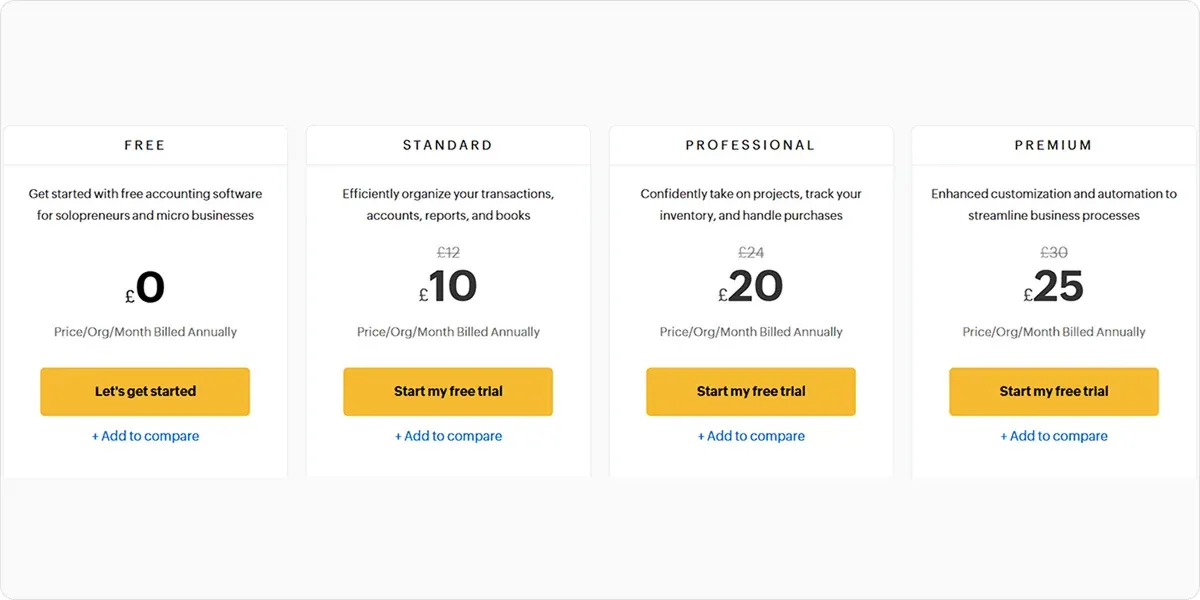
Zoho Books generally offers strong value for users who can take full advantage of its workflow capabilities.
5. Wave Accounting
Wave Accounting is best known for offering free access to core accounting features. It’s commonly used by individuals who want basic invoicing and expense tracking without a subscription fee.
However, its simplicity is also its biggest limitation.
Wave’s key features:
- Invoicing and payment tracking
- Basic expense management
- Simple financial reports
- Free core accounting tools
Wave doesn’t provide advanced automation or robust tax compliance features.
Wave vs QuickBooks: Key Differences
These are the key feature differences between QuickBooks and Wave:
| Feature | Wave Accounting | QuickBooks |
| Business account | Requires an external bank | Requires an external bank |
| Expense tracking | Manual | Semi-automated |
| Receipt capture | App upload | App upload or manual entry |
| VAT tracking | Very limited | Accounting-led |
| Tax alerts | Not available | Limited |
| Invoicing | Strong standalone invoicing | Built-in and fully integrated with accounting |
| Admin automation | Low | Moderate |
| Ease of use | Very simple | Accounting-focused |
| Integrations | Limited | Extensive |
| Support | Email and help centre | Email and phone support during business hours |
Wave is suitable for users with minimal requirements who want a free, no-stress solution. For anyone dealing with VAT, compliance deadlines, or higher transaction volumes, it’ll likely feel restrictive.
Pricing
Wave provides free access to its core accounting, invoicing, and expense tracking tools. Revenue is generated through optional paid services such as payment processing and payroll.
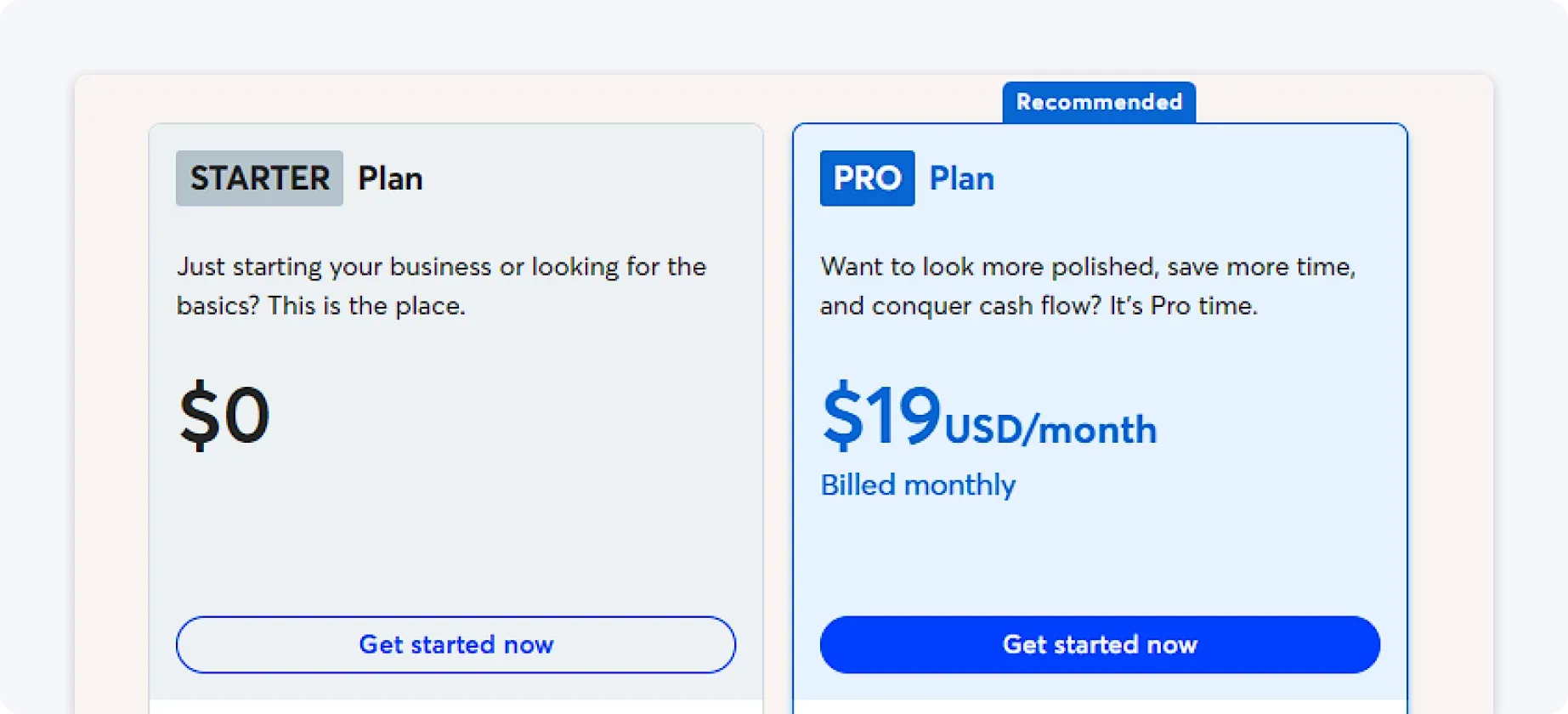
While the free plan is appealing, costs can add up when using paid add-ons or handling higher transaction volumes.
Why ANNA is the best QuickBooks alternative
Choosing a QuickBooks alternative is ultimately about deciding how involved you want to be in your own financial admin.
Most accounting platforms, including QuickBooks, FreeAgent, and Zoho Books, offer strong accounting features but still require regular manual oversight.
They’re built around the assumption that users will review transactions, reconcile accounts, interpret reports, and actively manage compliance tasks. That approach works if you enjoy accounting or have the time and expertise to stay on top of it. For many people, however, it just adds friction.
ANNA stands out because it removes that friction by design. Instead of prioritising bookkeeping workflows, ANNA focuses on outcomes: knowing what has been paid, what is owed, what is coming up, and what needs attention, and does this all automatically.
Cash management, invoicing, expense tracking, VAT, tax returns, and tax reminders all live in one system and are automated wherever possible, reducing the need for constant checking and manual intervention.
The result isn’t just cleaner books, but less mental overhead: fewer tools to manage, fewer decisions to make, and fewer chances to miss something important.
ANNA works quietly in the background, surfacing issues only when action is needed, so finances stop competing with the rest of your work for attention.
If you want a QuickBooks alternative that actively reduces admin rather than shifting it around, ANNA is the clear choice.
So get started with ANNA today and take financial admin off your to-do list.
FAQ
ANNA is specifically designed with non-accountants in mind, focusing on practical information such as what you owe, when it is due and what needs attention rather than requiring users to work through traditional accounting workflows.
Some do. ANNA includes automated VAT returns with Making Tax Digital compliance, Corporation Tax filing and free Self Assessment filing with MTD compatibility. FreeAgent, Sage and Zoho Books also include varying levels of VAT and tax functionality.
It can be if your financial needs are basic. The article describes Wave as suitable for users who want free core accounting, invoicing and expense tools. However, its limited VAT, tax compliance and automation features may make it restrictive as transaction volumes or compliance requirements increase
Read the latest updates







Open a business account in minutes
