





Learn how to choose the MTD bridging software and find the right tool to stay compliant, simplify submissions, and manage your tax reporting.


With Making Tax Digital (MTD) now firmly established in the UK tax landscape, all qualified sole traders and landlords have to file their tax returns through MTD-compatible software rather than the old HMRC portal.
For many small businesses, sole traders, and freelancers who still enjoy running their finances in spreadsheets or lightweight record-keeping tools, MTD bridging software offers a compromise. You can keep your current setup and stay compliant with HMRC’s digital filing requirements.
This article breaks down what bridging software is, when you should use it, and how to choose the best option for your business – including a rundown of the top MTD bridging tools available today.
What is MTD bridging software?
At its core, bridging software ‘bridges’ the gap between your existing record-keeping system (like Excel spreadsheets) and HMRC’s digital filing platform. Instead of moving to full accounting software, bridging software extracts the key numbers – such as your income and expenses totals for the quarter – and sends them to HMRC via a digital link.
This digital link is an important detail: under MTD rules, you can’t copy and paste or manually retype figures. A compliant bridging solution must transfer the data directly through HMRC’s API, maintaining a clear, auditable digital trail.
In simple terms:
- You can keep your spreadsheets
- Bridging software pulls together your quarterly income and expense totals
- It securely submits your updates to HMRC
Bridging software doesn’t manage invoices, reconcile bank feeds, or give you cashflow insights. Instead, it allows for compliant quarterly submissions with minimal disruption to your existing setup.
Who should use bridging software?
Bridging software is ideal for businesses or people who:
- Keep records of their income and expenses in spreadsheets or a non-MTD-compatible tool
- Want to avoid switching to full accounting software, at least for now
- Need a low-cost or simple solution for quarterly updates
- Don’t need ongoing bookkeeping automation, invoicing, or advanced reporting features
However, bridging software isn’t right for everyone. Here are some things to consider:
- It doesn’t automate bookkeeping tasks like bank reconciliation, expense tracking, or invoicing
- It may become less practical as your business grows
- It can’t flag errors or inconsistencies in your records before submission, which means that you need to pay more attention to accuracy
Bridging software is a great short-term or spreadsheet-focused solution – but businesses with more complex needs are more likely to outgrow it eventually.
Key factors to consider when choosing MTD bridging software
Not all MTD bridging tools are created equal. While they all have the same goal, the right choice depends on how you keep records, how confident you are with your finances, and how much time you want to spend on admin.
When comparing options, focus on the following factors:
1. HMRC compatibility and compliance
First and foremost, your chosen software must be fully MTD-compatible and recognised by HMRC. This means it should securely connect to HMRC’s systems via approved APIs and maintain the required digital link between your records and submissions.
Before committing to any provider, always check the official GOV.UK list of MTD-compatible software. This ensures:
- Your quarterly updates will be accepted by HMRC
- You remain compliant with current MTD regulations
- You’re protected if HMRC audits your digital records
Using unrecognised or partially compliant software can lead to rejected submissions, penalties, or extra work correcting errors.
2. Ease of use and spreadsheet integration
When considering your options for bridging software, look for software that:
- Works with Excel or Google Sheets
- Accepts common spreadsheet formats without heavy re-structuring
- Allows you to map or import income and expenses quickly
Some tools require strict spreadsheet layouts or complex setups, while others let you link cells or upload files. The best ones are easy to use from the start, without a long onboarding process.
Over time, this can save hours of admin and help avoid mistakes.
3. Price and billing structure
Pricing models for MTD bridging software vary widely, so it’s important to understand how costs will scale with your business.
Common pricing structures include:
- Free or low-cost plans for basic quarterly submissions
- Pay-per-submission pricing, useful for occasional use
- Monthly or annual subscriptions with added features or support
When comparing prices, consider:
- How often you’ll submit updates (typically quarterly under MTD for ITSA)
- Whether you manage multiple income streams or businesses
- Whether pricing increases as your needs grow
A tool that looks cheap at first glance may become expensive over time if it charges per submission or limits usage. Conversely, a flat subscription can be a better value if you file regularly or manage multiple returns.
4. Support, guidance, and documentation
Good support can make a huge difference, especially if you’re filing under MTD for the first time or don’t work with an accountant.
The best providers offer:
- Clear step-by-step user guides
- Responsive help desks or email support
- Tutorials and FAQs
- Video walkthroughs showing how to submit returns correctly
Support reduces the risk of mistakes, missed deadlines, or rejected submissions. For small business owners managing taxes themselves, reliable guidance can be the difference between a smooth quarterly process and a stressful one.
The top 4 MTD bridging software on the market right now
Below are the top four MTD bridging tools available today, chosen for their ease of use, HMRC compatibility, and suitability for different business needs:
1. My Tax Digital
My Tax Digital is a free, HMRC-recognised MTD tool that combines bridging and basic accounting.

Ease of use
This software is pretty flexible. You can either upload spreadsheet data using bridging mode or keep records directly in the app. Setup is simple, but using the accounting side requires more ongoing input.
Pricing
It is completely free for both MTD for VAT and MTD for Income Tax, making it one of the most cost-effective options available.
Support and documentation
It provides documentation to help with setup and submissions. Support is practical, but you’re expected to manage your own bookkeeping and data inputs.
Who it’s for
It is best for cost-conscious sole traders and landlords who want flexibility.
It works well if you want a free tool that can either connect to your spreadsheets or handle basic record-keeping in one place. It’s especially useful for those who use spreadsheets but want the option to gradually move toward digital records without switching software.
2. 123 Sheets Ltd
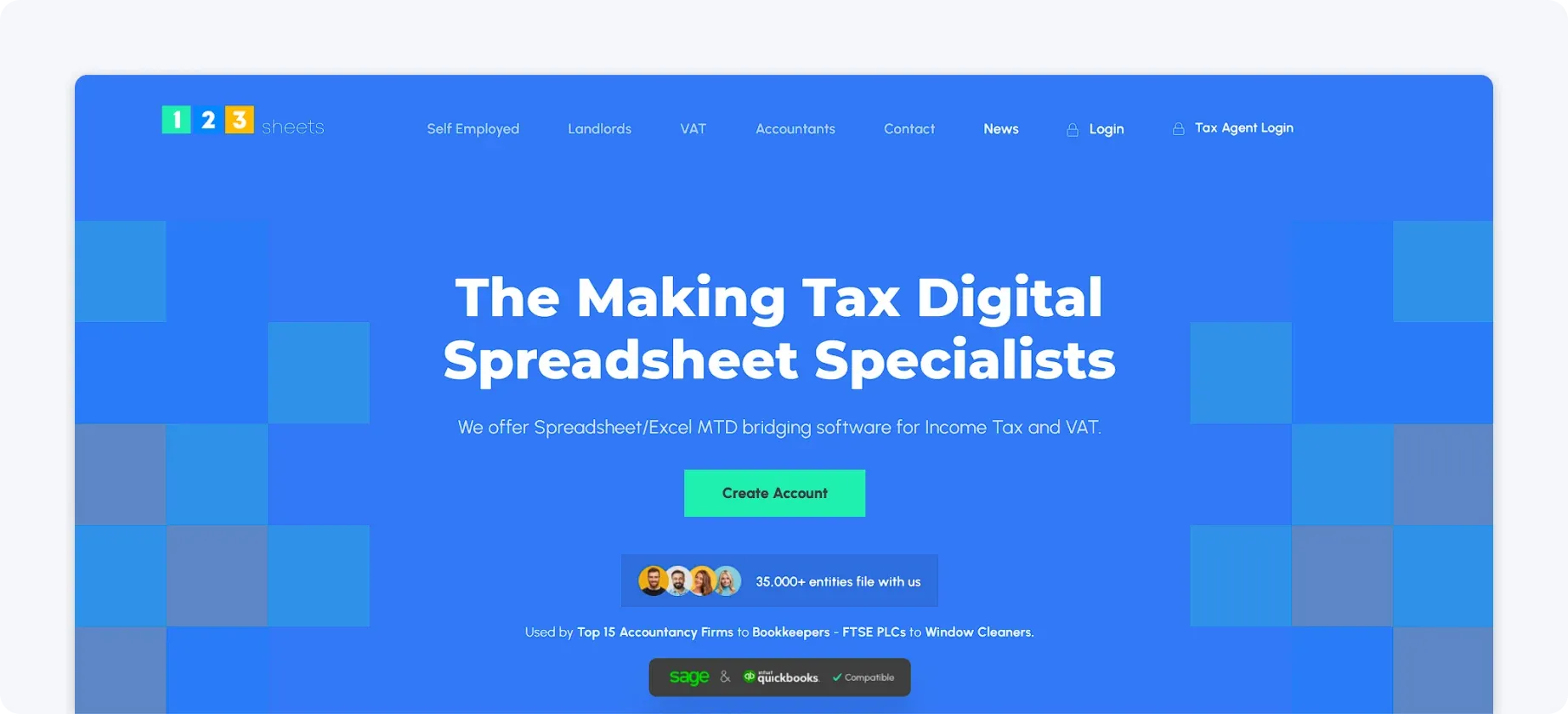
123 Sheets Ltd offers a spreadsheet-first approach to MTD for ITSA, combining Excel-style workflows with digital submission capabilities.
Ease of use
If you’re comfortable with spreadsheets, this software should feel familiar. It allows you to organise your records in a structured format and submit directly, without needing complex setup or additional tools.
Pricing
Pricing is generally affordable, with options suited to individual users as well as accountants managing multiple clients.

Support and documentation
Guidance is available to help you structure your data correctly and complete submissions, though support is more functional than hands-on. You’ll find clear instructions, templates, and responses to specific questions, but you’re still responsible for making sure everything is accurate before submission.
Who it’s for
Users who are comfortable structuring their own records but may need guidance with submissions will likely find this software intuitive and helpful.
It’s also a strong fit for those who value data security. Despite being a smaller provider, it highlights recognised security standards and certifications, making users feel more confident about the safety of their financial info.
3. Absolute Excel Income Tax Filer
Absolute Excel Income Tax Filer is an Excel-based bridging tool for MTD for ITSA.

Ease of use
Everything happens within Excel, so there’s no new interface to learn. Once set up, you can submit your quarterly updates directly from your spreadsheet. However, initial setup requires some technical familiarity and may take some time.
Pricing
Priced at around £40, Absolute Excel Income Tax Filer sits noticeably higher than some other bridging tools. However, the fee is charged per tax year rather than per individual submission, meaning you can file multiple times within that period.
Support and documentation
Support is more technical, focused on setup and submission rather than on ongoing bookkeeping help.
Who it’s for
This software is suitable for confident Excel users who want full control over their bookkeeping and MTD submissions. It’s best for those who don’t mind a longer setup and can handle technical details within their spreadsheet.
4. TaxNav
TaxNav is a bridging-style MTD for ITSA tool that blends simple record-keeping with submission functionality.

Ease of use
It offers a more guided experience than pure bridging tools, helping users structure their records before submission. This reduces the chance of errors, but it takes away some of the flexibility of traditional Excel filing.
Pricing
TaxNav typically operates on a subscription basis, with a free trial option and transparent pricing.

Support and documentation
Users benefit from clearer guidance and a more structured workflow, making it easier to stay on top of MTD requirements.
Who it’s for
It is designed for sole traders and landlords who want to stay compliant without relying on spreadsheets or fully manual processes.
Overall, it’s a good fit for users who want a balance between guidance and control, rather than a purely DIY spreadsheet approach or a fully hands-off automated solution.
A better, FREE solution for MTD ITSA
Say goodbye to spreadsheets, manual calculations, and juggling multiple tools. ANNA automates the entire MTD for ITSA process, so your income, expenses, and quarterly updates are tracked and submitted in the background.
Open an ANNA account, and you’ll get MTD for free – ANNA will prepare and submit your 2025/26 Self Assessment at no extra cost.
If you’ve already taken the plunge and filed your 2025/26 return using another platform, ANNA will refund whatever you’ve paid, too.
Here’s what ANNA can do for you:
- Fully automated MTD compliance: From income tracking to quarterly updates and your final Self Assessment, everything is handled for you in one place with no manual input required.
- Free 2025/26 Self Assessment filing: Your 2025/26 Self Assessment will be filed easily and for free. Already paid another provider? ANNA will refund you when you switch.
- Real-time tax visibility: You can see how much tax you owe as you earn, so there are no surprises at the end of the year.
- All-in-one financial workflow: Get a built-in UK business account, smart expense categorisation, receipt capture, and reminders, all seamlessly connected.
- Fewer errors, less admin: By removing manual data entry and duplicate tools, ANNA reduces the risk of mistakes and saves hours of work every quarter.
- 24/7 support: ANNA’s experienced team is on round the clock to help with any problems or questions you may have.
So, if you want to experience the benefits firsthand, sign up with ANNA today.
Read the latest updates

![What Is the Threshold for Making Tax Digital? [Guide]](https://storage.googleapis.com/anna-website-cms-prod/small_cover_3057_f0f2ffd268/small_cover_3057_f0f2ffd268.webp)


![Making Tax Digital for Freelancers [Complete 2026 Guide]](https://storage.googleapis.com/anna-website-cms-prod/small_cover_3000_25_15d6713572/small_cover_3000_25_15d6713572.webp)
![How to Sign Up for Making Tax Digital [A Detailed Guide]](https://storage.googleapis.com/anna-website-cms-prod/small_cover_3031_86f7f6f18a/small_cover_3031_86f7f6f18a.webp)
![MTD ITSA for Landlords [+6 Software Options Compared]](https://storage.googleapis.com/anna-website-cms-prod/small_cover_3025_77131ed4c8/small_cover_3025_77131ed4c8.webp)
You may also like
![9 Features to Look for When Choosing MTD Software [+Steps]](https://storage.googleapis.com/anna-website-cms-prod/small_cover_3000_32_ec1954cac9/small_cover_3000_32_ec1954cac9.webp)
![Making Tax Digital Costs: What Will MTD Cost You? [Breakdown]](https://storage.googleapis.com/anna-website-cms-prod/small_cover_3051_a896b063b0/small_cover_3051_a896b063b0.webp)





Open a business account in minutes
